フォーラムへの返信
-
投稿者投稿
-
storaid参加者storaid参加者
Hello, Tiki
see pics
Thanks
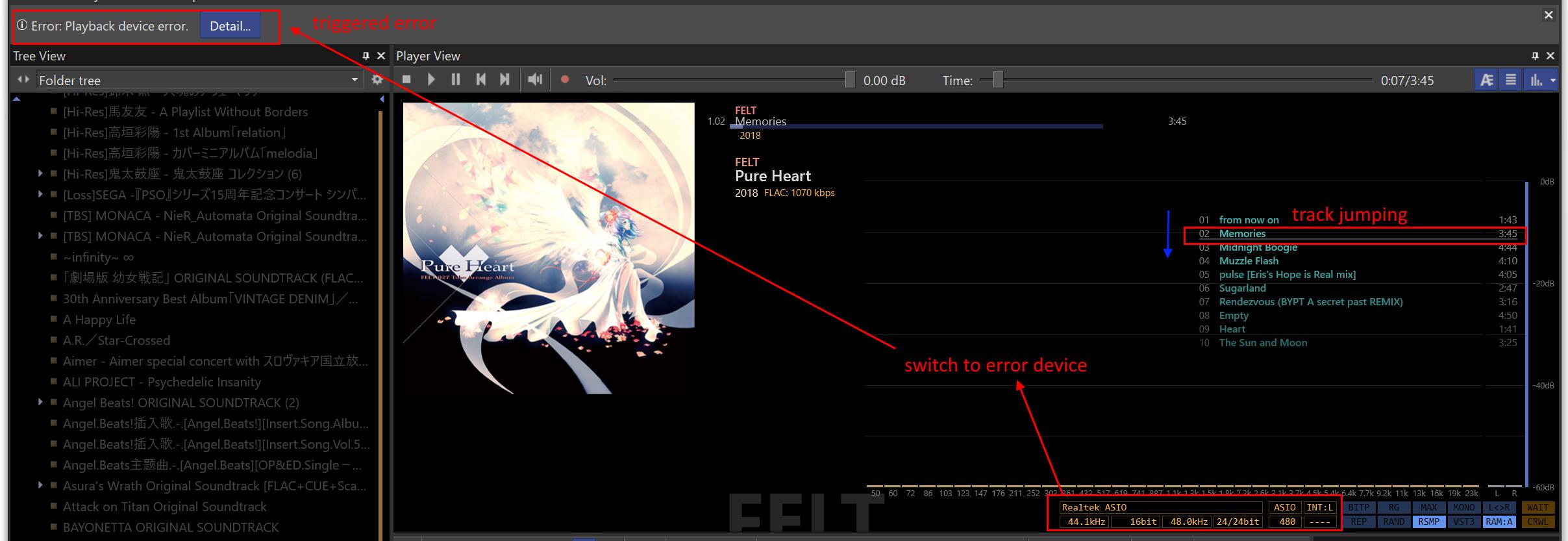
when playing the music….
normal device:
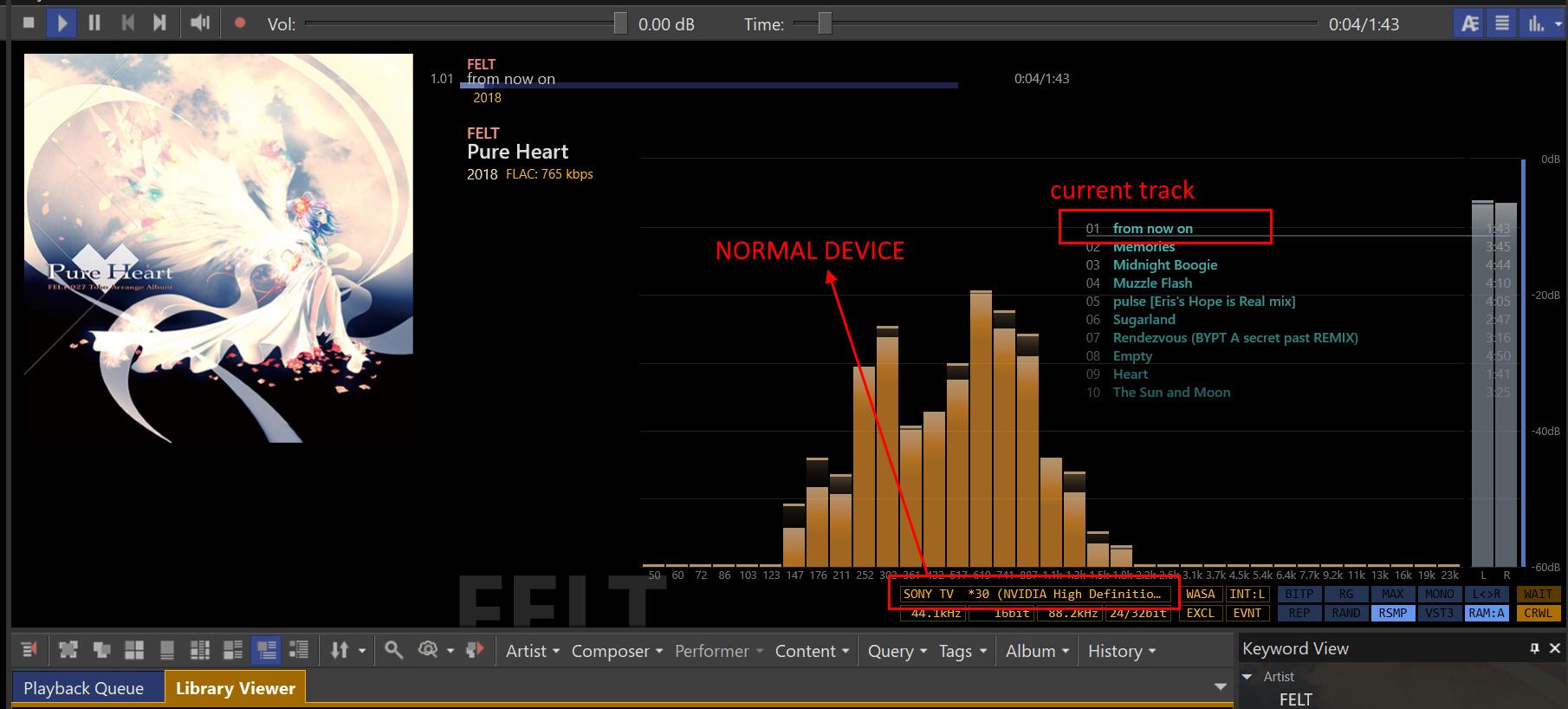
switching:
 storaid参加者
like this:
 storaid参加者
my environment is Windows 11 OS(23H2)..
it’s stable for me..
maybe it’s about Windows…
but I’m not sure.
so…
storaid参加者I’m not sure.
but it’s possible that I can change the TuneBrowser service port for debugging purposes?
default port: 10960?
storaid参加者Hello, Tiki
recently
again
I tested playing music using the AV Media Controller UPnP tool(loading BubbleUPnP server) and it worked fine.
I’m a bit confused though…
I didn’t notice any use of DLNA messages in the Control point.
I compared the packets with those obtained from TuneBrowser, and there isn’t much difference.
There might be some differences in the AVTransportURI…
Could you help me check this out?
The link is the Wireshark packet dump file:
https://1drv.ms/u/s!AvA1navurakAiKlKYdWnvIic5rqFdA?e=5Ln9pE
The IP 10.1.1.169 is the UPnP Renderer.
storaid参加者Ok thanks
storaid参加者For example, this thread:
現在、アイ・オー・データ機器のSoundgenicというDMRになる機器経由で出力を行っています。
https://www.iodata.jp/ssp/soundgenic/
TuneBrowserからレンダラーとしてSoundgenicに出力した際の挙動がいまいち安定しません。
ここの設定が影響しているのではないかという部分がありましたらご教授いただきたいです。
DMR (Digital Media Renderer) is a module within the DLNA protocol specification itself, so I believe that offering support for DLNA could improve compatibility with most UPnP/DLNA devices.
This is because currently, most devices supporting local streaming almost universally support the UPnP/DLNA protocol.
storaid参加者Can I close this topic ?
OK, very thanks for your help.
PS: I tested other players, such as Foobar2K and Synology Audion Station, and there is the same problem too.
storaid参加者Hello, Tiki
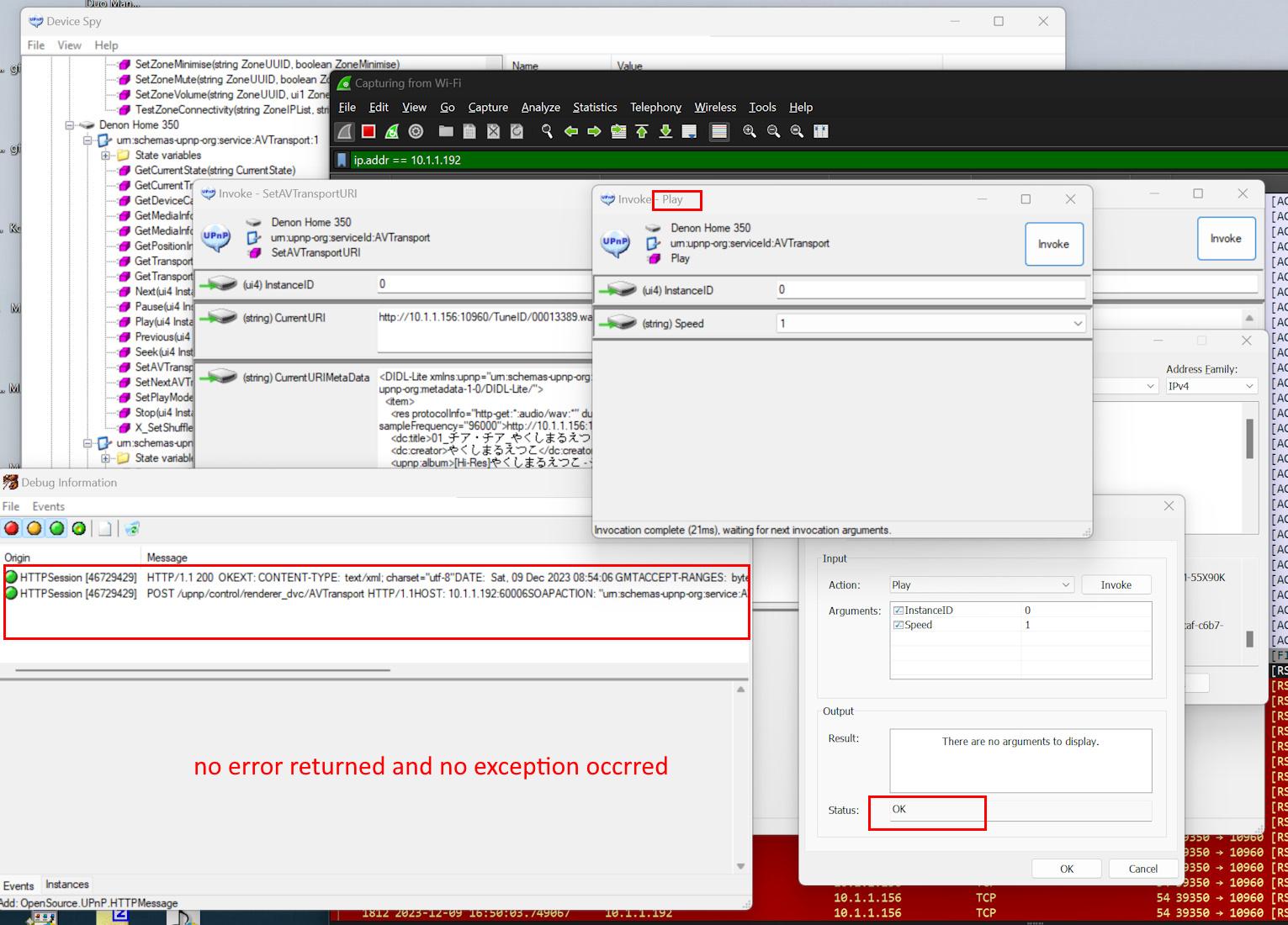
I have used some UPnP development tools for testing and I think I have identified the clues.
Although the renderer is unable to do successful playback and is returning a large number of RST packets, the problem is that the SOAP call to ‘Play’ does not return any errors, nor are any exceptions thrown.
This apparently leads TuneBrowser to be unaware of the actual status of the renderer.
I believe this could explain why TuneBrowser assumes that the ‘Play’ SOAP operation is proceeding without any anomalies.
 storaid参加者
Hello, Tiki
I have a question.
When the receiver cannot process an unsupported file, but the requested file format matches the receiver’s supported MIME, and it’s only the Sample Rate or Bit Depth format that is incompatible, how will TuneBrowser handle this situation further?
Indeed, there are a large number of RST packets being returned.
However, I am not sure whether TuneBrowser can discover this.
storaid参加者Hello, Tiki
Thank you for your help.
However, this improvement in functionality does not resolve my issue.
This is because it’s a problem caused by format unsupported.
The issue arises because Denon does not support 32-bit sources; Denon Home only supports PCM format up to 192k/24bit.
I am not sure if TuneBrowser can detect this problem.
I have captured packets with Wireshark and indeed, it returned a large number of RST packets.
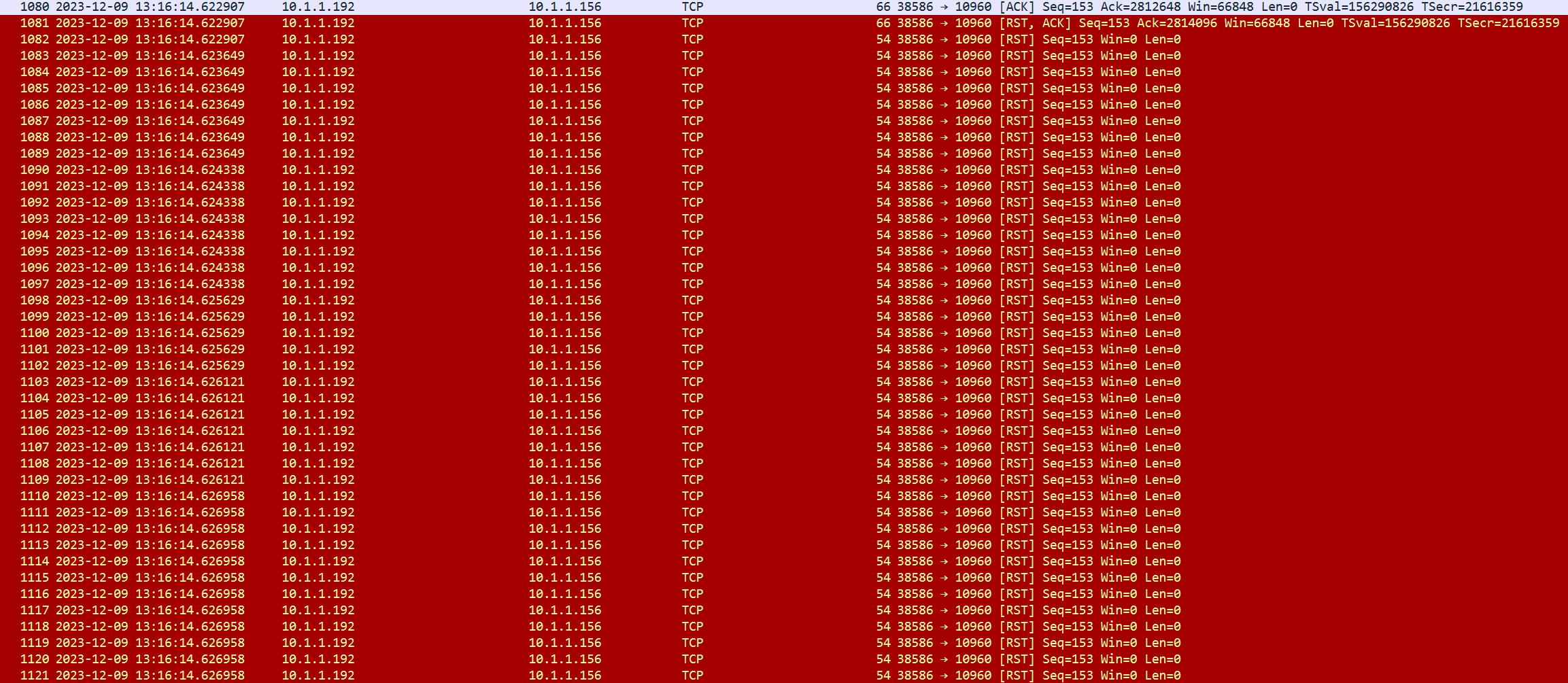
Packet dump file(Wireshark):
https://1drv.ms/u/s!AvA1navurakAiKkyzo_EU0ylg74uDQ?e=JO5uJ4
Thanks
storaid参加者Hello, Tiki
Thanks for your improvements
Seems like it’s working well with v5.4.2, even though the “port jump” problem occurs during device startup.
Thanks
2023-12-09 08:53 返信先: obvious background noise occurs when playing DSD file using ASIO(Creative) #14517storaid参加者recorded file:
2023-12-09 08:51 返信先: obvious background noise occurs when playing DSD file using ASIO(Creative) #14516storaid参加者Hello Tiki
I am still in ongoing communication with Creative Support, but I must say that the efficiency of their Support is extremely poor and bureaucratically slow.
I have recorded an audio clip while playing a DSD format file. Under ASIO mode, there is only severe noise occurring.
storaid参加者Hello, Tiki
This is my thought, please take it into consideration:
Some UPnP devices will change the listening port of their service endpoints during startup. However, under normal circumstances, these devices should continue to send NOTIFY SSDP packets to inform the control endpoint, like TuneBrowser, that the listening port of the service endpoint has changed.
This behavior is indeed possible with some UPnP devices.
Unless the control endpoint continuously monitors changes in NOTIFY packets to update the current device list, the only way is to wait for the UPnP device to complete startup, then start the control endpoint (such as TuneBrowser) to re-detect the UPnP device.
By then, the NOTIFY notification obtained from the UPnP device will already be the service endpoint currently in use.
storaid参加者Hello, Tiki
You are talking about SSDP protocol, and SSDP is using port 1900. So, I think 49152 and 49153 ports that you saying are client side port numbers. The port number on the client side changes with each session.
YES
When the TuneBrowser is running, if the service endpoint’s port on the iFi UPnP renderer changes during device startup, from 49152 to 49153, it will show as VOID on the device list.
Originally, the renderer would send a SSDP – NOTIFY to indicate that the LOCATION of the service endpoint is port 49152.
I suspect that during the device initialization, the service endpoint’s port changes to 49153 in some stage.
It’s possible that the TuneBrowser could make some improvements in this case?
For example, periodically detecting NOTIFY to check for changes, then updating the UPnP Renderer on the device list.
I am currently in touch with the iFi vendor to ask why the service endpoint’s port is changed during device startup.
storaid参加者Hello, Tiki
Well, I understand what you mean.
In your case, the TuneBrowser doesn’t rely on many special effects.
If you’re not using a new interface or applying rich effects, such as ID2D1Device1 and ID2D1Device3, then I agree with your point of view that upgrading to the newer version won’t necessarily bring performance improvements.
Direct2D API provides richer effects with each update.
This is just my personal opinion, take it as you will.
Direct2D 1.1 to 1.3 have been out for over 6 years now, and I haven’t seen any updates to them.
Tiki, if you are worried about compatibility with older operating systems, such as Windows 8, I think you can stay with version 1.0
However, given that Windows 10 is commonly used now and it’s a basic requirement for your software, I personally don’t think there would be significant compatibility issues when switching to a newer version.
Current GPU including iGPU already provide at least DirectX 11 support.
Even the very old Intel Haswell GT2 iGPU architecture guarantees at least DirectX 11.1 support, with some features of DirectX 12.
Therefore, in my judgement, I don’t think using a newer version of Direct2D would cause significant compatibility issues.
It’s been quite a while since the Direct2D API was updated.
Thanks
storaid参加者I believe that after version 1.0, the implementation of interfaces such as ID2D1Effect, ID2D1Device, and ID2D1DeviceContext can simplify code and make full use of GPU resources possible.
IMO, I see no reason not to take advantage of these features.
storaid参加者Hello, Tiki
Did you use the ID2D1Effect interface from d2d1_1.h??
Although it’s not from1.3 feature.
storaid参加者This should explain why restarting is the only way to make the device get back to normal status.
storaid参加者Hello, Tiki
I checked this problem using Wireshark.
The incorrect [VOID], a RST (RESET) packet, was due to a change in the port from 49152 to 49153.
These are all commonly used ports.
And the iFi device sent a NOTIFY signal to inform the TuneBrowser that a new session had started.
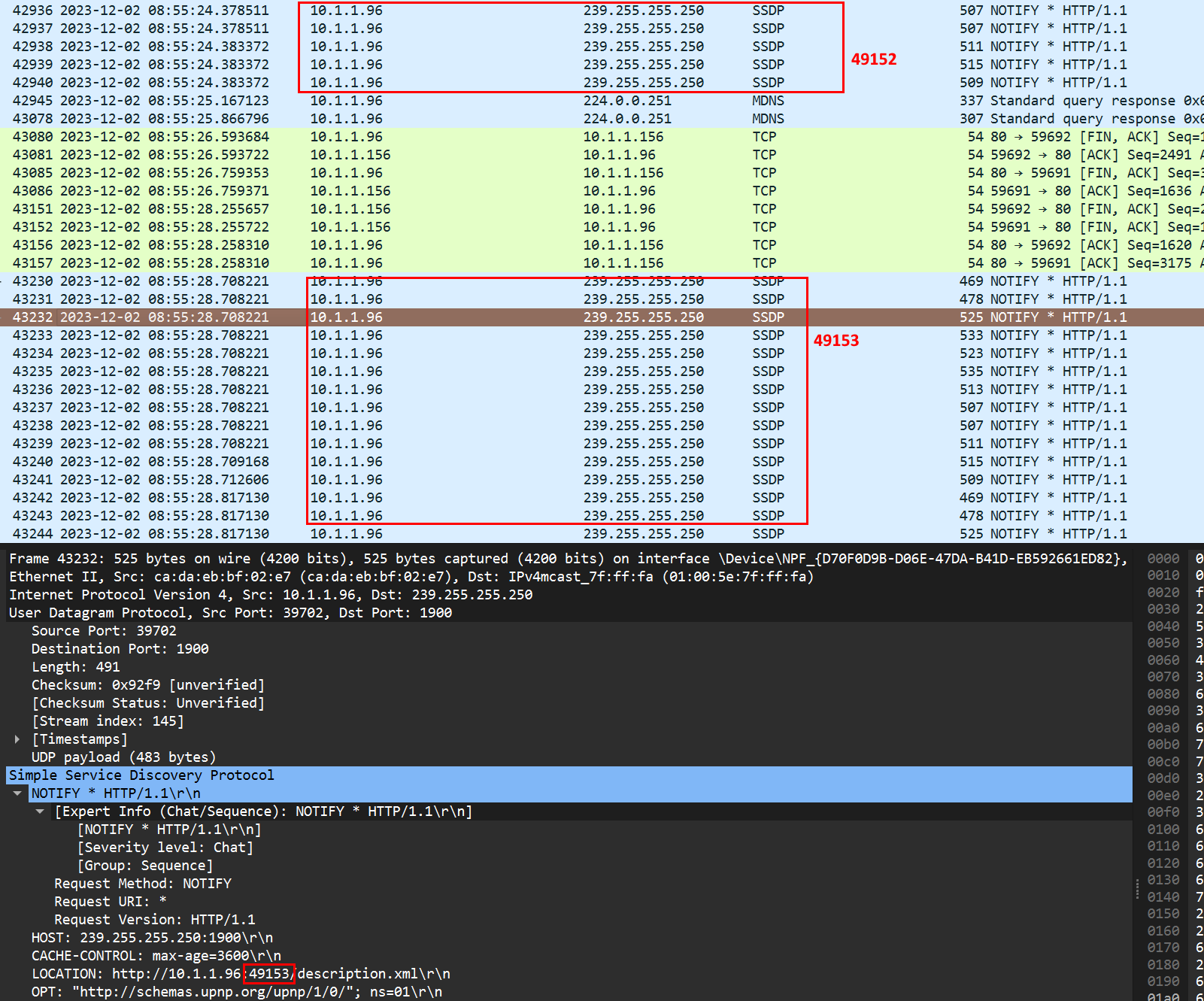 storaid参加者
Hello,
As I said first, the TuneBrowser is working well for your file. At this time, I think there is no “further fine-tune”.
Ok, thanks
storaid参加者Hello, Tiki
Do you mean being able to further fine-tune UPnP’s operations in this case?
Thanks
storaid参加者Hello, Tiki
I did take a look at the UPnP log and noticed the following as a part of it.
2023/11/22 18:54:04,016: UL02346: T0a6b8: UPnP_P: [ResolveTune]: URI: [http://10.1.1.156:10960/TuneID/00013389.wav]
2023/11/22 18:54:04,017: UL02348: T0a6b8: UPnP_P: [ResolveTune]: - Mine:Yes Managed:Yes Recorded:Yes Local file: [\\NAS1\music\[Hi-Res]やくしまるえつこ - チア・チア\01_チア・チア_やくしまるえつこ.wav]
2023/11/22 18:54:04,018: UL02350: T01b90: UPnP_P: Proc PlayerNotify: 0003 [Start]
2023/11/22 18:54:04,031: UL02352: T01b90: UPnP_P: Proc PlayerNotify: 0003 [Started]
2023/11/22 18:54:04,119: UL02354: T08fb4: --> EVENT /SR_AVTransport: uuid:73556646-8925-11ee-b641-83d7476a55a3
2023/11/22 18:54:04,119: UL02356: T08fb4: Subscriber: [Event]: Received EVENT: [AVTransport]
2023/11/22 18:54:04,119: UL02358: T08fb4: Subscriber: - [AVTransport]: Device notification: [TransportState ] : [STOPPED]
2023/11/22 18:54:04,119: UL02360: T08fb4: UPnP_P: [Proc:TrState ]<EVT>: PlayerUPnP UPState changed [PLAYING ] to [STOPPED ]
2023/11/22 18:54:04,119: UL02362: T08fb4: UPnP_P: [Proc:TrState ]<EVT>: PlayerUPnP PLStatus changed [PlayStatus::Playing ] to [PlayStatus::Stop ]
2023/11/22 18:54:04,119: UL02364: T08fb4: UPnP_P: [Proc:TrState ]<EVT>: Stop detected.
2023/11/22 18:54:04,119: UL02366: T08fb4: UPnP_P: [Proc:TrState ]<EVT>: Next tune sequence position 0 -> 1.
2023/11/22 18:54:04,119: UL02368: T08fb4: UPnP_P: [Proc:TrState ]<EVT>: Player is UnderControl. Next tune SeqPos:1 found. Continue playback.
2023/11/22 18:54:04,119: UL02370: T08fb4: UPnP_P: [Proc:TrState ]<EVT>: PlayerStatus: Continue
2023/11/22 18:54:04,119: UL02372: T08fb4: UPnP_P: [Proc:TrState ]<EVT>: State : STOPPED
Could these triggered events above have been caused by playback, resulting in the stopping of playback?
Thanks
storaid参加者Hello, Tiki
What actually happens next when the TuneBrowser player receives no errors?
Even if TuneBrowser was unaware of RST happened.
storaid参加者Hello, Tiki
So, the TuneBrowser cannot detect error.
You mean it is not capable of detecting errors from RST response???
Thanks
storaid参加者Hello, Tiki
As I said above, renderer is supporting wav. So TuneBrowser is using original wav file.I see
But this leads to the problem I mentioned where the TuneBrowser player doesn’t perform any action.
Is there any possible way to improve this problem in this case?
Thanks
storaid参加者Logging:
2023/11/16 21:49:30,359: UL00515: T0f728: UPnP_P: PlayerLogToUPnP is enabled.
2023/11/16 21:49:30,360: UL00517: T0f728: UPnP_P: Created player object: [UPnP: Denon Home 350]
2023/11/16 21:49:30,363: UL00520: T0f728: UPnP_P: Stage: [InitializePlayer]
(omitted because of too long)
Capture from wireshark:
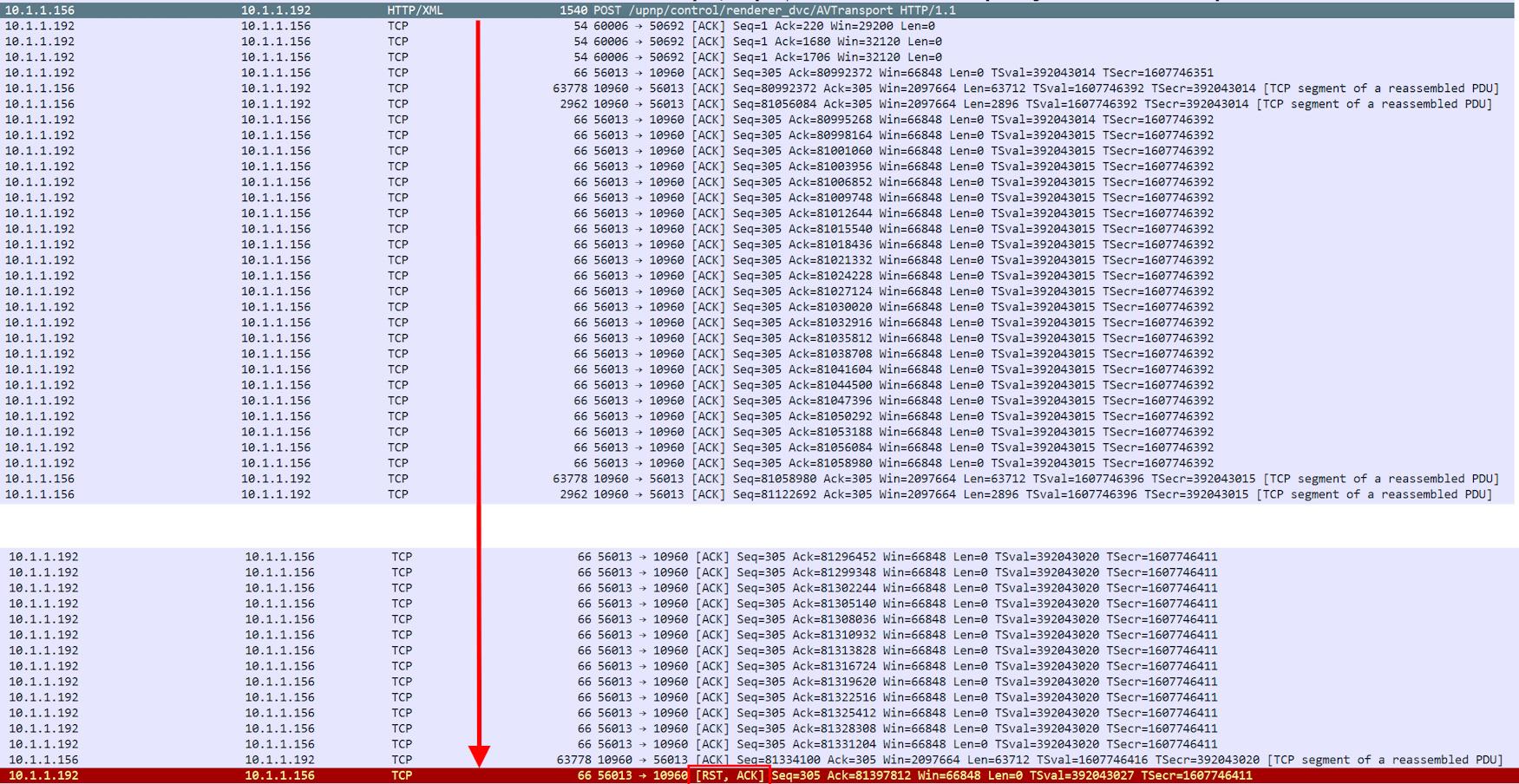 storaid参加者
Hello, Tiki
the following is from Denon device:
http-get:*:audio/mpeg:* http-get:*:audio/vnd.dlna.adts:* http-get:*:audio/x-ms-wma:* http-get:*:audio/x-ms-wma:* http-get:*:audio/L16;rate=48000;channels=2:* http-get:*:audio/L16;rate=48000;channels=1:* http-get:*:audio/L16;rate=44100;channels=2:* http-get:*:audio/L16;rate=44100;channels=1:* http-get:*:audio/wav:* http-get:*:audio/mp3:* http-get:*:audio/flac:* http-get:*:audio/aac:* http-get:*:audio/m4a:*storaid参加者Hello, Tiki
What you are asking for is more like a dedicated internal RAM Disk implementation.
that’s right. it’s like a RAM Disk..
I am sorry, but I do not plan to achieve such behavior.
okay, thanks
storaid参加者Hello, Tiki,
Indeed, I was informed that the Denon device does not support this file format…
However, I’m curious as to why the on-the-fly transcoding does not occur?
Thanks
storaid参加者Hello, Tiki
I think this thread should be closed because the problem cannot be reproduced until now.
Thank you
storaid参加者Hello, Tiki,
I have conducted a test by playing music using a CUE file.
Generally, for the UPnP renderer, a temporary file is generated on the local disk.
I am wondering if it’s possible for this temporary file to be buffered into the system memory, within the allowed size of the RAM buffer? For example, if the default RAM buffer size is 2048MB.
Ideally, the generation of a temporary file every time a track is loaded should be avoided, especially to avoid writing into the local disk(e.g., SSD).
And, the size of the RAM buffer is configurable.
My hope is to reduce the number of write operations to the SSD, in order to lower the impact on its TBW and extend its lifespan.
Thanks
storaid参加者Hello, Tiki
Have there been any improvements to this problem in the new version v1714?
I tested this version and it seems that the problem I mentioned no longer occurs.
storaid参加者Hello, Tiki
Is it possible, before performing the on-the-fly transcoding operation, to buffer the generated temporary files (flac) into the system memory instead of storing them on the SSD/HDD?
This could be determined by a setting for the size of a RAM buffer. For example, with a default value of 2048MB, if the temporary file exceeds this size, it would be stored on the SSD/HDD, otherwise, it would be buffered into the memory.
Particularly, my aim is to reduce the number of write operations to the SSD as much as possible.
Thanks..
storaid参加者Hello, Tiki
I am loading the tracks from the CUE file.
But there will be a waiting, a prepare stream happened, situation.
what circumstances will there be transcoding on-the-fly working?
storaid参加者Hello, Tiki
I mean it’s possible that the control of the device will be back by clicking the stop button without restarting?
storaid参加者it’s weird.
now I can’t reproduce this issue.I just encountered that after pressing the Detail button, the response of displaying the dialog box was relatively slow.
storaid参加者Tested it for a while…
Well, in this version, it’s working well with UPnP renderer.
thanks, Tiki
storaid参加者ok…
now this version
it’s working well with playing hi-res ape…
thanks..
storaid参加者the problem is gone…
thanks
storaid参加者Hello, Tiki
v5.4.0
APEのコーデックを更新し、対応形式が増えました.
only very big noise happens in this version
you can test my ape sample I provided above
storaid参加者no….
I was wrong..
it’s not about audio/L16 settings..
changing everything will cause the application crash
storaid参加者Hello, Tiki
it’s working and very fast with setting Watch network drive (NAS) as Auto…
Thanks for your answer…
2023-09-30 10:46 返信先: obvious background noise occurs when playing DSD file using ASIO(Creative) #14308storaid参加者Hello, Tiki
Once I felt that it it strange that foobar2000 seems to be playing DSD native with samplerate 2822400, but your TuneBrowser seems to be playing by DoP format.
Maybe you are right in this Foobar2000 case.
I was told that trying another player MusicBee play DSD format file.
It does support DoP and Native by its ASIO configuration.
Native ASIO is not working for sure, but DoP it can get working well.
That’s why their Tech Support still believe this is a compatibility issue with TuneBrowser. Orzstoraid参加者Hello, Tiki
Not periodically. these will be scanned soon when added into managed folder.
Here is what I tried:
After waiting for approximately 10 to 20 minutes, I didn’t observe any indication that the Quick Scan was functioning.
For example, I added an album named “[Hi-Res]TVアニメ「葬送のフリーレン」OPテーマ「勇者」/YOASOBI” to the managed folder located at the path “//NAS1/music”.
Although I waited for about 20 minutes, I still couldn’t find this album added in the “Folder Tree”.
According to your statement, the Quick Scan should have worked in this case, correct? However, it did NOT.
This is what has left me confused about the above situation.
Did I miss something?
Of course! There is a solution. It will start working again after restarting TuneBrowser.
2023-09-29 13:34 返信先: obvious background noise occurs when playing DSD file using ASIO(Creative) #14298storaid参加者After a long wait, I was informed by Creative Support that they still believe this is a compatibility issue with TuneBrowser.
If their Creative ASIO driver only plays DSD files, there will be background noise only.
It is likely that most player software, including Foobar2000, will encounter this issue.
It is unlikely that only TuneBrowser software will have this problem.
Creative Support advised me to report this to the developers of TuneBrowser.
At least one Foobar2000 can play DSD format music without any issues using SACD f2k component.Foobar2k output console when playing DSD64:
autoproxy_output::check_dsd_stream(true) => DSD stream contains 3 chunks and 14112 samples
autoproxy_output::process_samples() => Switch to DSD playback
autoproxy_output::process_samples() => Input stream [channels: 2, samplerate: 2822400, channel_config: 0x00000003]
autoproxy_output::process_samples() => Output stream [channels: 2, samplerate: 2822400, channel_config: 0x00000003]
autoproxy_output::process_output(transition = 0.000)
autoproxy_output::process_samples(channels = 2, sample_rate = 2822400, channel_config = 0x00000003)
autoproxy_output::volume_adjust(samplerate = 2822400, latency = 0.000, volume = 0.000)
autoproxy_output::check_dsd_stream(false) => DSD stream contains 4 chunks and 18816 samples
TuneBrowser log:
2023/09/29 12:27:23,458: UL01458: T06a58: TL18: --- Preparing device for DoP / 176400 Hz / 24 bit : [Creative Sound Blaster ASIO]
2023/09/29 12:27:23,458: UL01459: T06a58: TL18: Auto resampler: [If device does not support sample rate]
2023/09/29 12:27:23,458: UL01460: T06a58: TL18: SR Table: 176400
2023/09/29 12:27:23,458: UL01461: T06a58: TL18: --- Try 1/1: Preparing device by [PCM] 176400 Hz.
2023/09/29 12:27:23,458: UL01462: T06a58: TL18: ASIOProxyProcess: Call : [Confirm] Param:0
2023/09/29 12:27:23,458: UL01463: T06a58: TL18: ASIOProxyProcess: Done : [Confirm] Result:1 Wait:0
2023/09/29 12:27:23,458: UL01464: T06a58: TL18: Post PlayerNotify: 7008 [SpecUpdate]
2023/09/29 12:27:23,458: UL01465: T06a58: TL18: ASIOProxyProcess: Call : [Prepare] Param:0
2023/09/29 12:27:23,459: UL01466: T088a4: TL18: Proc PlayerNotify: 7008 [SpecUpdate]
2023/09/29 12:27:23,459: UL01467: T04e94: TL18: ASIOProxyProcess: Event: [PrepareBuffer] Param:565800
2023/09/29 12:27:23,459: UL01468: T04e94: TL18: ASIOProxyProcess: Done : [PrepareBuffer] Result:1
2023/09/29 12:27:23,459: UL01469: T06a58: TL18: Prx: 2023/09/29 12:27:23,458.721: T054c8: TL01: Requesting IoFormat: PCM (Device has no IoFormat)
2023/09/29 12:27:23,459: UL01470: T06a58: TL18: Prx: 2023/09/29 12:27:23,458.729: T054c8: TL01: Requested sample rate: 176400 Hz is same as device.
2023/09/29 12:27:23,459: UL01471: T06a58: TL18: Prx: 2023/09/29 12:27:23,458.739: T054c8: TL01: Device CH Output:8, Input:2
2023/09/29 12:27:23,459: UL01472: T06a58: TL18: Prx: 2023/09/29 12:27:23,458.743: T054c8: TL01: Allocating ASIO buffer CH:8 Size:1768
2023/09/29 12:27:23,459: UL01473: T06a58: TL18: Prx: 2023/09/29 12:27:23,458.747: T054c8: TL01: Calling ASIODriverCreateASIOBuffers_SEH_Wrapper
2023/09/29 12:27:23,459: UL01474: T06a58: TL18: Prx: 2023/09/29 12:27:23,459.148: T054c8: TL01: ASIOMessage: 2:[kAsioEngineVersion ] Value:0
2023/09/29 12:27:23,459: UL01475: T06a58: TL18: Prx: 2023/09/29 12:27:23,459.154: T054c8: TL01: ASIOMessage: 7:[kAsioSupportsTimeInfo ] Value:0
2023/09/29 12:27:23,459: UL01476: T06a58: TL18: Prx: 2023/09/29 12:27:23,459.176: T054c8: TL01: Calling ASIODriverCreateASIOBuffers_SEH_Wrapper completed: 0
2023/09/29 12:27:23,459: UL01477: T06a58: TL18: Prx: 2023/09/29 12:27:23,459.178: T054c8: TL01: Allocating ASIO buffer OK.
2023/09/29 12:27:23,459: UL01478: T06a58: TL18: Prx: 2023/09/29 12:27:23,459.204: T054c8: TL01: Driver stage: [Initialized] -> [Prepared ]
2023/09/29 12:27:23,459: UL01479: T06a58: TL18: Prx: 2023/09/29 12:27:23,459.211: T054c8: TL01: Safe wait time: 10 ms, Preferred: 10.023 ms, Buffer: 10.023 ms
2023/09/29 12:27:23,459: UL01480: T06a58: TL18: ASIOProxyProcess: Done : [Prepare] Result:2 Wait:0
2023/09/29 12:27:23,459: UL01481: T06a58: TL18: ASIOProxyProcess: Call : [Confirm] Param:1
2023/09/29 12:27:23,459: UL01482: T06a58: TL18: Prx: 2023/09/29 12:27:23,459.950: T054c8: TL01: ASIO driver 0: [Creative Sound Blaster ASIO]
2023/09/29 12:27:23,459: UL01483: T06a58: TL18: Prx: 2023/09/29 12:27:23,459.953: T054c8: TL01: ASIO driver DSD support: DSDLevel::DoP (Keep current by user request)
2023/09/29 12:27:23,459: UL01484: T06a58: TL18: Prx: 2023/09/29 12:27:23,459.956: T054c8: TL01: ASIO driver IoFormat: PCM only
2023/09/29 12:27:23,459: UL01485: T06a58: TL18: Prx: 2023/09/29 12:27:23,459.957: T054c8: TL01: ASIO driver sample rate: 176400 Hz
2023/09/29 12:27:23,459: UL01486: T06a58: TL18: Prx: 2023/09/29 12:27:23,459.960: T054c8: TL01: ASIO driver CH: Input:2 Output:8
2023/09/29 12:27:23,459: UL01487: T06a58: TL18: Prx: 2023/09/29 12:27:23,459.963: T054c8: TL01: ASIO driver format: ASIOSTInt32LSB
2023/09/29 12:27:23,459: UL01488: T06a58: TL18: Prx: 2023/09/29 12:27:23,459.964: T054c8: TL01: ASIO driver format: 4 bytes
2023/09/29 12:27:23,459: UL01489: T06a58: TL18: ASIOProxyProcess: Done : [Confirm] Result:1 Wait:0
2023/09/29 12:27:23,459: UL01490: T06a58: TL18: Post PlayerNotify: 7009 [SpecUpdate]
2023/09/29 12:27:23,459: UL01491: T06a58: TL18: ASIOProxyProcess: Call : [Confirm] Param:0
2023/09/29 12:27:23,460: UL01492: T06a58: TL18: ASIOProxyProcess: Done : [Confirm] Result:1 Wait:0
2023/09/29 12:27:23,469: UL01493: T06a58: TL18: FFT SampleRate : 44100 Hz
2023/09/29 12:27:23,469: UL01494: T06a58: TL18: FFT SpectrumDelay: 0 samples (0 ms)
2023/09/29 12:27:23,469: UL01495: T06a58: TL18: FFT Timeline : 88200 samples
2023/09/29 12:27:23,469: UL01496: T06a58: TL18: Device word:32 bit, Device Data:32 bit, Tune word:24 bit, Buffer:1768 words
2023/09/29 12:27:23,469: UL01497: T06a58: TL18: Device tick:10.023 ms / 99.774 Hz
2023/09/29 12:27:23,469: UL01498: T06a58: TL18: PrepareDevice result: OK
2023/09/29 12:27:23,469: UL01499: T06a58: TL18: --- Try 1/1: Preparing device completed.
2023/09/29 12:27:23,469: UL01500: T06a58: TL18: Device sample rate is fixed: 176400 Hz.
2023/09/29 12:27:23,469: UL01501: T06a58: TL18: Post PlayerNotify: 7010 [SpecUpdate]
2023/09/29 12:27:23,470: UL01503: T06a58: TL18: WaitControl: Seek wait: None.
2023/09/29 12:27:23,470: UL01504: T06a58: TL18: Setting seek value to void.
2023/09/29 12:27:23,470: UL01505: T06a58: Channel information:
2023/09/29 12:27:23,470: UL01506: T06a58: - Device channel: 0 [Default] Decoder channel: 0 [FrontL ]
2023/09/29 12:27:23,470: UL01507: T06a58: - Device channel: 1 [Default] Decoder channel: 1 [FrontR ]
2023/09/29 12:27:23,470: UL01508: T06a58: - Device channel: 2 [Default] Decoder channel: -1 [Void ]
2023/09/29 12:27:23,470: UL01509: T06a58: - Device channel: 3 [Default] Decoder channel: -1 [Void ]
2023/09/29 12:27:23,470: UL01510: T06a58: - Device channel: 4 [Default] Decoder channel: -1 [Void ]
2023/09/29 12:27:23,470: UL01511: T06a58: - Device channel: 5 [Default] Decoder channel: -1 [Void ]
2023/09/29 12:27:23,470: UL01512: T06a58: - Device channel: 6 [Default] Decoder channel: -1 [Void ]
2023/09/29 12:27:23,470: UL01513: T06a58: - Device channel: 7 [Default] Decoder channel: -1 [Void ]
2023/09/29 12:27:23,470: UL01514: T06a58: - Decoder FrontL: 0
2023/09/29 12:27:23,470: UL01515: T06a58: - Decoder FrontR: 1
2023/09/29 12:27:23,470: UL01516: T06a58: - 2CH + Void Processing.
2023/09/29 12:27:23,470: UL01517: T06a58: TL18: Post PlayerNotify: 0001 [Start]
2023/09/29 12:27:23,470: UL01518: T06a58: TL18: Stage: [StartDevice]
2023/09/29 12:27:23,470: UL01519: T06a58: TL18: WaitControl: Before start wait: None.
2023/09/29 12:27:23,471: UL01522: T06a58: TL18: ASIOProxyProcess: Call : [Start] Param:0
2023/09/29 12:27:23,483: UL01523: T088a4: TL18: Proc PlayerNotify: 7009 [SpecUpdate]
2023/09/29 12:27:23,494: UL01524: T088a4: TL18: Proc PlayerNotify: 7010 [SpecUpdate]
2023/09/29 12:27:23,502: UL01525: T088a4: TL18: Proc PlayerNotify: 0001 [Start]
2023/09/29 12:27:23,512: UL01526: T06a58: TL18: Prx: 2023/09/29 12:27:23,471.445: T054c8: TL01: Buffer ahead: 4
2023/09/29 12:27:23,512: UL01527: T06a58: TL18: Prx: 2023/09/29 12:27:23,502.234: T054c8: TL01: Starting ASIO driver: [Creative Sound Blaster ASIO]
2023/09/29 12:27:23,512: UL01528: T06a58: TL18: Prx: 2023/09/29 12:27:23,502.240: T054c8: TL01: Calling ASIODriverStart_SEH_Wrapper
2023/09/29 12:27:23,512: UL01529: T06a58: TL18: Prx: 2023/09/29 12:27:23,512.677: T054c8: TL01: Transfer thread priority adjusted: 0 -> 2
2023/09/29 12:27:23,512: UL01530: T06a58: TL18: Prx: 2023/09/29 12:27:23,512.728: T054c8: TL01: Calling ASIODriverStart_SEH_Wrapper completed: 0
2023/09/29 12:27:23,512: UL01531: T06a58: TL18: Prx: 2023/09/29 12:27:23,512.732: T054c8: TL01: Driver stage: [Prepared ] -> [Running ]
2023/09/29 12:27:23,512: UL01532: T06a58: TL18: ASIOProxyProcess: Done : [Start] Result:1 Wait:0
2023/09/29 12:27:23,512: UL01533: T06a58: TL18: WaitControl: After start silent: None.
2023/09/29 12:27:23,512: UL01534: T06a58: TL18: Post PlayerNotify: 0001 [Started]
2023/09/29 12:27:23,512: UL01535: T06a58: TL18: Fade in.
2023/09/29 12:27:23,512: UL01536: T06a58: TL18: Clear fade control.
2023/09/29 12:27:23,512: UL01537: T06a58: TL18: Post PlayerNotify: 7011 [Update]
2023/09/29 12:27:23,527: UL01538: T088a4: TL18: Proc PlayerNotify: 0001 [Started]
2023/09/29 12:27:23,528: UL01540: T088a4: DecodeLine:
2023/09/29 12:27:23,529: UL01541: T088a4: Source: DSD 2822.4 kHz 2 ch 1 bit
2023/09/29 12:27:23,529: UL01542: T088a4: Decoded: DoP 176.4 kHz 2 ch 24 bit
2023/09/29 12:27:23,529: UL01543: T088a4: Device: DoP 176.4 kHz 8 ch 32 bit
2023/09/29 12:27:23,534: UL01544: T088a4: TL18: Proc PlayerNotify: 7011 [Update]
If I need further assistance from Creative Support, they would like me to do a recording when the problem occurred.
storaid参加者I think the TuneBrowser has no big-noise issue with playing 24bit ape..
but seems like the hi-res ape can not be played.
My Test sample:
https://1drv.ms/u/s!AvA1navurakAiKc6-0ENq1Cb2AiT4g?e=iGO0ko
2023/09/29 09:34:57,754.869: T07e24: TL15: Reading file: [D:\OneDrive\Private\test_sample.ape]
2023/09/29 09:34:57,755.190: T07e24: TL15: Reading APE specdata from cache: [test_sample.ape]
2023/09/29 09:34:57,765.228: T07e24: TL15: Error: Failed to call APE decoder: CreateIAPEDecompressEx().
Message: Processing files failed.
Version: 1706
File info:
{ "creatingLibrary":{"name":"MediaInfoLib","version":"23.09","url":"https://mediaarea.net/MediaInfo"}, "media":{"@ref":"D:\\OneDrive\\Private\\test_sample.ape","track":[{"@type":"General","AudioCount":"1", "FileExtension":"ape", "Format":"Monkey's Audio", "Format_Version":"3.990", "FileSize":"277473964", "Duration":"435.008", "OverallBitRate":"5102876", "StreamSize":"0", "File_Created_Date":"2023-09-29 01:27:29.590 UTC", "File_Created_Date_Local":"2023-09-29 09:27:29.590", "File_Modified_Date":"2023-09-29 01:25:29.315 UTC", "File_Modified_Date_Local":"2023-09-29 09:25:29.315"},{"@type":"Audio","Format":"Monkey's Audio", "Format_Version":"3.990", "Format_Profile":"Float", "Duration":"435.008", "BitRate":"5102875", "Channels":"2", "SamplingRate":"96000", "SamplingCount":"41760768", "BitDepth":"32", "Compression_Mode":"Lossless", "StreamSize":"277473964", "Encoded_Library_Settings":"Insane"}]} }storaid参加者so strange
bigfear.ape => failed only for TuneBrowser
other file samples provided by the following thread:
https://trac.ffmpeg.org/ticket/10563
24_bit_fixed_stereo_44k_insane.ape => okay, no big-noise
24_bit_fixed_mono_44k_insane.ape=> okay, no big-noise
storaid参加者Hello,
questions
1. When I add a new album(or files) to a specified Music Folder, will Quick Scan be executed periodically?
2. After launching TuneBrowser, a scan will be executed soon. Is it a Quick Scan?Thanks
storaid参加者Hello, Tiki
is there possible anyway to trigger the Quick Scan??
storaid参加者Hello, Tiki
I was wrong..
It’s not caused by the above I mentioned.It’s more like a network issue caused…
I’m trying to determine what caused the problem
Thanks…
storaid参加者Tested Device: Denon Home
storaid参加者Hello,
my test
2023/09/19 19:52:52,804: UL12169: T04a10: TL18: [UPP_WorkerThread]: Elapsed: 00:02:00 -> 120.0 / 251.0 sec (per 10 seconds)
2023/09/19 19:53:02,868: UL12171: T04a10: TL18: [UPP_WorkerThread]: Elapsed: 00:02:10 -> 130.0 / 251.0 sec (per 10 seconds)
2023/09/19 19:53:12,937: UL12178: T04a10: TL18: [UPP_WorkerThread]: Elapsed: 00:02:20 -> 140.0 / 251.0 sec (per 10 seconds)
2023/09/19 19:53:22,998: UL12253: T04a10: TL18: [UPP_WorkerThread]: Elapsed: 00:02:30 -> 150.0 / 251.0 sec (per 10 seconds)
2023/09/19 19:53:33,053: UL12255: T04a10: TL18: [UPP_WorkerThread]: Elapsed: 00:02:40 -> 160.0 / 251.0 sec (per 10 seconds)
2023/09/19 19:53:43,149: UL12258: T04a10: TL18: [UPP_WorkerThread]: Elapsed: 00:02:50 -> 170.0 / 251.0 sec (per 10 seconds)
2023/09/19 19:53:53,226: UL12291: T04a10: TL18: [UPP_WorkerThread]: Elapsed: 00:03:00 -> 180.0 / 251.0 sec (per 10 seconds)
2023/09/19 19:54:03,337: UL12297: T04a10: TL18: [UPP_WorkerThread]: Elapsed: 00:03:10 -> 190.0 / 251.0 sec (per 10 seconds)
2023/09/19 19:54:13,425: UL12300: T04a10: TL18: [UPP_WorkerThread]: Elapsed: 00:03:20 -> 200.0 / 251.0 sec (per 10 seconds)
2023/09/19 19:54:23,526: UL12373: T04a10: TL18: [UPP_WorkerThread]: Elapsed: 00:03:30 -> 210.0 / 251.0 sec (per 10 seconds)
2023/09/19 19:54:33,588: UL12375: T04a10: TL18: [UPP_WorkerThread]: Elapsed: 00:03:40 -> 220.0 / 251.0 sec (per 10 seconds)
2023/09/19 19:54:42,658: UL12397: T04a10: TL18: [UPP_WorkerThread]: Elapsed: 00:03:50 -> 230.0 / 251.0 sec (per 10 seconds)
2023/09/19 19:54:48,469: UL12469: T04a10: TL18: [UPP_WorkerThread]: Post PlayerNotify: 7013 [Update]
2023/09/19 19:54:48,469: UL12471: T04a10: TL18: [UPP_WorkerThread]: VolumeReport (UPnP) : [0] -> 0.000000 ( -inf dB)
2023/09/19 19:54:48,471: UL12473: T085fc: TL18: Proc PlayerNotify: 7013 [Update]
2023/09/19 19:54:48,474: UL12475: T085fc: TL18: VolumeReport (Device): -23.20 dB -> -inf dB
<strong>2023/09/19 19:54:49,290: UL12477: T04a10: TL18: [UPP_WorkerThread]: PlayerUPnP status changed [PlayStatus::Playing ] to [PlayStatus::Error ]</strong>
<strong>2023/09/19 19:54:49,290: UL12479: T04a10: TL18: [Proc:PlayStatus]: Post PlayerNotify: 0001 [PlayStatus]</strong>
<strong>2023/09/19 19:54:49,290: UL12481: T04a10: TL18: Error: [Proc:PlayStatus]: PlayerStatus: Error</strong>
<strong>2023/09/19 19:54:49,290: UL12483: T04a10: TL18: [UPP_WorkerThread]: Status: </strong>
<strong>2023/09/19 19:54:49,290: UL12485: T04a10: TL18: [UPP_WorkerThread]: PlayerUPnP UPState changed [PLAYING ] to [UPPlayState::Unknown]</strong>
2023/09/19 19:54:49,290: UL12487: T04a10: TL18: [UPP_WorkerThread]: State :
2023/09/19 19:54:49,292: UL12489: T085fc: TL18: Proc PlayerNotify: 0001 [PlayStatus]
2023/09/19 19:54:49,293: UL12491: T085fc: TL18: Next tune sequence position 4 -> 5.
Attachments:
storaid参加者Hi,
> 1.
okay
> 2.
could you help to confirm why adding a new UPnP device to the device list causes music playback to be interrupted?
storaid参加者okay
thanks
Tiki
storaid参加者thanks for your answer..
Tiki
storaid参加者Hi,
This problem occurs on the main thread?
storaid参加者that’s my test:
2023/09/16 21:11:27,704.421: T09ff8: TL19: Begin TaskFrameWnd.
2023/09/16 21:11:27,704.430: T09ff8: TL19: Assigned task: Converter
2023/09/16 21:11:27,727.423: T09ff8: TL19: Stage: Prepare files
2023/09/16 21:11:27,727.458: T09ff8: TL19: Set StageState: [——-] -> [Running]: <Prepare files>
2023/09/16 21:11:27,728.075: T07be8: TL19: Set StageState: [Running] -> [Done ]: <Prepare files>
2023/09/16 21:11:27,730.464: T09ff8: TL19: Stage: Decode and encode
2023/09/16 21:11:27,730.555: T09ff8: TL19: Set StageState: [——-] -> [Running]: <Decode and encode>
2023/09/16 21:11:27,730.973: T05f48: TL19: Preparing file list.
2023/09/16 21:11:27,731.649: T05f48: TL19: J01: Creating FLAC decoder.
2023/09/16 21:11:27,764.533: T05f48: TL19: J01: Opening tune file to decode.
2023/09/16 21:11:28,479.063: T05f48: TL19: J01: Decoding range is block:10889760 to block:22568616 – 1
2023/09/16 21:11:28,486.383: T05f48: TL19: J01: Opened file: [\\NAS1\music\SLAYERS MEGUMIX\SLAYERS MEGUMIX -GOLD-\SLAYERS MEGUMIX -GOLD-.flac]
2023/09/16 21:11:28,486.421: T05f48: TL19: J01: 1 Sample:16 bit, 1 Word:16 bit.
2023/09/16 21:11:29,201.910: T05f48: TL19: DSP: DSP array is disabled.
2023/09/16 21:11:29,201.938: T05f48: TL19: J01: – TopBlock : 10889760
2023/09/16 21:11:29,201.943: T05f48: TL19: J01: – EndBlock : 22568616
2023/09/16 21:11:29,201.946: T05f48: TL19: J01: – Total : 11678856
2023/09/16 21:11:29,201.950: T05f48: TL19: J01: – Silent : 0 (0.000 sec)
2023/09/16 21:11:29,202.210: T05f48: TL19: J01: Reading metadata from source file to calculate output path.
2023/09/16 21:11:29,202.219: T05f48: TL19: J01: Reading file: [\\NAS1\music\SLAYERS MEGUMIX\SLAYERS MEGUMIX -GOLD-\SLAYERS MEGUMIX -GOLD-.cue]
2023/09/16 21:11:29,911.596: T05f48: TL19: J01: Reading as a CueFile.
2023/09/16 21:11:29,921.827: T05f48: TL19: J01: Internal: No File: [\\NAS1\music\SLAYERS MEGUMIX\SLAYERS MEGUMIX -GOLD-\SLAYERS MEGUMIX -GOLD-.cue]
2023/09/16 21:11:29,924.157: T05f48: TL19: J01: Destination: [D:\ConvertedMusic\林原めぐみ – SLAYERS MEGUMIX -GOLD-]
2023/09/16 21:11:29,924.289: T05f48: TL19: J01: Converting [SLAYERS MEGUMIX -GOLD-.cue?2] to [__TBTMPF.SLAYERS ME.2.00008740.11._tfxtemp.standby.mp3]
2023/09/16 21:11:29,924.302: T05f48: TL19: This task is using ThreadPool.
2023/09/16 21:11:29,924.495: T07ac8: TL19: J01: Begin convert from: \\NAS1\music\SLAYERS MEGUMIX\SLAYERS MEGUMIX -GOLD-\SLAYERS MEGUMIX -GOLD-.cue:2
2023/09/16 21:11:29,924.688: T07ac8: TL19: J01: Creating EncoderProcess.
2023/09/16 21:11:29,926.441: T07ac8: TL19: J01: Creating EncoderProcess completed.
2023/09/16 21:11:29,926.475: T07ac8: TL19: J01: SourceFile: \\NAS1\music\SLAYERS MEGUMIX\SLAYERS MEGUMIX -GOLD-\SLAYERS MEGUMIX -GOLD-.flac
2023/09/16 21:11:29,926.481: T07ac8: TL19: J01: PCM Spec :
2023/09/16 21:11:29,926.485: T07ac8: TL19: J01: – SampleRate: 44100
2023/09/16 21:11:29,926.489: T07ac8: TL19: J01: – Channels : 2
2023/09/16 21:11:29,926.493: T07ac8: TL19: J01: – BitDepth : 16
2023/09/16 21:11:33,815.853: T07ac8: TL19: J01: Decoding done.
2023/09/16 21:11:34,003.676: T07ac8: TL19: J01: Encoder finished : lame\lame.exe –tt –ta –cbr -b 256 – “C:\Users\sysadmin\AppData\Local\Temp\__TBTMPF.SLAYERS ME.2.00008740.11._tfxtemp.standby.mp3”
2023/09/16 21:11:34,003.732: T07ac8: TL19: J01: Copying metatdata:
2023/09/16 21:11:34,003.921: T07ac8: TL19: J01: Reading metadata from file : ID3 or APE: [__TBTMPF.SLAYERS ME.2.00008740.11._tfxtemp.standby.mp3]
2023/09/16 21:11:34,009.908: T07ac8: TL19: J01: Reading metadata from cache: ID3: [__TBTMPF.SLAYERS ME.2.00008740.11._tfxtemp.standby.mp3]
2023/09/16 21:11:34,010.226: T07ac8: TL19: J01: Reading metadata from cache: APE: [__TBTMPF.SLAYERS ME.2.00008740.11._tfxtemp.standby.mp3]
2023/09/16 21:11:34,010.295: T07ac8: TL19: J01: APE tag:No ID3 tag:Yes (ID3v2 tag:Yes ID3v1 tag:No )
2023/09/16 21:11:34,010.346: T07ac8: TL19: J01: Adding new ENCODINGTIME.
2023/09/16 21:11:34,010.517: T07ac8: TL19: J01: Reading metadata from file : FLAC: [SLAYERS MEGUMIX -GOLD-.flac]
2023/09/16 21:11:34,017.673: T07ac8: TL19: J01: Copying embedded image.
2023/09/16 21:11:34,023.608: T07ac8: TL19: J01: Embedding folder image.
2023/09/16 21:11:34,375.405: T07ac8: TL19: J01: Writing metadata.
2023/09/16 21:11:34,375.423: T07ac8: TL19: J01: Writing metadata to file : ID3 or APE: [__TBTMPF.SLAYERS ME.2.00008740.11._tfxtemp.standby.mp3]
2023/09/16 21:11:34,375.430: T07ac8: TL19: J01: Writing ID3 tag.
2023/09/16 21:11:34,375.436: T07ac8: TL19: J01: Writing metadata to file : ID3: [__TBTMPF.SLAYERS ME.2.00008740.11._tfxtemp.standby.mp3]
2023/09/16 21:11:34,401.633: T07ac8: TL19: J01: ID3v1 tag was erased.
2023/09/16 21:11:34,401.644: T07ac8: TL19: J01: Writing metadata to file done: Completed
2023/09/16 21:11:34,401.653: T07ac8: TL19: J01: Writing metadata to file done: Completed
2023/09/16 21:11:34,401.663: T07ac8: TL19: J01: Writing metadata done: true
2023/09/16 21:11:34,401.985: T07ac8: TL19: J01: End convert from: \\NAS1\music\SLAYERS MEGUMIX\SLAYERS MEGUMIX -GOLD-\SLAYERS MEGUMIX -GOLD-.cue:2
2023/09/16 21:11:34,428.888: T05f48: TL19: Set StageState: [Running] -> [Done ]: <Decode and encode>
2023/09/16 21:11:34,526.618: T09ff8: TL19: Stage: Commit result
2023/09/16 21:11:34,526.668: T09ff8: TL19: Set StageState: [——-] -> [Running]: <Commit result>
2023/09/16 21:11:34,534.252: T02c7c: TL19: J01: Generated: [D:\ConvertedMusic\林原めぐみ – SLAYERS MEGUMIX -GOLD-\02 Give a reason.mp3]
2023/09/16 21:11:34,534.264: T02c7c: TL19: Kick Explorer.
2023/09/16 21:11:34,569.278: T02c7c: TL19: Cleanup.
2023/09/16 21:11:34,569.476: T02c7c: TL19: Converted 1 file.
2023/09/16 21:11:34,569.512: T02c7c: TL19: Set StageState: [Running] -> [Done ]: <Commit result>
2023/09/16 21:11:34,581.995: T09ff8: TL19: Set TaskState: [——-] -> [Done ]: <Converter>
2023/09/16 21:11:34,660.456: T09ff8: TL19:
2023/09/16 21:11:34,660.462: T09ff8: TL19: All tasks have completed.just tested FLAC file
I don’t have wv file, but I don’t think there are any differences by using lame…
mm…maybe..
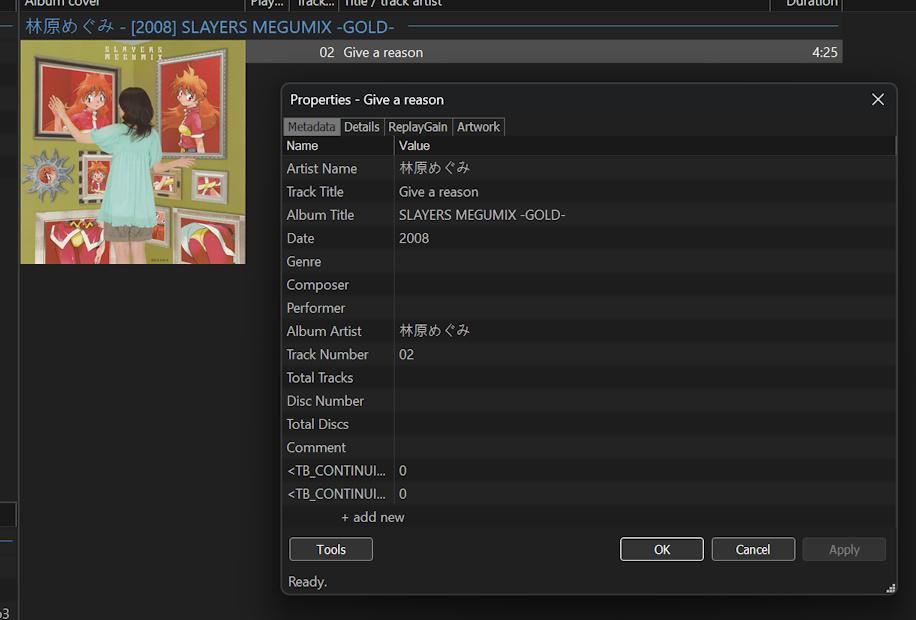
metadata json:
{
“creatingLibrary”:{“name”:”MediaInfoLib”,”version”:”23.09″,”url”:”https://mediaarea.net/MediaInfo”},
“media”:{“@ref”:”D:\\ConvertedMusic\\林原めぐみ – SLAYERS MEGUMIX -GOLD-\\02 Give a reason.mp3″,”track”:[{“@type”:”General”,”AudioCount”:”1″,
“ImageCount”:”1″,
“FileExtension”:”mp3″,
“Format”:”MPEG Audio”,
“FileSize”:”12315626″,
“Duration”:”264.855″,
“OverallBitRate”:”256000″,
“StreamSize”:”3839415″,
“Title”:”Give a reason”,
“Album”:”SLAYERS MEGUMIX -GOLD-“,
“Album_Performer”:”林原めぐみ”,
“Track”:”Give a reason”,
“Track_Position”:”02″,
“Performer”:”林原めぐみ”,
“Recorded_Date”:”2008″,
“Encoded_Date”:”2023-09-16 21:11:34 UTC”,
“File_Created_Date”:”2023-09-16 13:11:34.530 UTC”,
“File_Created_Date_Local”:”2023-09-16 21:11:34.530″,
“File_Modified_Date”:”2023-09-16 13:11:34.398 UTC”,
“File_Modified_Date_Local”:”2023-09-16 21:11:34.398″,
“Encoded_Library”:”LAME3.100″,
“Cover”:”Yes”,
“Cover_Type”:”Cover (front)”,
“Cover_Mime”:”image/jpeg”,
“extra”:{“TB_CONTINUITY_TOP”:”0″,”TB_CONTINUITY_END”:”0″}},{“@type”:”Audio”,”Format”:”MPEG Audio”,
“Format_Version”:”1″,
“Format_Profile”:”Layer 3″,
“Format_Settings_Mode”:”Joint stereo”,
“Duration”:”264.856″,
“BitRate_Mode”:”CBR”,
“BitRate”:”256000″,
“Channels”:”2″,
“SamplesPerFrame”:”1152″,
“SamplingRate”:”44100″,
“SamplingCount”:”11680128″,
“FrameRate”:”38.281″,
“FrameCount”:”10139″,
“Compression_Mode”:”Lossy”,
“StreamSize”:”8475376″,
“Encoded_Library”:”LAME3.100″,
“Encoded_Library_Settings”:”-m j -V 4 -q 3 -lowpass 19.7″},{“@type”:”Image”,”Format”:”JPEG”,
“Width”:”2808″,
“Height”:”2800″,
“ColorSpace”:”YUV”,
“ChromaSubsampling”:”4:2:0″,
“BitDepth”:”8″,
“Compression_Mode”:”Lossy”,
“StreamSize”:”3837112″}]}
}
CUEHSEET content:
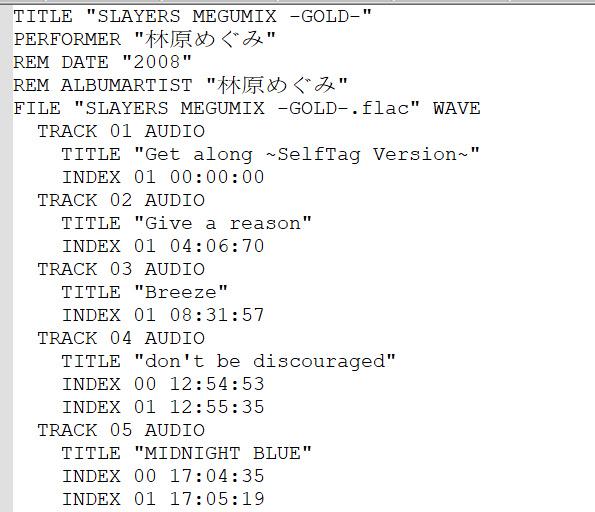 2023-09-16 12:12 返信先: difference between Always and NotFixed on the UPnP ProxyStream setting???? #14263storaid参加者
got it!
thanks…
Tiki
2023-09-16 10:54 返信先: difference between Always and NotFixed on the UPnP ProxyStream setting???? #14261storaid参加者hello,
what do you mean “fixed drive”????
local disk???
storaid参加者Hello,
I noticed you made a changes
thanks..
Tiki
storaid参加者Hello, Tiki..
I give it up…
I have tested other players, include Microsoft WMP..
They all carry related DLNA information, such as ContentFeatures.dlna.org, TransferMode.dlna.org, DNLA FLAGS..
if there is no plan to implement DLNA feature..
maybe this thread should be closed…
very thx your help, Tiki
storaid参加者No, Tiki
UPnP support is good for TuneBrowser…
Intel AV Media Wizard that tool is a standard ancient something..
What I’m more surprised about is that the A7000 is working with it…
In other words, none of the other products I have on hand is getting working unless that A7000…XDstoraid参加者I use the very old Intel AV Media Wizard to play music under the UPnP HTTP transmission.
The special thing is that A7000 can work normally…
I don’t quite understand what makes it work properly.
 storaid参加者
Ok,
Unfortunately, these home multimedia products, such as Soundbar or TV, usually support DLNA and are certified.
Carrying DLNA information is usually required, such as “TransferMode.dlna.org”
I think the SONY HT-A7000 soundbar probably has compatibility issue using UPnP with TuneBrowser.
storaid参加者Hello, Tiki
Unfortunately, it still doesn’t work properly
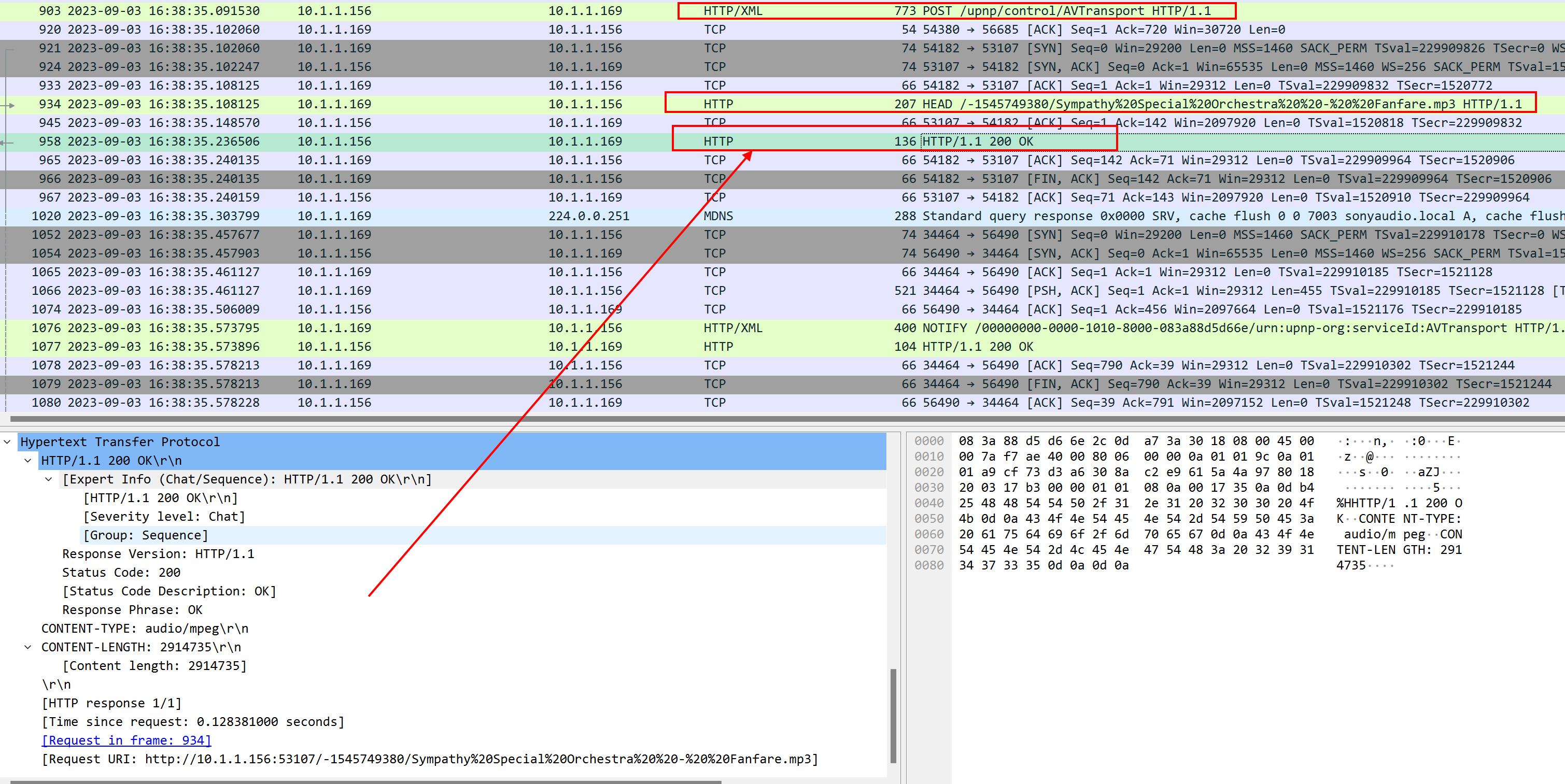
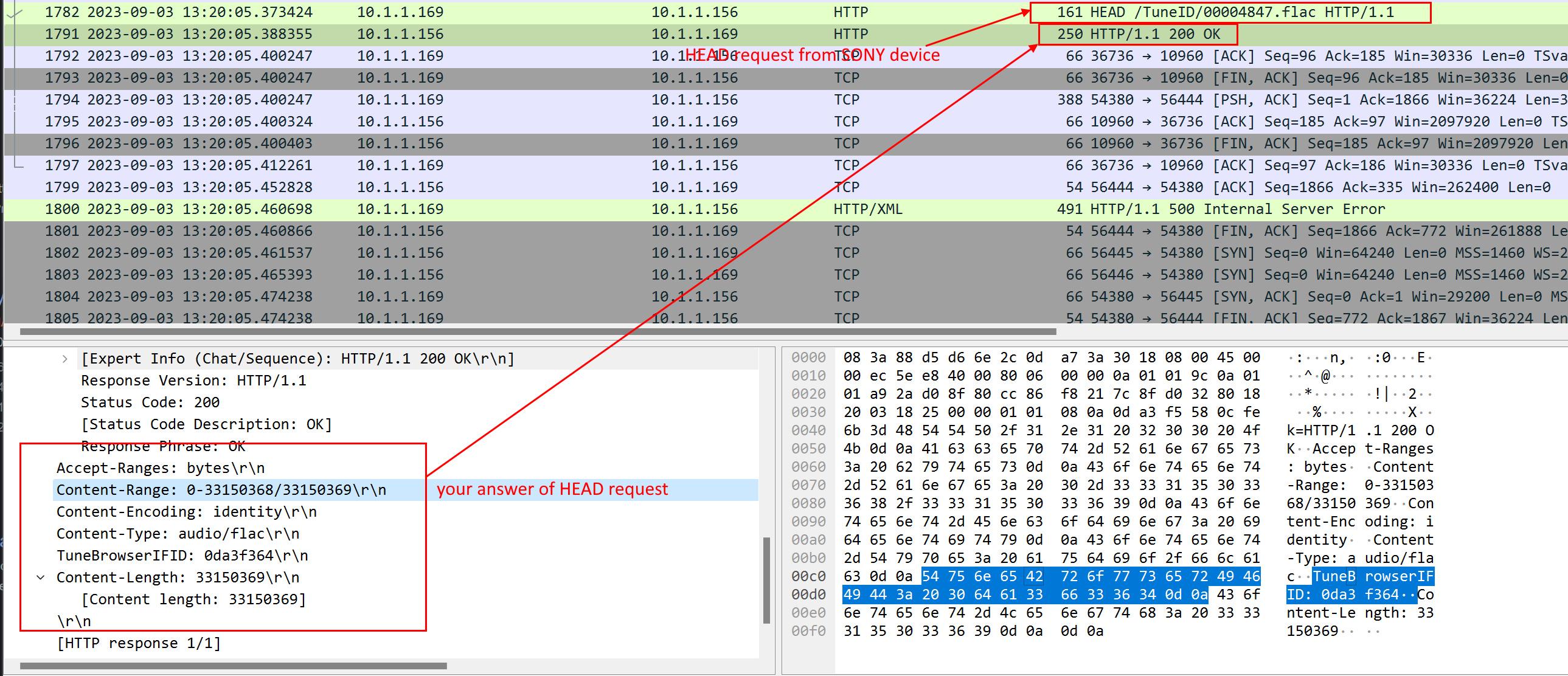
I captured some packets and did some comparisonsI found that there is a part that is different…
After the SetAVTransportURI request, the A7000 sends a HEAD request…
This part of the response seems to be very important…
I checked it out, and this is not just for compatibility with SONY devices…
These tags have an effect on some other brands, such as Samsung and others
[Tunebrowser]
 [foobar2000]
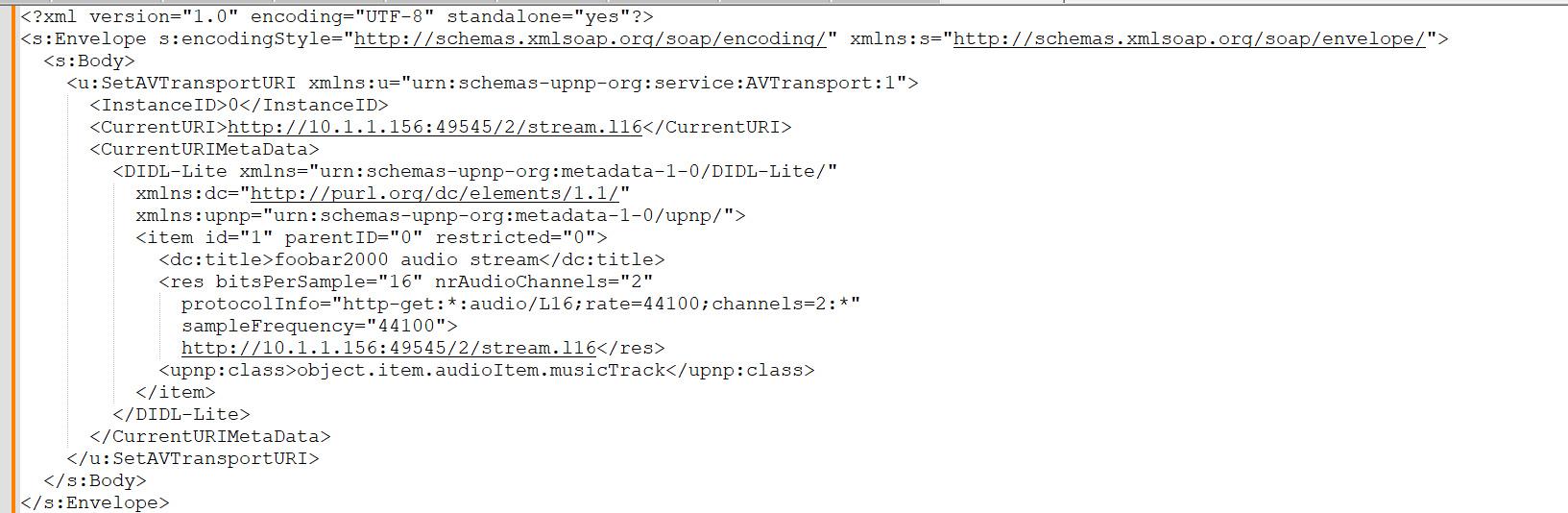
XML content of SetAVTransportURI request:
HEAD request part:
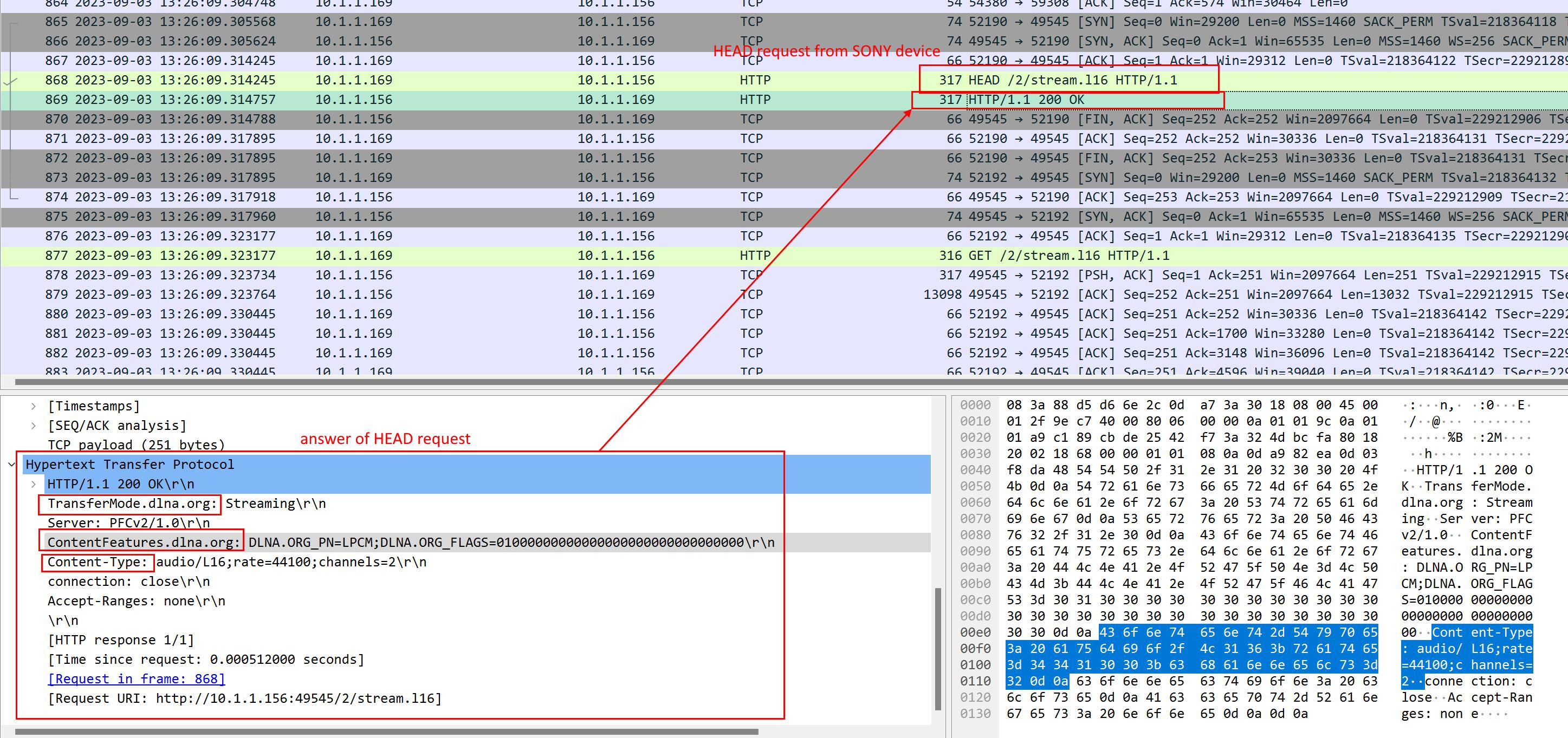
Attention:
1. TransferMode.dlna.org
ex: Streaming
2. ContentFeatures.dlna.org
ex: DLNA.ORG_OP=01;DLNA.ORG_CI=0;DLNA.ORG_FLAGS=01700000000000000000000000000000
3. Content-Typecheck these threads:
https://stackoverflow.com/questions/28422609/how-to-send-setavtransporturi-using-upnp-c
https://stackoverflow.com/questions/29182754/c-dlna-generate-dlna-org-flags
storaid参加者I tested the new version..
looks like this problem is gone…
thanks…
Tiki
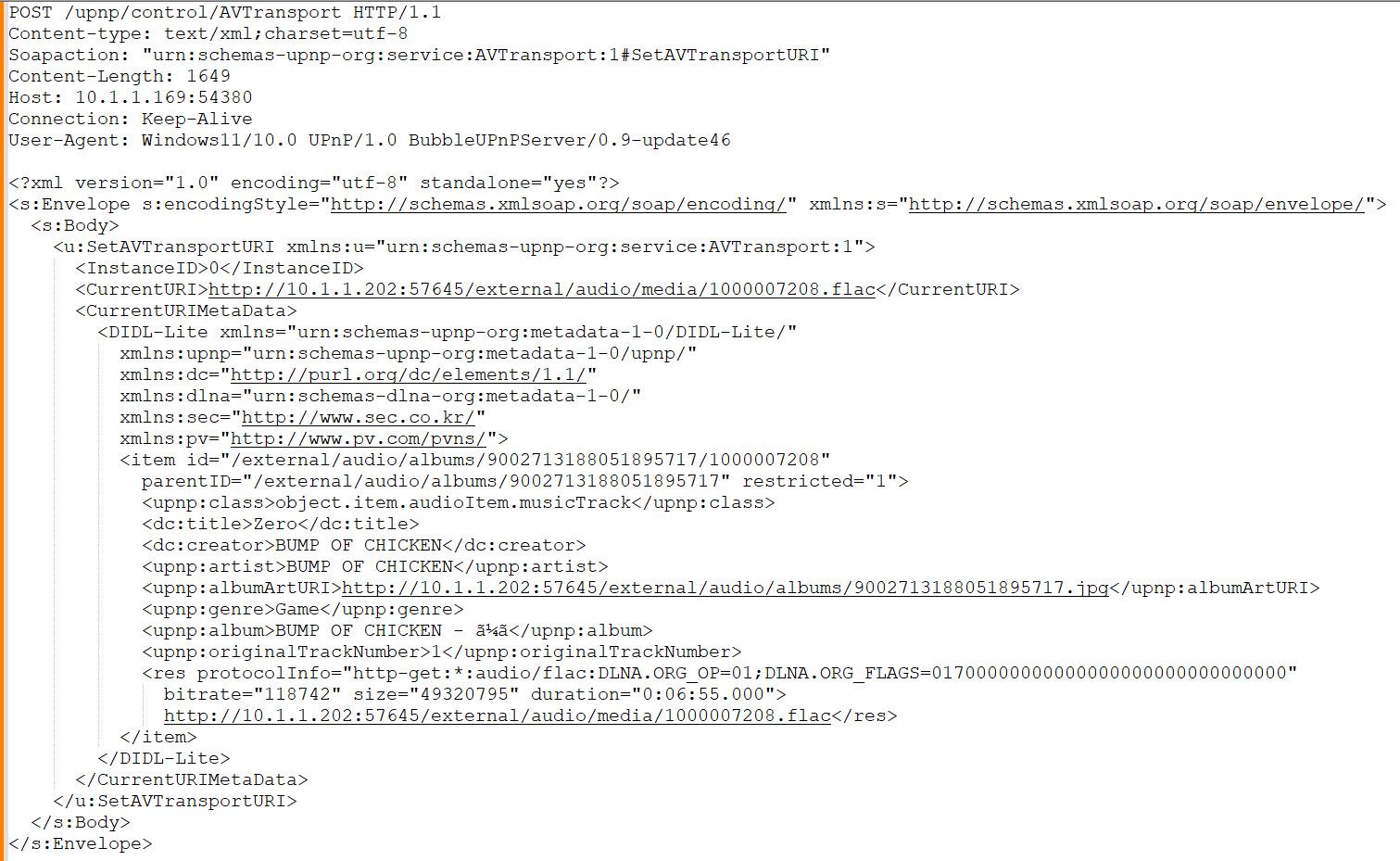
storaid参加者I installed and tested the BubbleUPnP Server.
Installing BubbleUPnP Client on Android phone is working well with the SONY A7000 to do music playback.
And I captured some packets to look at…
Its operation behavior is almost no different from Foobar2000 and Sony Music Center
Wireshark
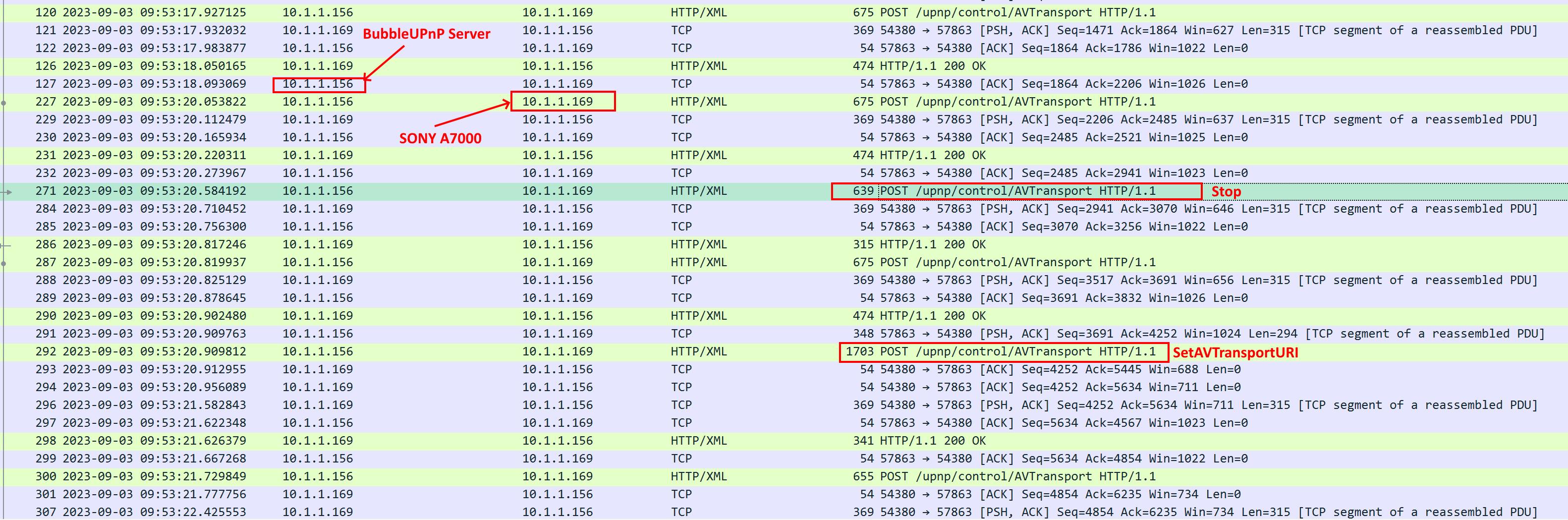
AVTransport:1#Stop
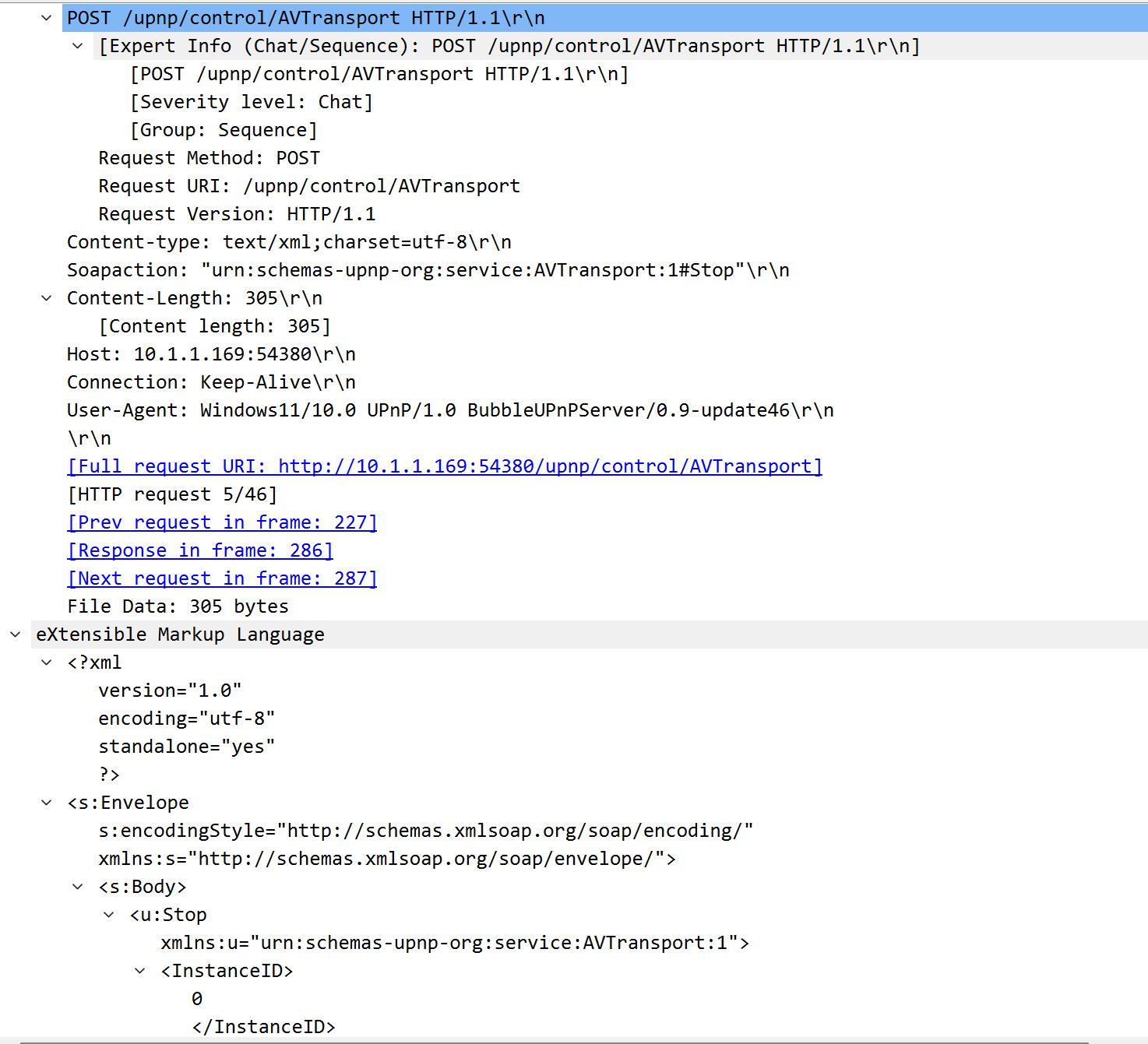
AVTransport:1#SetAVTransportURI
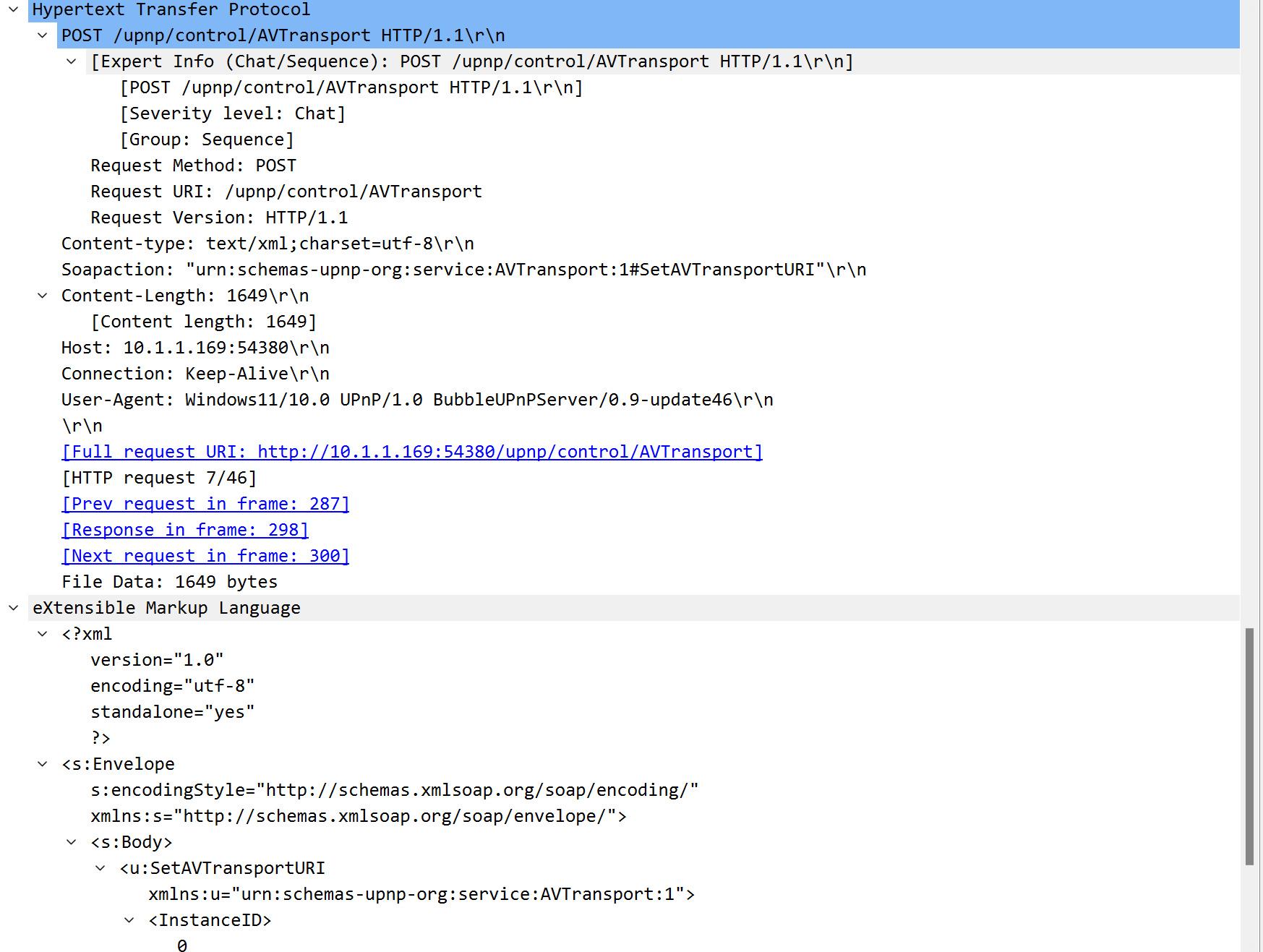
XML content of SetAVTransportURI request:
 storaid参加者
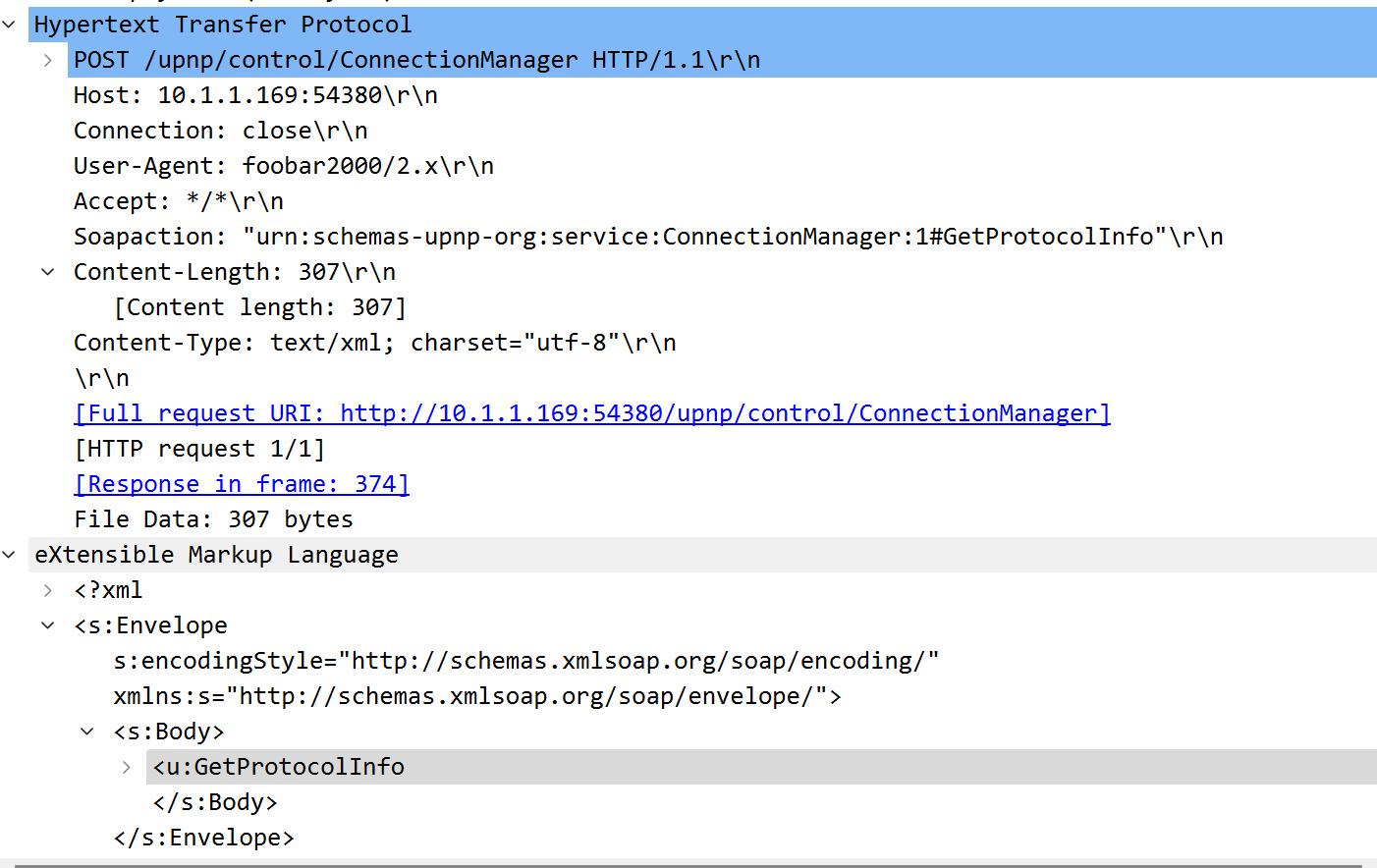
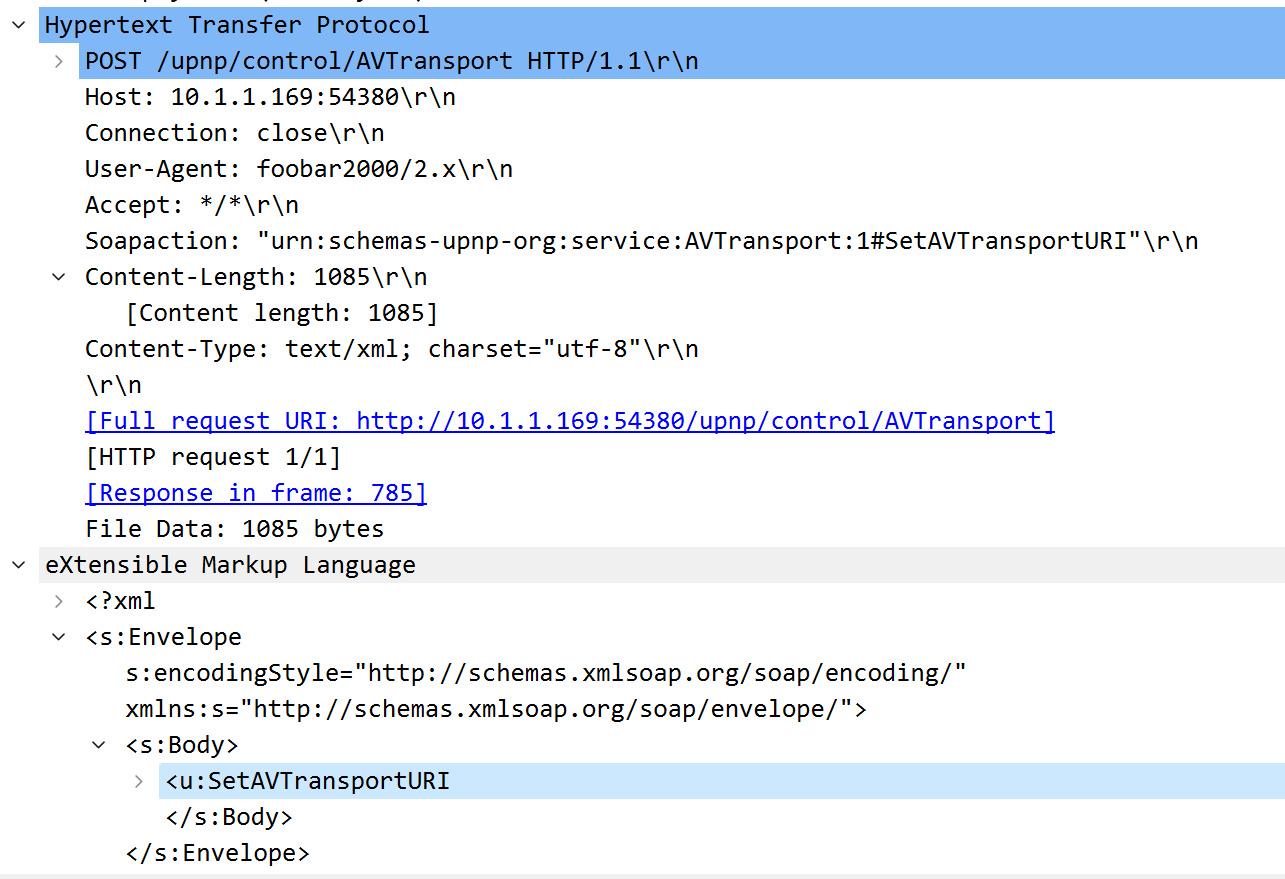
I captured the packets of Foobar2000 and Sony Music Center and did some comparisons.
They have two behaviors before calling SetAVTransportURI request for UPnP as follows…
AVTransport:1#Stop => ConnectionManager:1#GetProtocolInfo => [AVTransport:1#SetAVTransportURI]AVTransport:1#Stop
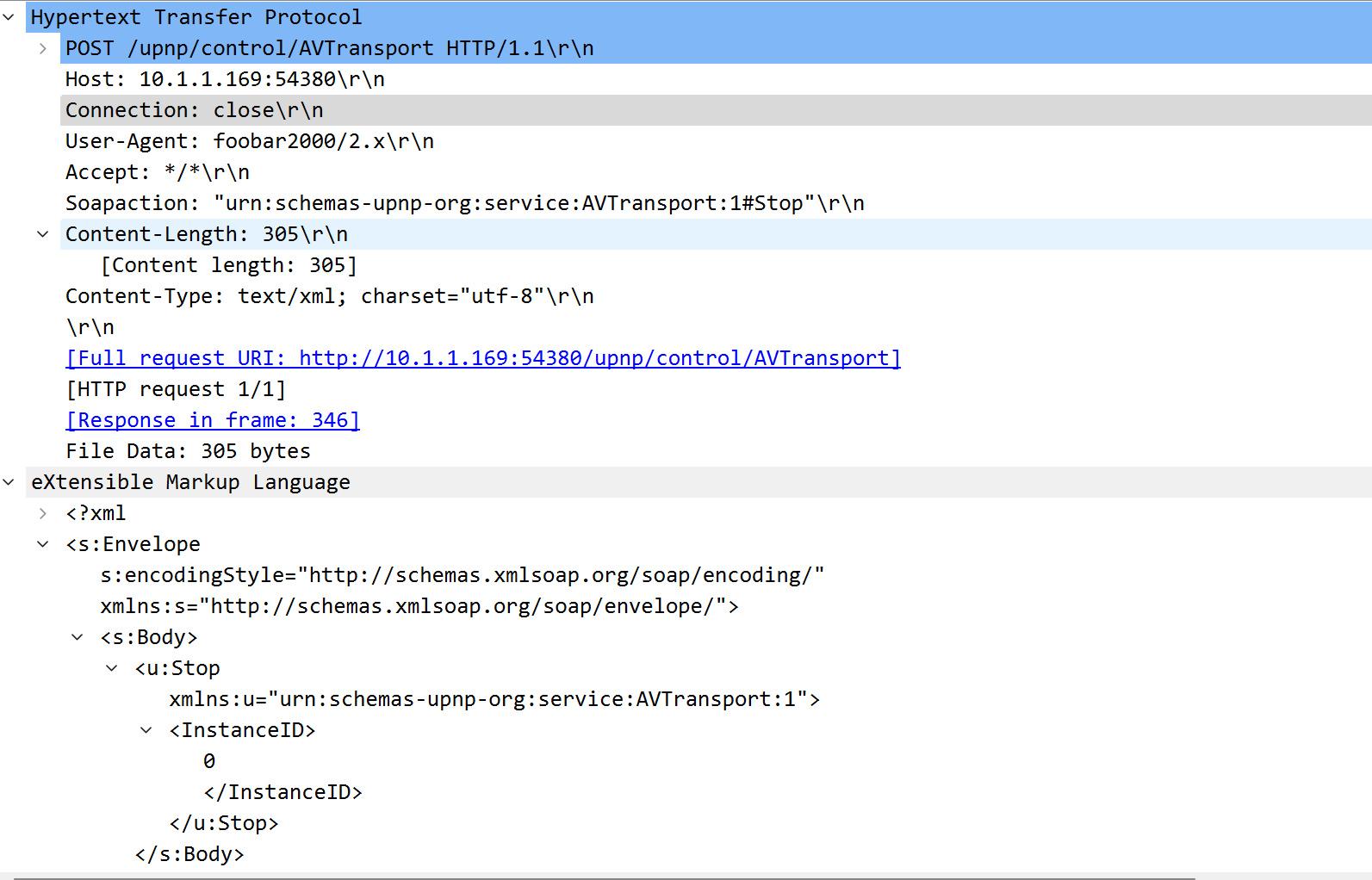
ConnectionManager:1#GetProtocolInfo
AVTransport:1#SetAVTransportURI
I looked up information about SONY’s operation of UPnP for devices on the internet:
The AVTransport:1#Stop command ensures that SONY devices avoid SetAVTransportURI requests returning 500 errors
I used Device Spy to do some testing, calling SetAVTransportURI on SONY devices never succeeded.
It returned the same error message as TuneBrowser player.I’m not sure, because I didn’t spend time coding for UPnP testing (this obviously requires coding to test)…
I just tested Foobar2000 and Sony Music Center, they both succeeded in playing music.
PS: Also they both added “User-Agent” information in the header, I don’t think it has any effect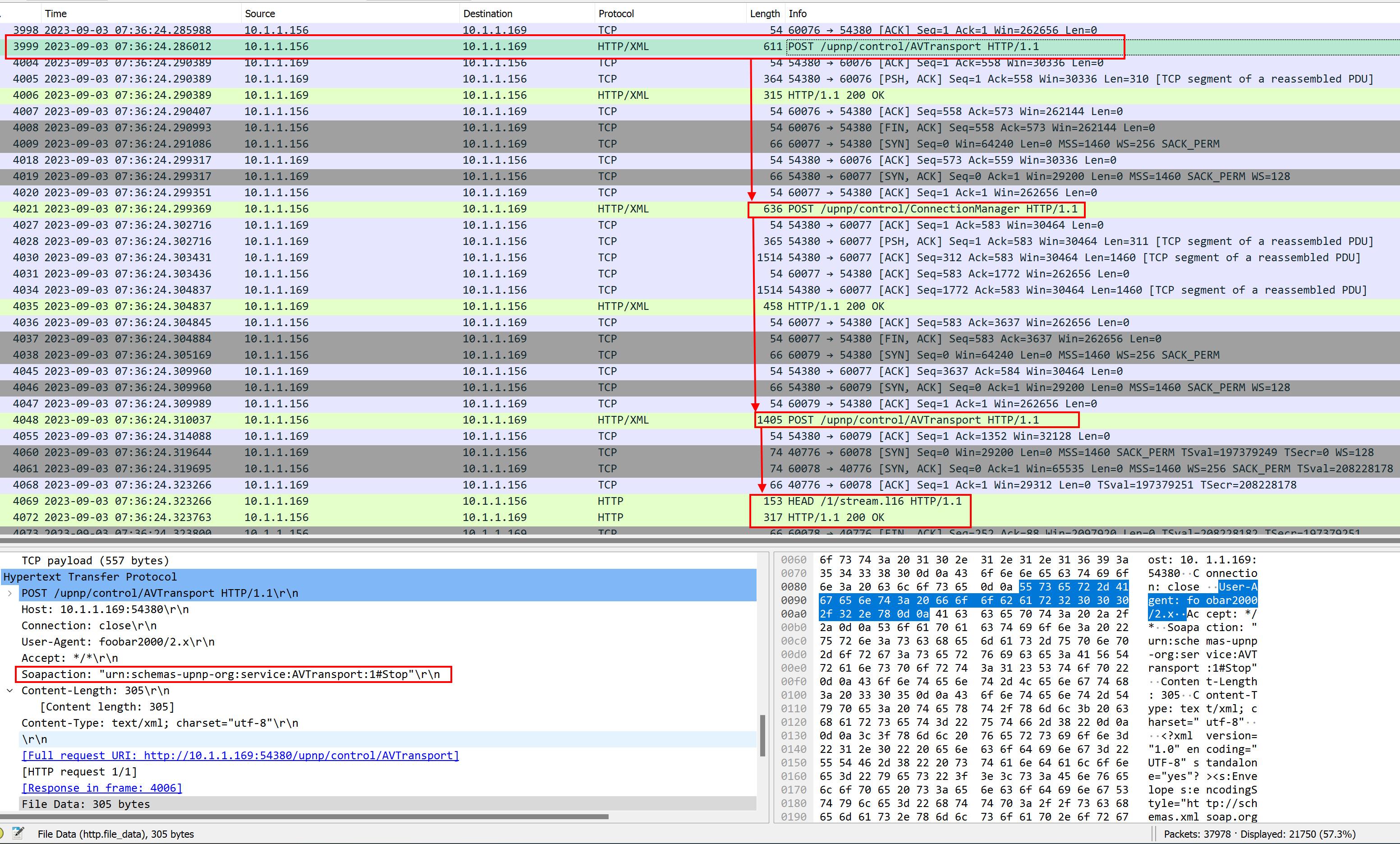 storaid参加者
Ok, I was wrong…
still sending SetAVTransportURI request was reject by HT-A7000
2023/09/03 00:42:52,531.742: T07c20: TL18: Set volume to device: 35 2023/09/03 00:42:52,532.005: T07c20: TL18: [SOAP Request]: SOAP request: [SetVolume] to [http://10.1.1.169:54380/upnp/control/RenderingControl] 2023/09/03 00:42:52,753.826: T07c20: TL18: [SOAP Request]: SOAP request: [SetVolume] finished. 2023/09/03 00:42:52,754.012: T07c20: TL18: Playback starts from the top. 2023/09/03 00:42:52,754.046: T07c20: TL18: Post PlayerNotify: 0009 [PlayStatus] 2023/09/03 00:42:52,754.068: T07c20: TL18: Post PlayerNotify: 7061 [PlaybackBegin] 2023/09/03 00:42:52,754.109: T07c20: TL18: PlayImpl: Doing SetAVTransportURI: AVTType::CurrTune 2023/09/03 00:42:52,754.137: T07c20: TL18: PlayImpl: CheckProxyStream: MimeType is supported by device: audio/flac 2023/09/03 00:42:52,754.148: T07c20: TL18: PlayImpl: CheckProxyStream: This is not Subsong. 2023/09/03 00:42:52,754.163: T07c20: TL18: PlayImpl: CheckProxyStream: User param: ProxyStreamT::Auto 2023/09/03 00:42:52,754.176: T07c20: TL18: PlayImpl: CheckProxyStream: ProxyStream is not needed. 2023/09/03 00:42:52,754.344: T07c20: TL18: [SetAVTransportURI]: File : [\\NAS1\music\[Hi-Res]TVアニメ「Re:ゼロから始める異世界生活」2nd Season 後期EDテーマ「Believe in you」/nonoc\01. Believe in you.flac] 2023/09/03 00:42:52,754.357: T07c20: TL18: [SetAVTransportURI]: URL : [http://10.1.1.156:10960/TuneID/00012513.flac] 2023/09/03 00:42:52,754.381: T07c20: TL18: [SetAVTransportURI]: <DIDL-Lite xmlns:upnp="urn:schemas-upnp-org:metadata-1-0/upnp/" xmlns:dc="http://purl.org/dc/elements/1.1/" xmlns:dlna="urn:schemas-dlna-org:metadata-1-0/" xmlns="urn:schemas-upnp-org:metadata-1-0/DIDL-Lite/"> 2023/09/03 00:42:52,754.392: T07c20: TL18: [SetAVTransportURI]: <item> 2023/09/03 00:42:52,754.403: T07c20: TL18: [SetAVTransportURI]: <res protocolInfo="http-get:*:audio/flac:*" duration="0:04:39.333" bitrate="1778377" bitsPerSample="24" nrAudioChannels="2" sampleFrequency="48000">http://10.1.1.156:10960/TuneID/00012513.flac</res> 2023/09/03 00:42:52,754.415: T07c20: TL18: [SetAVTransportURI]: <dc:title>Believe in you</dc:title> 2023/09/03 00:42:52,754.428: T07c20: TL18: [SetAVTransportURI]: <dc:date>2021</dc:date> 2023/09/03 00:42:52,754.445: T07c20: TL18: [SetAVTransportURI]: <dc:creator>nonoc</dc:creator> 2023/09/03 00:42:52,754.457: T07c20: TL18: [SetAVTransportURI]: <upnp:album>Believe in you</upnp:album> 2023/09/03 00:42:52,754.467: T07c20: TL18: [SetAVTransportURI]: <upnp:genre>Anime</upnp:genre> 2023/09/03 00:42:52,754.476: T07c20: TL18: [SetAVTransportURI]: <upnp:artist>nonoc</upnp:artist> 2023/09/03 00:42:52,754.488: T07c20: TL18: [SetAVTransportURI]: <upnp:originalTrackNumber>1</upnp:originalTrackNumber> 2023/09/03 00:42:52,754.498: T07c20: TL18: [SetAVTransportURI]: <upnp:albumArtURI>http://10.1.1.156:10960/Image/25230.c834c1f4-d99b-40f4-b1323d6a7175f54a.jpg</upnp:albumArtURI> 2023/09/03 00:42:52,754.510: T07c20: TL18: [SetAVTransportURI]: <upnp:class>object.item.audioItem.musicTrack</upnp:class> 2023/09/03 00:42:52,754.525: T07c20: TL18: [SetAVTransportURI]: </item> 2023/09/03 00:42:52,754.535: T07c20: TL18: [SetAVTransportURI]: </DIDL-Lite> 2023/09/03 00:42:52,755.009: T07c20: TL18: [SOAP Request]: SOAP request: [SetAVTransportURI] to [http://10.1.1.169:54380/upnp/control/AVTransport] 2023/09/03 00:42:52,757.552: T08034: TL18: Proc PlayerNotify: 0009 [PlayStatus] 2023/09/03 00:42:52,768.617: T08034: TL18: Proc PlayerNotify: 7061 [PlaybackBegin] 2023/09/03 00:42:52,824.545: T07c20: TL18: Error: [SOAP Request]: SOAP request: [SetAVTransportURI] was failed. 2023/09/03 00:42:52,824.552: T07c20: TL18: Error: [SOAP Request]: SOAP request received error: [500][Internal Server Error] 2023/09/03 00:42:52,824.624: T07c20: TL18: Error: [SetAVTransportURI]: Device did not accept current tune by SetAVTransportURI: [http://10.1.1.156:10960/TuneID/00012513.flac] 2023/09/03 00:42:52,824.647: T07c20: TL18: PlayImpl: ResubscribeAllEvent. 2023/09/03 00:42:52,824.653: T07c20: TL18: PlayImpl: UnsubscribeAllEvent. 2023/09/03 00:42:57,867.666: T07c20: TL18: PlayImpl: End Subscriber. 2023/09/03 00:42:57,867.684: T07c20: TL18: PlayImpl: Begin Subscriber. 2023/09/03 00:42:57,868.260: T07c20: TL18: PlayImpl: SubscribeAllEvent. 2023/09/03 00:42:57,897.291: T07c20: TL18: PlayImpl: ResubscribeAllEvent done. 2023/09/03 00:42:57,927.975: T07c20: TL18: PlayImpl: SyncActive: No 2023/09/03 00:42:57,927.984: T07c20: TL18: PlayImpl: Post Play. 2023/09/03 00:42:57,928.217: T07c20: TL18: [SOAP Request]: SOAP request: [Play] to [http://10.1.1.169:54380/upnp/control/AVTransport] 2023/09/03 00:42:57,993.603: T07c20: TL18: Error: [SOAP Request]: SOAP request: [Play] was failed. 2023/09/03 00:42:57,993.636: T07c20: TL18: Error: [SOAP Request]: SOAP request received error: [500][Internal Server Error] 2023/09/03 00:42:57,993.847: T07c20: TL18: Post PlayerNotify: 0009 [PlayStatus] 2023/09/03 00:42:57,993.872: T07c20: TL18: Error: Playback device error. Message: Playback device error. Version: 1702storaid参加者I think the possible problem is that when A7000 is in a state of being used as a WASAPI/ASIO device by Windows system…
It may be difficult to directly invoke SetAVTransportURI to set the music to play…
You may encounter the problem of the request being rejected (500Error)
Because I tried to install SONY Music Center and try to capture the packet content to check
The result is that it will only promptThe selected device is busy. Mask sure other PCs or devices are not playing for this deviceThe weird thing is, I use foobar2000 and can make A7000 automatically switch to N.NET to play music
This is what I don’t understand…I use Device Spy to send SetAVTransportURI requests to DENON or iFi other devices and they can get working well.
Only SONY’s A7000 can’t successfully execute playbackI made some comparisons based on the packet content(XML) of SetAVTransportURI, but I really can’t see any difference…
Maybe there may need to be some prompt messages for this kind of similar case…
For example, the prompt message I provided earlierThe selected device is busy. Mask sure other PCs or devices are not playing for this device.This is my thought.
storaid参加者Hello, Tiki
I checked the XML content of your SetAVTransportURI request using the UPnP protocol.
2023/09/02 18:23:40,464: UL10076: T08a94: TL18: [SetAVTransportURI]: <DIDL-Lite xmlns:upnp="urn:schemas-upnp-org:metadata-1-0/upnp/" xmlns:dc="http://purl.org/dc/elements/1.1/" xmlns:dlna="urn:schemas-dlna-org:metadata-1-0/" xmlns="urn:schemas-upnp-org:metadata-1-0/DIDL-Lite/">
2023/09/02 18:23:40,464: UL10078: T08a94: TL18: [SetAVTransportURI]: <item>
2023/09/02 18:23:40,464: UL10080: T08a94: TL18: [SetAVTransportURI]: <res protocolInfo="http-get:*:audio/mp3:*" duration="0:01:18.080" bitrate="293000" bitsPerSample="0" nrAudioChannels="2" sampleFrequency="44100">http://10.1.1.156:10960/TuneID/00014825.mp3</res>
2023/09/02 18:23:40,464: UL10082: T08a94: TL18: [SetAVTransportURI]: <dc:title>Fanfare</dc:title>
2023/09/02 18:23:40,464: UL10084: T08a94: TL18: [SetAVTransportURI]: <dc:date>2016</dc:date>
2023/09/02 18:23:40,464: UL10086: T08a94: TL18: [SetAVTransportURI]: <dc:creator>Sympathy Special Orchestra</dc:creator>
2023/09/02 18:23:40,464: UL10088: T08a94: TL18: [SetAVTransportURI]: <upnp:album>『PSO』シリーズ15周年記念コンサート「シンパシー2015」ライブメモリアルアルバム</upnp:album>
2023/09/02 18:23:40,464: UL10090: T08a94: TL18: [SetAVTransportURI]: <upnp:genre>Game</upnp:genre>
2023/09/02 18:23:40,464: UL10092: T08a94: TL18: [SetAVTransportURI]: <upnp:artist>Sympathy Special Orchestra</upnp:artist>
2023/09/02 18:23:40,464: UL10094: T08a94: TL18: [SetAVTransportURI]: <upnp:originalTrackNumber>1</upnp:originalTrackNumber>
2023/09/02 18:23:40,464: UL10096: T08a94: TL18: [SetAVTransportURI]: <upnp:albumArtURI>http://10.1.1.156:10960/Image/18320.8b8da04c-401c-4561-946425134dd95449.jpg</upnp:albumArtURI>
2023/09/02 18:23:40,464: UL10098: T08a94: TL18: [SetAVTransportURI]: <upnp:class>object.item.audioItem.musicTrack</upnp:class>
2023/09/02 18:23:40,464: UL10100: T08a94: TL18: [SetAVTransportURI]: </item>
2023/09/02 18:23:40,464: UL10102: T08a94: TL18: [SetAVTransportURI]: </DIDL-Lite>
I suspect that the SONY device rejected your request.
This may be a compatibility issue with the XML content you sent to the SONY device…
As a result, this caused a 500 Error on the A7000.
For testing purposes, the following XML content is successfully working with A7000:
<?xml version="1.0" encoding="utf-8"?>
<s:Envelope s:encodingStyle="http://schemas.xmlsoap.org/soap/encoding/" xmlns:s="http://schemas.xmlsoap.org/soap/envelope/">
<s:Body>
<u:SetAVTransportURI xmlns:u="urn:schemas-upnp-org:service:AVTransport:1">
<InstanceID>0</InstanceID>
<CurrentURI>http://10.1.1.156:58592/-1545749380/Sympathy%20Special%20Orchestra%20%20-%20%20Fanfare.mp3</CurrentURI>
<CurrentURIMetaData />
</u:SetAVTransportURI>
</s:Body>
</s:Envelope>
I think further research is needed on the compatibility issue
storaid参加者Hello, Tiki
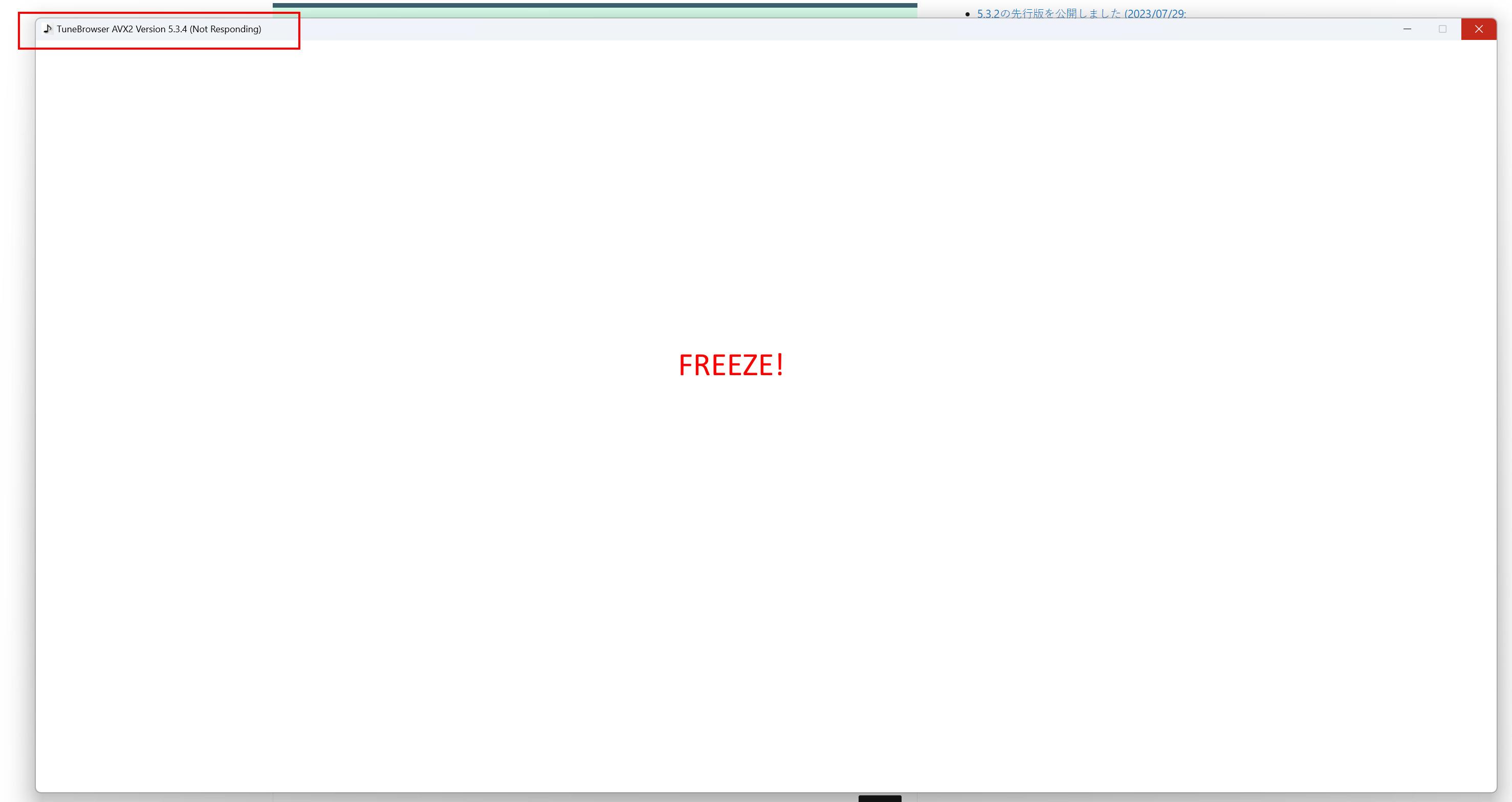
encountered an unknown crash..
sent a dump file to you…
thanks
storaid参加者Sometimes switching to another device will cause a crash..
 storaid参加者
SetAVTransportURI
2023/09/02 09:24:03,672: UL01844: T0572c: TL18: Current tune: [\\NAS1\music\[Hi-Res]5th Album「V」/SawanoHiroyuki[nZk]\02.FAKEit( feat.Laco).flac:0] 2023/09/02 09:24:03,673: UL01846: T0572c: TL18: Post PlayerNotify: 7008 [Update] 2023/09/02 09:24:03,673: UL01848: T0572c: TL18: Current tune adjusted to sequence position 1. 2023/09/02 09:24:03,673: UL01850: T0572c: TL18: Apply current seek value to player: 0.0 2023/09/02 09:24:03,677: UL01860: T0572c: TL18: Proc PlayerNotify: 7008 [Update] 2023/09/02 09:24:05,300: UL01875: T0572c: TL18: Requesting player command: [Play] 2023/09/02 09:24:05,301: UL01877: T0512c: TL18: Processing player command: [Play] 2023/09/02 09:24:05,301: UL01879: T0512c: TL18: Proc: [Play] 2023/09/02 09:24:05,301: UL01881: T0512c: TL18: Set volume to device: 35 2023/09/02 09:24:05,301: UL01883: T0512c: TL18: [SOAP Request]: SOAP request: [SetVolume] to [http://10.1.1.167:54380/upnp/control/RenderingControl] 2023/09/02 09:24:05,424: UL01885: T0512c: TL18: [SOAP Request]: SOAP request: [SetVolume] finished. 2023/09/02 09:24:05,424: UL01887: T0512c: TL18: Playback starts from the middle. 2023/09/02 09:24:05,424: UL01889: T0512c: TL18: Preparing fade. 2023/09/02 09:24:05,424: UL01891: T0512c: TL18: Fade out. 2023/09/02 09:24:05,424: UL01893: T0512c: TL18: Enter fade control. 2023/09/02 09:24:05,424: UL01895: T0512c: TL18: Post PlayerNotify: 7009 [PlaybackBegin] 2023/09/02 09:24:05,427: UL01897: T0572c: TL18: Proc PlayerNotify: 7009 [PlaybackBegin] 2023/09/02 09:24:05,466: UL01899: T0512c: TL18: PlayImpl: Doing SetAVTransportURI: AVTType::CurrTune 2023/09/02 09:24:05,466: UL01901: T0512c: TL18: PlayImpl: CheckProxyStream: MimeType is supported by device: audio/flac 2023/09/02 09:24:05,466: UL01903: T0512c: TL18: PlayImpl: CheckProxyStream: This is not Subsong. 2023/09/02 09:24:05,466: UL01905: T0512c: TL18: PlayImpl: CheckProxyStream: User param: ProxyStreamT::Auto 2023/09/02 09:24:05,466: UL01907: T0512c: TL18: PlayImpl: CheckProxyStream: ProxyStream is not needed. 2023/09/02 09:24:05,466: UL01909: T0512c: TL18: [SetAVTransportURI]: File : [\\NAS1\music\[Hi-Res]5th Album「V」/SawanoHiroyuki[nZk]\02.FAKEit( feat.Laco).flac] 2023/09/02 09:24:05,466: UL01911: T0512c: TL18: [SetAVTransportURI]: URL : [http://10.1.1.156:10960/TuneID/00016312.flac] 2023/09/02 09:24:05,466: UL01913: T0512c: TL18: [SetAVTransportURI]: <DIDL-Lite xmlns:upnp="urn:schemas-upnp-org:metadata-1-0/upnp/" xmlns:dc="http://purl.org/dc/elements/1.1/" xmlns:dlna="urn:schemas-dlna-org:metadata-1-0/" xmlns="urn:schemas-upnp-org:metadata-1-0/DIDL-Lite/"> 2023/09/02 09:24:05,466: UL01915: T0512c: TL18: [SetAVTransportURI]: <item> 2023/09/02 09:24:05,466: UL01917: T0512c: TL18: [SetAVTransportURI]: <res protocolInfo="http-get:*:audio/flac:*" duration="0:02:54.118" bitrate="3436038" bitsPerSample="24" nrAudioChannels="2" sampleFrequency="96000">http://10.1.1.156:10960/TuneID/00016312.flac</res> 2023/09/02 09:24:05,466: UL01919: T0512c: TL18: [SetAVTransportURI]: <dc:title>FAKEit( feat.Laco)</dc:title> 2023/09/02 09:24:05,466: UL01921: T0512c: TL18: [SetAVTransportURI]: <dc:creator>SawanoHiroyuki[nZk]</dc:creator> 2023/09/02 09:24:05,466: UL01923: T0512c: TL18: [SetAVTransportURI]: <upnp:originalDiscNumber>01</upnp:originalDiscNumber> 2023/09/02 09:24:05,466: UL01925: T0512c: TL18: [SetAVTransportURI]: <upnp:album>V</upnp:album> 2023/09/02 09:24:05,466: UL01927: T0512c: TL18: [SetAVTransportURI]: <upnp:artist>SawanoHiroyuki[nZk]</upnp:artist> 2023/09/02 09:24:05,466: UL01929: T0512c: TL18: [SetAVTransportURI]: <upnp:artist role="AlbumArtist">SawanoHiroyuki[nZk]</upnp:artist> 2023/09/02 09:24:05,466: UL01931: T0512c: TL18: [SetAVTransportURI]: <upnp:artist role="Composer">澤野 弘之</upnp:artist> 2023/09/02 09:24:05,466: UL01933: T0512c: TL18: [SetAVTransportURI]: <upnp:originalTrackNumber>2</upnp:originalTrackNumber> 2023/09/02 09:24:05,466: UL01935: T0512c: TL18: [SetAVTransportURI]: <upnp:albumArtURI>http://10.1.1.156:10960/Image/04202.a66d24c1-4b8a-4656-8aeb835ab0dd7257.jpg</upnp:albumArtURI> 2023/09/02 09:24:05,466: UL01937: T0512c: TL18: [SetAVTransportURI]: <upnp:class>object.item.audioItem.musicTrack</upnp:class> 2023/09/02 09:24:05,466: UL01939: T0512c: TL18: [SetAVTransportURI]: </item> 2023/09/02 09:24:05,466: UL01941: T0512c: TL18: [SetAVTransportURI]: </DIDL-Lite> 2023/09/02 09:24:05,467: UL01943: T0512c: TL18: [SOAP Request]: SOAP request: [SetAVTransportURI] to [http://10.1.1.167:54380/upnp/control/AVTransport] 2023/09/02 09:24:05,481: UL01944: T092e0: HTTP Server: [10.1.1.167 :44480]: Socket accepted. 2023/09/02 09:24:05,485: UL01946: T070b0: HTTP Server: [10.1.1.167 :44480]: Tune : 00016312.flac -> 2023/09/02 09:24:05,485: UL01947: T070b0: HTTP Server: [10.1.1.167 :44480]: Tune : \\NAS1\music\[Hi-Res]5th Album「V」/SawanoHiroyuki[nZk]\02.FAKEit( feat.Laco).flac <strong>2023/09/02 09:24:05,549: UL01949: T0512c: TL18: Error: [SOAP Request]: SOAP request: [SetAVTransportURI] was failed.</strong> <strong>2023/09/02 09:24:05,549: UL01951: T0512c: TL18: Error: [SOAP Request]: SOAP request received error: [500][Internal Server Error]</strong> <strong>2023/09/02 09:24:05,549: UL01953: T0512c: TL18: Error: [SetAVTransportURI]: Device did not accept current tune by SetAVTransportURI: [http://10.1.1.156:10960/TuneID/00016312.flac]</strong> 2023/09/02 09:24:05,549: UL01955: T0512c: TL18: PlayImpl: ResubscribeAllEvent. 2023/09/02 09:24:05,549: UL01957: T0512c: TL18: PlayImpl: UnsubscribeAllEvent. 2023/09/02 09:24:05,549: UL01958: T0512c: UnsubscribeEvent: http://10.1.1.167:54380/upnp/event/AVTransport 2023/09/02 09:24:05,557: UL01959: T0512c: UnsubscribeEvent: http://10.1.1.167:54380/upnp/event/ConnectionManager 2023/09/02 09:24:05,567: UL01960: T0512c: UnsubscribeEvent: http://10.1.1.167:54380/upnp/event/RenderingControl 2023/09/02 09:24:05,577: UL01962: T0512c: TL18: PlayImpl: End Subscriber.storaid参加者Hi, Tiki
something I don’t know unexpected state happened
I have sent a dump file to you
storaid参加者I looked at the packet content with the Wireshark
There was no problem with RST packets like DENON devices
I just see a 500 Internal Error error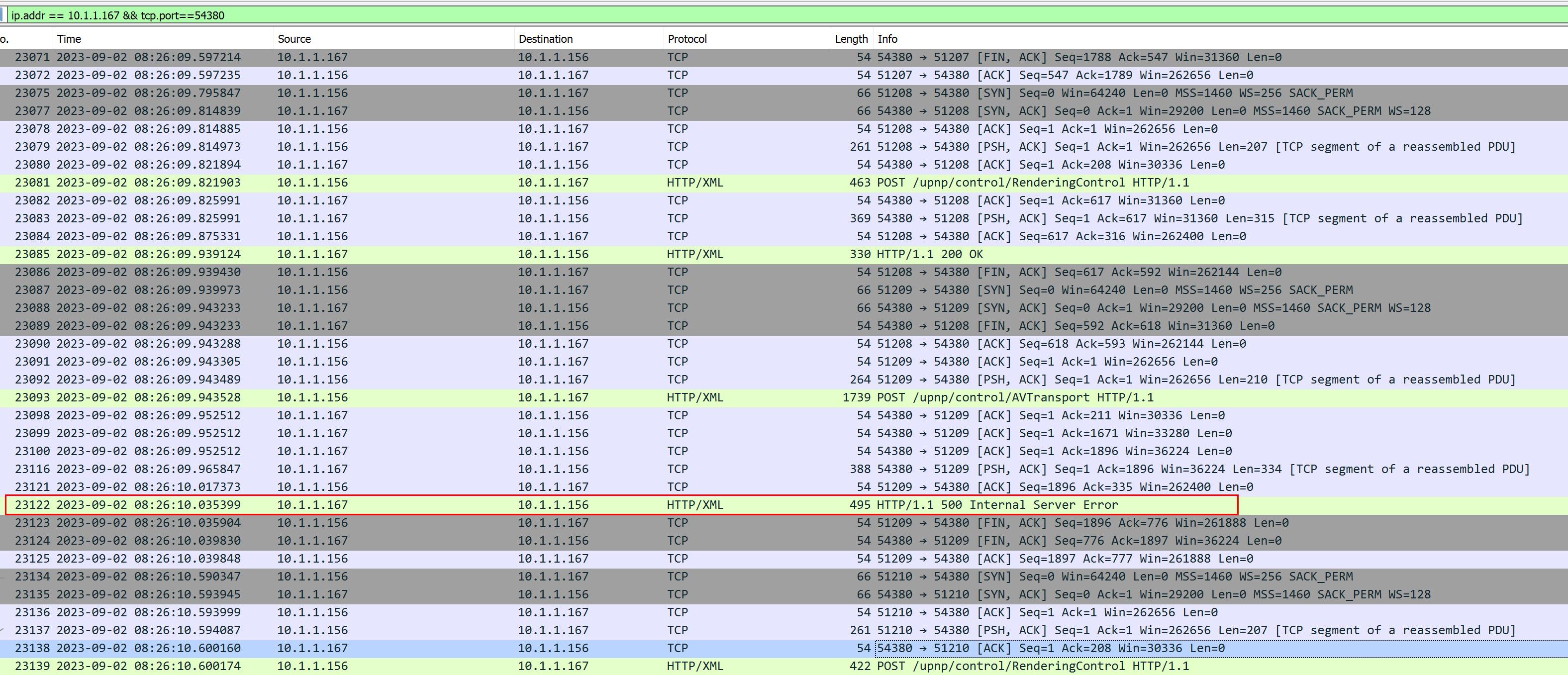 storaid参加者
Thanks, Tiki…
It looks like the crash problem has been solved
But the strange thing is that A7000 did not automatically switch to [Home Network] “H.NET” service screen and start playing music as expected
I tested Foobar2000, A7000 can switch to [Home Network] “H.NET” service and play music normally2023/09/02 08:09:16,579: UL10693: T04028: TL18: [SOAP Request]: SOAP request: [GetVolume] to [http://10.1.1.167:54380/upnp/control/RenderingControl] 2023/09/02 08:09:16,775: UL10695: T04028: TL18: [SOAP Request]: SOAP request: [GetVolume] finished. 2023/09/02 08:09:16,775: UL10697: T04028: TL18: [SOAP Request]: SOAP request: [GetTransportInfo] to [http://10.1.1.167:54380/upnp/control/AVTransport] 2023/09/02 08:09:16,838: UL10699: T04028: TL18: [SOAP Request]: SOAP request: [GetTransportInfo] finished. 2023/09/02 08:09:16,839: UL10701: T04028: TL18: [SOAP Request]: SOAP request: [GetPositionInfo] to [http://10.1.1.167:54380/upnp/control/AVTransport] 2023/09/02 08:09:16,855: UL10703: T04028: TL18: [SOAP Request]: SOAP request: [GetPositionInfo] finished. 2023/09/02 08:09:17,055: UL10705: T04028: TL18: PlayImpl: Detected timeout while waiting for event. 2023/09/02 08:09:17,055: UL10707: T04028: TL18: PlayImpl: Preparing next tune by SetNextAVTransportURI. 2023/09/02 08:09:17,055: UL10709: T04028: TL18: PlayImpl: Next tune sequence position 1 -> 2. 2023/09/02 08:09:17,055: UL10711: T04028: TL18: PlayImpl: This device is supporting SetNextAVTransportURI. 2023/09/02 08:09:17,055: UL10713: T04028: TL18: PlayImpl: Procedure has been done. 2023/09/02 08:09:17,055: UL10715: T08338: TL18: [UPP_TransCThread]: Doing SetAVTransportURI: AVTType::NextTune 2023/09/02 08:09:17,055: UL10717: T04028: TL18: Fade in. 2023/09/02 08:09:17,055: UL10719: T08338: TL18: [UPP_TransCThread]: CheckProxyStream: MimeType is supported by device: audio/flac 2023/09/02 08:09:17,055: UL10721: T08338: TL18: [UPP_TransCThread]: CheckProxyStream: This is not Subsong. 2023/09/02 08:09:17,055: UL10723: T04028: TL18: Set volume to device: 35 2023/09/02 08:09:17,055: UL10725: T08338: TL18: [UPP_TransCThread]: CheckProxyStream: User param: ProxyStreamT::Auto 2023/09/02 08:09:17,055: UL10727: T08338: TL18: [UPP_TransCThread]: CheckProxyStream: ProxyStream is not needed. 2023/09/02 08:09:17,055: UL10729: T04028: TL18: [SOAP Request]: SOAP request: [SetVolume] to [http://10.1.1.167:54380/upnp/control/RenderingControl] 2023/09/02 08:09:17,059: UL10731: T08338: TL18: [SetNextAVTransportURI]: File : [\\NAS1\music\[Hi-Res]5th Album「V」/SawanoHiroyuki[nZk]\03.LEMONADE( feat.XAI).flac] 2023/09/02 08:09:17,059: UL10733: T08338: TL18: [SetNextAVTransportURI]: URL : [http://10.1.1.156:10960/TuneID/00016313.flac] 2023/09/02 08:09:17,059: UL10735: T08338: TL18: [SetNextAVTransportURI]: <DIDL-Lite xmlns:upnp="urn:schemas-upnp-org:metadata-1-0/upnp/" xmlns:dc="http://purl.org/dc/elements/1.1/" xmlns:dlna="urn:schemas-dlna-org:metadata-1-0/" xmlns="urn:schemas-upnp-org:metadata-1-0/DIDL-Lite/"> 2023/09/02 08:09:17,059: UL10737: T08338: TL18: [SetNextAVTransportURI]: <item> 2023/09/02 08:09:17,059: UL10739: T08338: TL18: [SetNextAVTransportURI]: <res protocolInfo="http-get:*:audio/flac:*" duration="0:02:48.633" bitrate="3376337" bitsPerSample="24" nrAudioChannels="2" sampleFrequency="96000">http://10.1.1.156:10960/TuneID/00016313.flac</res> 2023/09/02 08:09:17,059: UL10741: T08338: TL18: [SetNextAVTransportURI]: <dc:title>LEMONADE( feat.XAI)</dc:title> 2023/09/02 08:09:17,059: UL10743: T08338: TL18: [SetNextAVTransportURI]: <dc:creator>SawanoHiroyuki[nZk]</dc:creator> 2023/09/02 08:09:17,059: UL10745: T08338: TL18: [SetNextAVTransportURI]: <upnp:originalDiscNumber>01</upnp:originalDiscNumber> 2023/09/02 08:09:17,059: UL10747: T08338: TL18: [SetNextAVTransportURI]: <upnp:album>V</upnp:album> 2023/09/02 08:09:17,059: UL10749: T08338: TL18: [SetNextAVTransportURI]: <upnp:artist>SawanoHiroyuki[nZk]</upnp:artist> 2023/09/02 08:09:17,059: UL10751: T08338: TL18: [SetNextAVTransportURI]: <upnp:artist role="AlbumArtist">SawanoHiroyuki[nZk]</upnp:artist> 2023/09/02 08:09:17,059: UL10753: T08338: TL18: [SetNextAVTransportURI]: <upnp:artist role="Composer">澤野 弘之</upnp:artist> 2023/09/02 08:09:17,059: UL10755: T08338: TL18: [SetNextAVTransportURI]: <upnp:originalTrackNumber>3</upnp:originalTrackNumber> 2023/09/02 08:09:17,059: UL10757: T08338: TL18: [SetNextAVTransportURI]: <upnp:albumArtURI>http://10.1.1.156:10960/Image/04203.137f06c9-5d69-42cb-a269c964faa31816.jpg</upnp:albumArtURI> 2023/09/02 08:09:17,059: UL10759: T08338: TL18: [SetNextAVTransportURI]: <upnp:class>object.item.audioItem.musicTrack</upnp:class> 2023/09/02 08:09:17,059: UL10761: T08338: TL18: [SetNextAVTransportURI]: </item> 2023/09/02 08:09:17,059: UL10763: T08338: TL18: [SetNextAVTransportURI]: </DIDL-Lite> 2023/09/02 08:09:17,161: UL10765: T04028: TL18: [SOAP Request]: SOAP request: [SetVolume] finished. 2023/09/02 08:09:17,161: UL10767: T08338: TL18: [SOAP Request]: SOAP request: [SetNextAVTransportURI] to [http://10.1.1.167:54380/upnp/control/AVTransport] 2023/09/02 08:09:17,161: UL10769: T04028: TL18: Clear fade control. 2023/09/02 08:09:17,161: UL10771: T04028: TL18: Post PlayerNotify: 7035 [Update] 2023/09/02 08:09:17,167: UL10773: T05120: TL18: Proc PlayerNotify: 7035 [Update] 2023/09/02 08:09:17,186: UL10774: T00e30: HTTP Server: [10.1.1.167 :37844]: Socket accepted. 2023/09/02 08:09:17,186: UL10775: T04334: HTTP Server: [10.1.1.167 :37844]: Tune : 00016313.flac -> 2023/09/02 08:09:17,186: UL10776: T04334: HTTP Server: [10.1.1.167 :37844]: Tune : \\NAS1\music\[Hi-Res]5th Album「V」/SawanoHiroyuki[nZk]\03.LEMONADE( feat.XAI).flac 2023/09/02 08:09:17,253: UL10778: T08338: TL18: Error: [SOAP Request]: SOAP request: [SetNextAVTransportURI] was failed. 2023/09/02 08:09:17,253: UL10780: T08338: TL18: Error: [SOAP Request]: SOAP request received error: [500][Internal Server Error] 2023/09/02 08:09:17,253: UL10782: T08338: TL18: Error: [SetNextAVTransportURI]: Device did not accept next tune by SetNextAVTransportURI: [http://10.1.1.156:10960/TuneID/00016313.flac] 2023/09/02 08:09:18,039: UL10784: T07ce8: TL18: [SOAP Request]: SOAP request: [GetVolume] to [http://10.1.1.167:54380/upnp/control/RenderingControl] 2023/09/02 08:09:18,164: UL10786: T07ce8: TL18: [SOAP Request]: SOAP request: [GetVolume] finished. 2023/09/02 08:09:18,165: UL10788: T07ce8: TL18: [SOAP Request]: SOAP request: [GetTransportInfo] to [http://10.1.1.167:54380/upnp/control/AVTransport] 2023/09/02 08:09:18,240: UL10790: T07ce8: TL18: [SOAP Request]: SOAP request: [GetTransportInfo] finished. 2023/09/02 08:09:18,240: UL10792: T07ce8: TL18: [SOAP Request]: SOAP request: [GetPositionInfo] to [http://10.1.1.167:54380/upnp/control/AVTransport] 2023/09/02 08:09:18,258: UL10794: T07ce8: TL18: [SOAP Request]: SOAP request: [GetPositionInfo] finished.From the log content, it seems to have a similar “skip track issue” problem.
The track I requested is not the track shown in the log content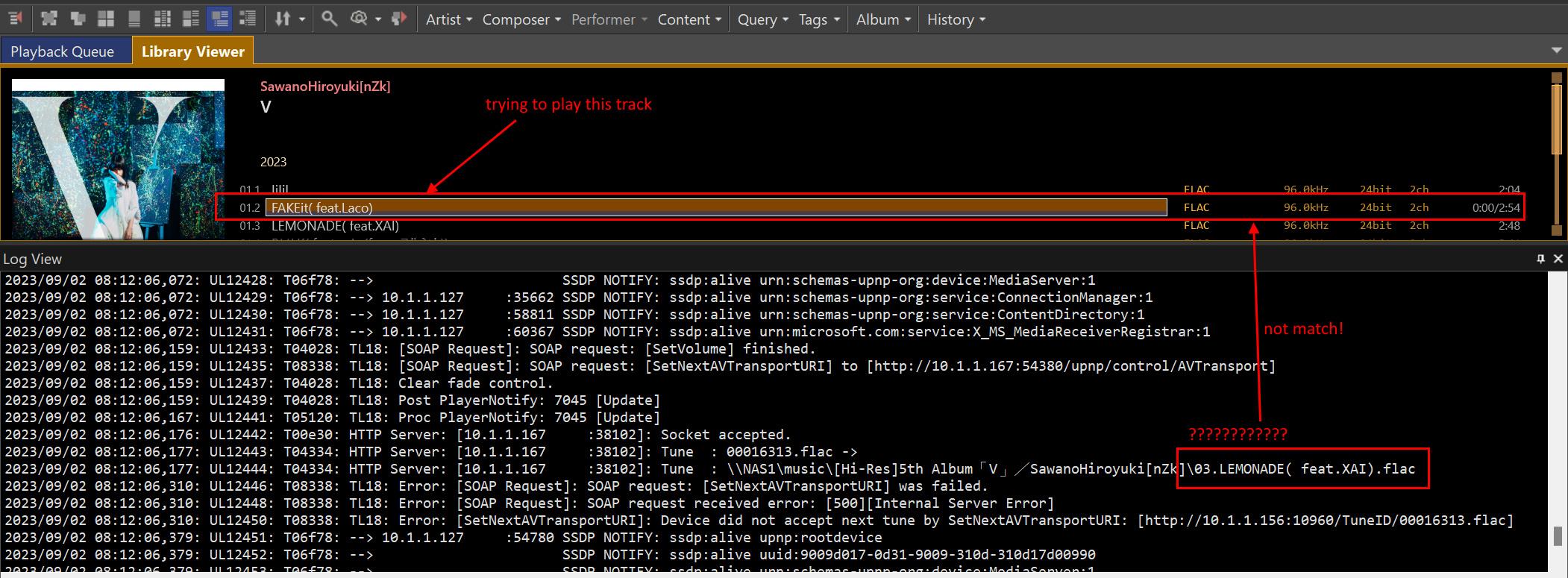 2023-09-01 00:02 返信先: obvious background noise occurs when playing DSD file using ASIO(Creative) #14148storaid参加者
Hello, Tiki
that’s my idea…
Can you compile newer versions of the libdsdpcm and libdstdec components?
I want to try if Creative ASIO can play DSD format files normally…
storaid参加者Tiki,
dump file has been sent..
storaid参加者Hello, Tiki
I have sent a dump file to you…
thanks
2023-08-30 19:18 返信先: obvious background noise occurs when playing DSD file using ASIO(Creative) #14134storaid参加者After a very long time..
Here is the response with Creative support:
Thank you for your patience with us.
Regarding your inquiry, we have tested TuneBrowser 3.5.2 without any issues. Hence, it could be due to compatibility.
I don’t know how did they get that very old version…
storaid参加者Hello, Tiki
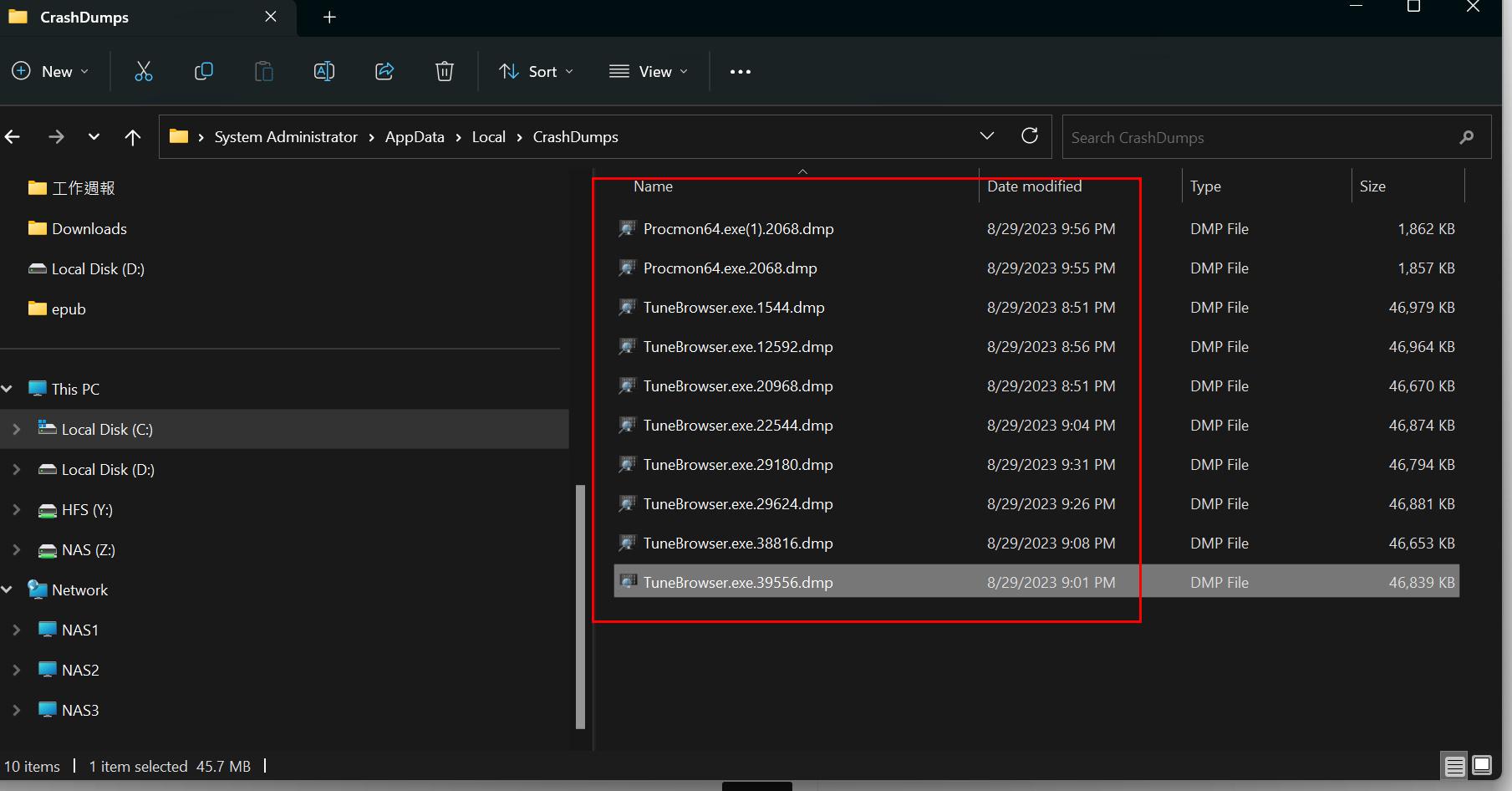
I saw generated several dmp files by the system. I don’t know if it’s helpful to you.
Because it usually needs to be used with WinDbg to assist in debugging your code.
 storaid参加者
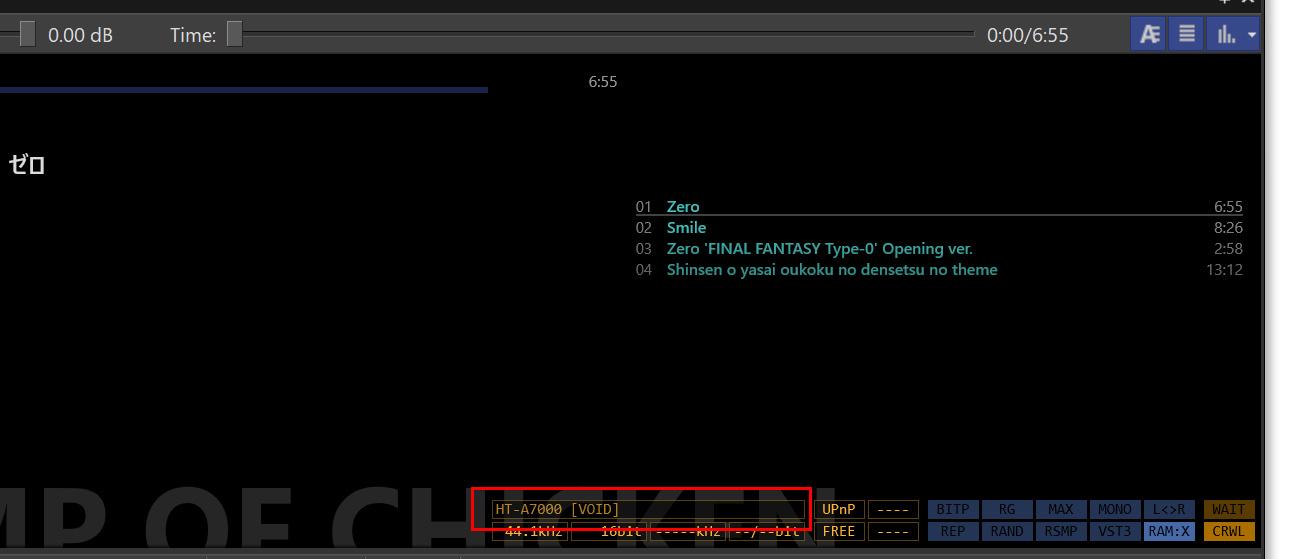
Hello, Tiki.
Can I generate a dump file and send it to you in this state?
 storaid参加者
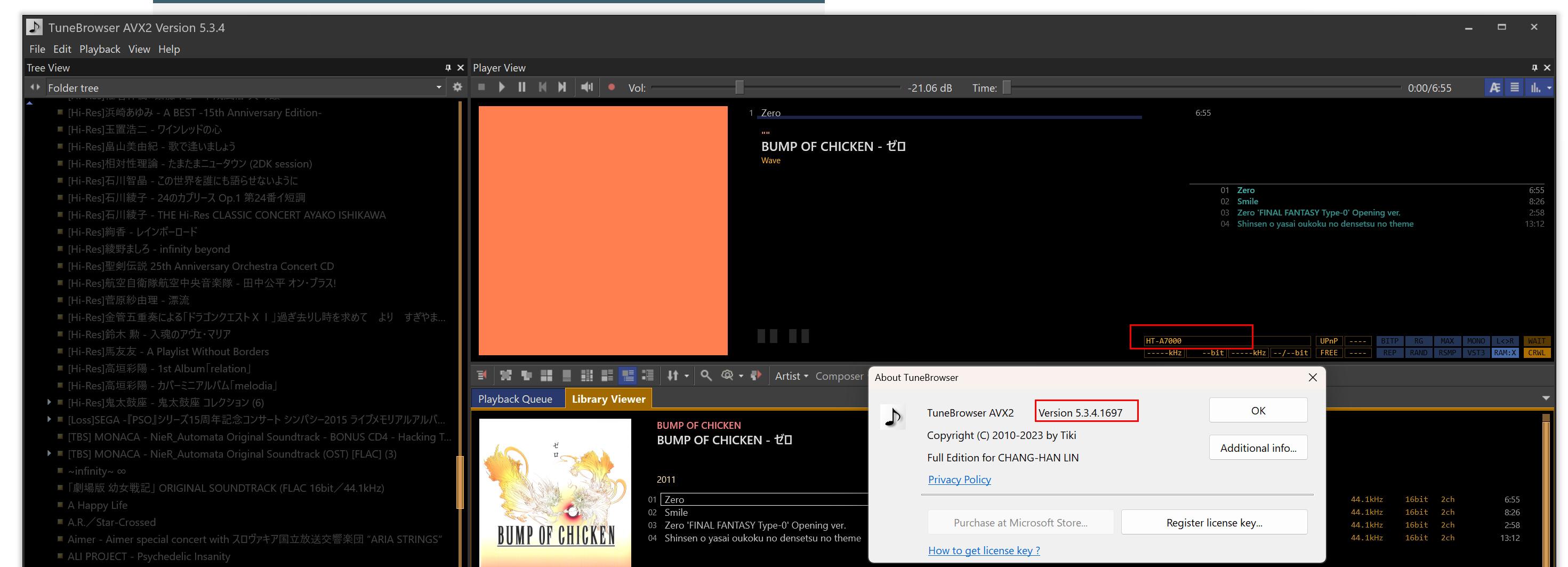
Hello, Tiki
Just now I tested v1697, no crash happened on the selected HT-A7000 device…
It’s working…
 storaid参加者
Ok, Tiki
but how can I find these dumpfile(s)???
storaid参加者Hello, Tiki
How can I check the dumpfile if it’s existed???
storaid参加者Hello, Tiki
After checking my network environment again today and verifying my Synology Audio Station settings, I conducted another test.
It seems that under the UPnP protocol, the HT-A7000 works well with Synology Audio Station.
2023-08-29T19:14:52+08:00 NAS1 synoaudiod[22511]: upnp.cpp:425
2023-08-29T19:14:52+08:00 NAS1 synoaudiod[22511]: upnp.cpp:426 Control Complete from URL [http://10.1.1.167:54380/upnp/control/AVTransport]
2023-08-29T19:14:52+08:00 NAS1 synoaudiod[22511]: upnp.cpp:280 TrackDuration [0:00:00][0]
2023-08-29T19:14:52+08:00 NAS1 synoaudiod[22511]: upnp.cpp:290 RelTime [0:00:00][0]
2023-08-29T19:14:52+08:00 NAS1 synoaudiod[22511]: upnp.cpp:425
2023-08-29T19:14:52+08:00 NAS1 synoaudiod[22511]: upnp.cpp:426 Control Complete from URL [http://10.1.1.167:54380/upnp/control/AVTransport]
2023-08-29T19:14:52+08:00 NAS1 synoaudiod[22511]: upnp.cpp:311 [HT-A7000] GetTransportInfoResponse [TransportState] = PLAYING
2023-08-29T19:14:52+08:00 NAS1 synoaudiod[22511]: upnp.cpp:425
2023-08-29T19:14:52+08:00 NAS1 synoaudiod[22511]: upnp.cpp:426 Control Complete from URL [http://10.1.1.167:54380/upnp/control/RenderingControl]
2023-08-29T19:14:52+08:00 NAS1 synoaudiod[22511]: upnp.cpp:332 [HT-A7000] GetVolumeResponse [CurrentVolume] = 35
This does not appear to be a bug with the HT-A7000.
Both Foobar2000 and Synology Audio Station can successfully play music on the HT-A7000 device.
I have confirmed this many times…storaid参加者I have a basic question. Which crashes, TuneBrowser or HT-A7000?
Hello, Tiki
it’s TuneBrowser crash
storaid参加者I’m trying to use Device Spy to invoke this GetProductIInfo method…
I don’t pass in any parameters, and the results will return the following supported audio formats:http-get:*:audio/L16:DLNA.ORG_PN=LPCM;DLNA.ORG_FLAGS=9d300000000000000000000000000000, http-get:*:audio/mpeg:DLNA.ORG_PN=MP3;DLNA.ORG_FLAGS=9d300000000000000000000000000000, http-get:*:audio/mpeg:DLNA.ORG_PN=MP3X;DLNA.ORG_FLAGS=9d300000000000000000000000000000, http-get:*:audio/x-ms-wma:DLNA.ORG_PN=WMABASE;DLNA.ORG_FLAGS=9d300000000000000000000000000000, http-get:*:audio/x-ms-wma:DLNA.ORG_PN=WMAFULL;DLNA.ORG_FLAGS=9d300000000000000000000000000000, http-get:*:audio/vnd.dlna.adts:DLNA.ORG_PN=AAC_ADTS;DLNA.ORG_FLAGS=9d300000000000000000000000000000, http-get:*:audio/vnd.dlna.adts:DLNA.ORG_PN=AAC_ADTS_192;DLNA.ORG_FLAGS=9d300000000000000000000000000000, http-get:*:audio/vnd.dlna.adts:DLNA.ORG_PN=AAC_ADTS_320;DLNA.ORG_FLAGS=9d300000000000000000000000000000, http-get:*:audio/mp4:DLNA.ORG_PN=AAC_ISO;DLNA.ORG_FLAGS=9d300000000000000000000000000000, http-get:*:audio/3gpp:DLNA.ORG_PN=AAC_ISO;DLNA.ORG_FLAGS=9d300000000000000000000000000000, http-get:*:audio/mp4:DLNA.ORG_PN=AAC_ISO_192;DLNA.ORG_FLAGS=9d300000000000000000000000000000, http-get:*:audio/3gpp:DLNA.ORG_PN=AAC_ISO_192;DLNA.ORG_FLAGS=9d300000000000000000000000000000, http-get:*:audio/mp4:DLNA.ORG_PN=AAC_ISO_320;DLNA.ORG_FLAGS=9d300000000000000000000000000000, http-get:*:audio/3gpp:DLNA.ORG_PN=AAC_ISO_320;DLNA.ORG_FLAGS=9d300000000000000000000000000000, http-get:*:audio/vnd.dlna.adts:DLNA.ORG_PN=AAC_MULT5_ADTS;DLNA.ORG_FLAGS=9d700000000000000000000000000000, http-get:*:audio/mp4:DLNA.ORG_PN=AAC_MULT5_ISO;DLNA.ORG_FLAGS=9d700000000000000000000000000000, http-get:*:audio/3gpp:DLNA.ORG_PN=AAC_MULT5_ISO;DLNA.ORG_FLAGS=9d700000000000000000000000000000, http-get:*:audio/vnd.dlna.adts:DLNA.ORG_PN=HEAAC_L2_ADTS;DLNA.ORG_FLAGS=9d300000000000000000000000000000, http-get:*:audio/mp4:DLNA.ORG_PN=HEAAC_L2_ISO;DLNA.ORG_FLAGS=9d300000000000000000000000000000, http-get:*:audio/3gpp:DLNA.ORG_PN=HEAAC_L2_ISO;DLNA.ORG_FLAGS=9d300000000000000000000000000000, http-get:*:audio/vnd.dlna.adts:DLNA.ORG_PN=HEAAC_L2_ADTS_320;DLNA.ORG_FLAGS=9d300000000000000000000000000000, http-get:*:audio/mp4:DLNA.ORG_PN=HEAAC_L2_ISO_320;DLNA.ORG_FLAGS=9d300000000000000000000000000000, http-get:*:audio/3gpp:DLNA.ORG_PN=HEAAC_L2_ISO_320;DLNA.ORG_FLAGS=9d300000000000000000000000000000, http-get:*:audio/mp4:DLNA.ORG_PN=HEAAC_L2_ISO_128;DLNA.ORG_FLAGS=9d300000000000000000000000000000, http-get:*:audio/3gpp:DLNA.ORG_PN=HEAAC_L2_ISO_128;DLNA.ORG_FLAGS=9d300000000000000000000000000000, http-get:*:audio/mpeg:*, http-get:*:audio/L16:*, http-get:*:audio/wav:*, http-get:*:audio/x-wav:*, http-get:*:audio/x-ms-wma:*, http-get:*:audio/mp4:*, http-get:*:audio/3gpp:*, http-get:*:audio/vnd.dlna.adts:*, http-get:*:audio/flac:*, http-get:*:audio/x-flac:*, http-get:*:audio/aiff:*, http-get:*:audio/x-aiff:*, http-get:*:audio/aif:*, http-get:*:audio/x-aif:*, http-get:*:audio/m4a:*, http-get:*:audio/x-m4a:*, http-get:*:audio/x-alac:*, http-get:*:audio/ogg:*, http-get:*:audio/x-ogg:*, http-get:*:audio/x-monkeys-audio:*, http-get:*:audio/ape:*, http-get:*:audio/x-ape:*, http-get:*:audio/dsd:*, http-get:*:audio/x-dsd:*I’m not sure if there is some content that causes the exception to occur?
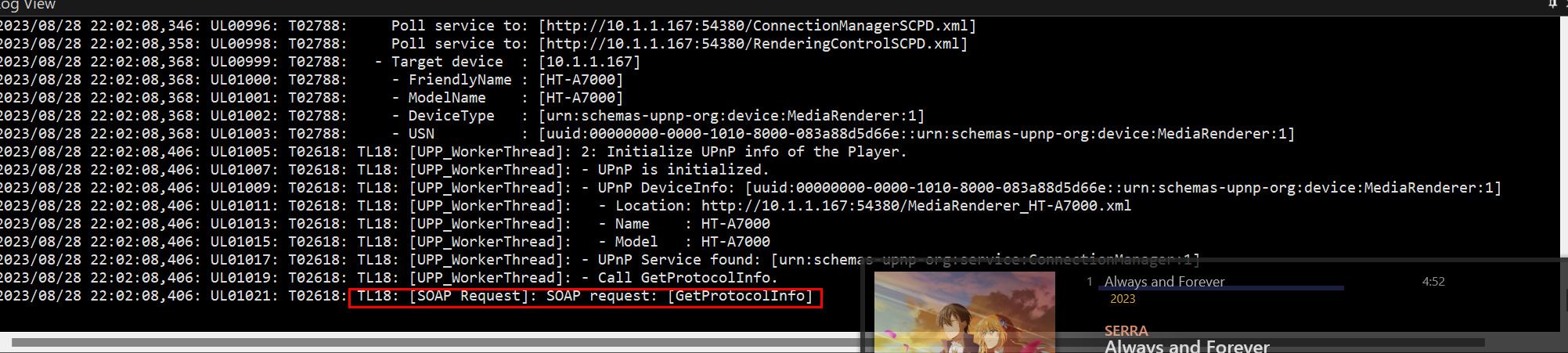
storaid参加者Hello, Tiki..
From the log provided by TuneBrowser, it seems that an unexpected program crash occurred during a SOAP request process.
 storaid参加者
terrible Sony support as I expect
No tech support via E-mail…
live chat is sucks…
US, Canada…Orz…I just contacted JP Sony support by E-mail
I don’t expect a proper response at all, like Creative support…
I’ve posted my question to AVSForum..
storaid参加者I just tested it with foobar2000 and it’s interesting that it can successfully perform music playback.
~!@#$%^&….Orz
storaid参加者UPnP devices, receive volume information from the device.
Other devices, volume starts with 0 dB. And the last volume is saved when TuneBrowser exits.
Ok
thanks, Tiki
storaid参加者If you want to continue the discussion about the HT-A7000, I am sorry, but could you please start a separate topic? If you do, I think it would be easier to get information from more users if you put the name of the device HT-A7000 in the topic title.
Ok
Understood
Thanks, Tiki
storaid参加者Hello, Tiki
I tried to power off and restart the A7000, and although there are some differences in the content checked from Device Spy
After SONY released the new firmware a few days ago, I performed the update operation…
Two A7000 devices appeared in Device Spy…
I have never seen this case before…
Once I accidentally switch to the A7000 device, the program will crash.
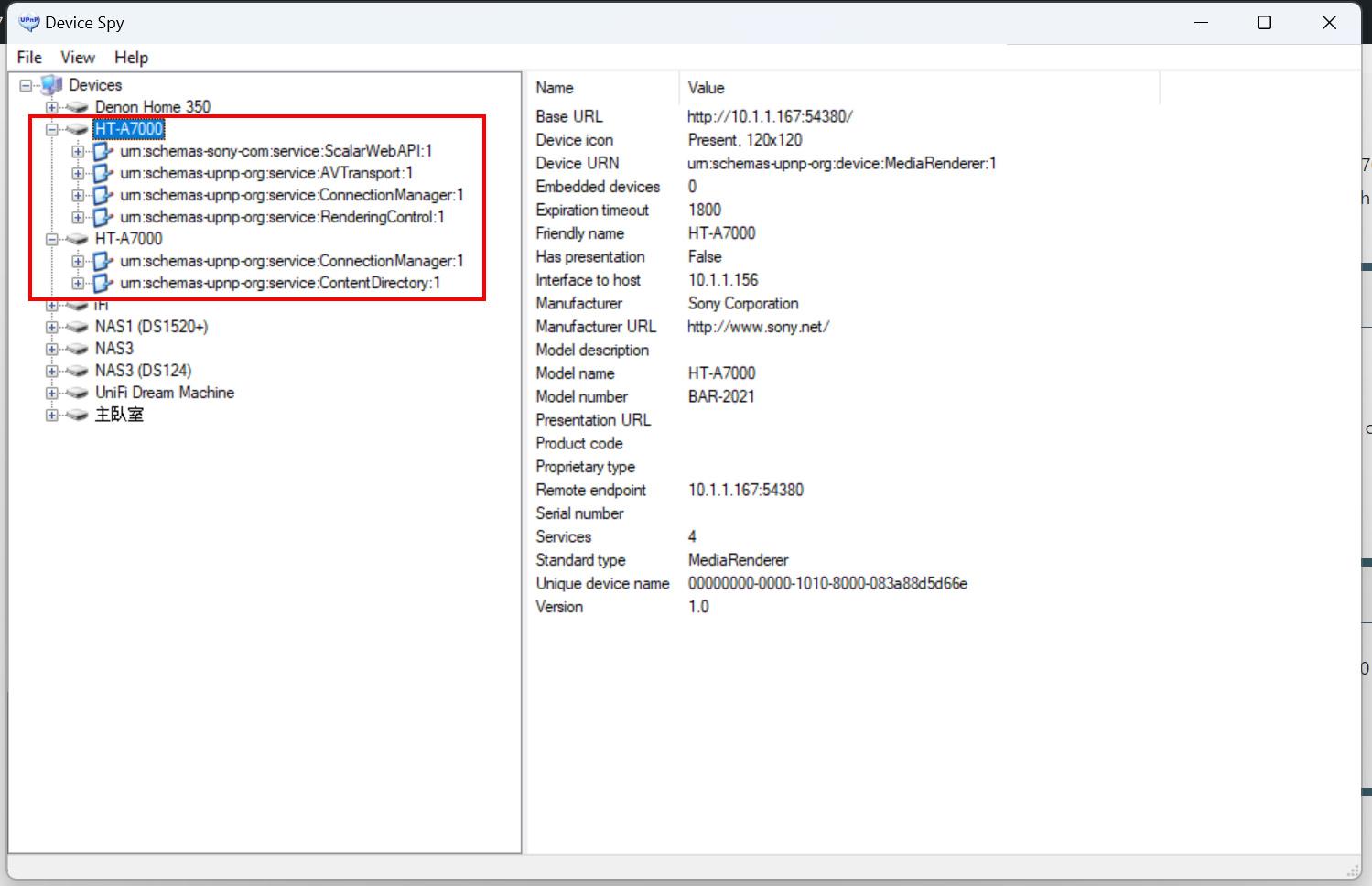 storaid参加者
Hi, Tiki
I think there should be no problem with the compatibility of Denon’s device…
You can return it to DENON
thanksstoraid参加者Are there others in a similar situation? > ALL
no, it’s only for SONY HT-A7000 I had
Is this related to the upnp structure of HT-A7000?(Device Spy)
I’m not sure if there is something wrong with HT-A7000, maybe I might need to try rebooting it. -
投稿者投稿