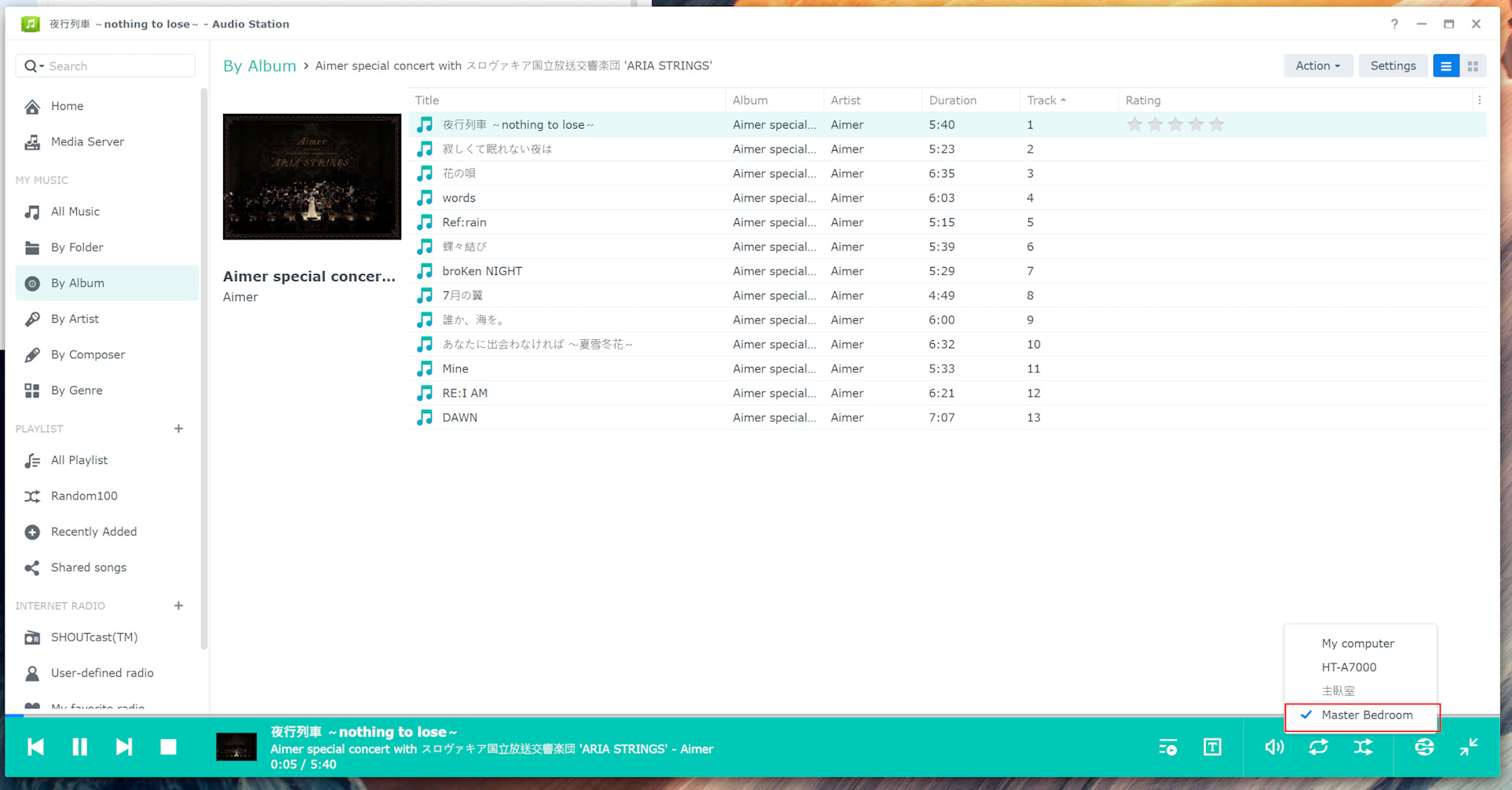
フォーラムへの返信
-
投稿者投稿
-
storaid参加者
Hello, Tiki
It seems that I encountered this problem for the first time when I installed version 1699 in the afternoon…
And then I didn’t see this again next time…
How does TuneBrowser initialize the volume information??
Is the device’s volume information history only temporarily saved while the program is running?storaid参加者Hello, Tiki
Hello, Tiki I encountered a strange problem
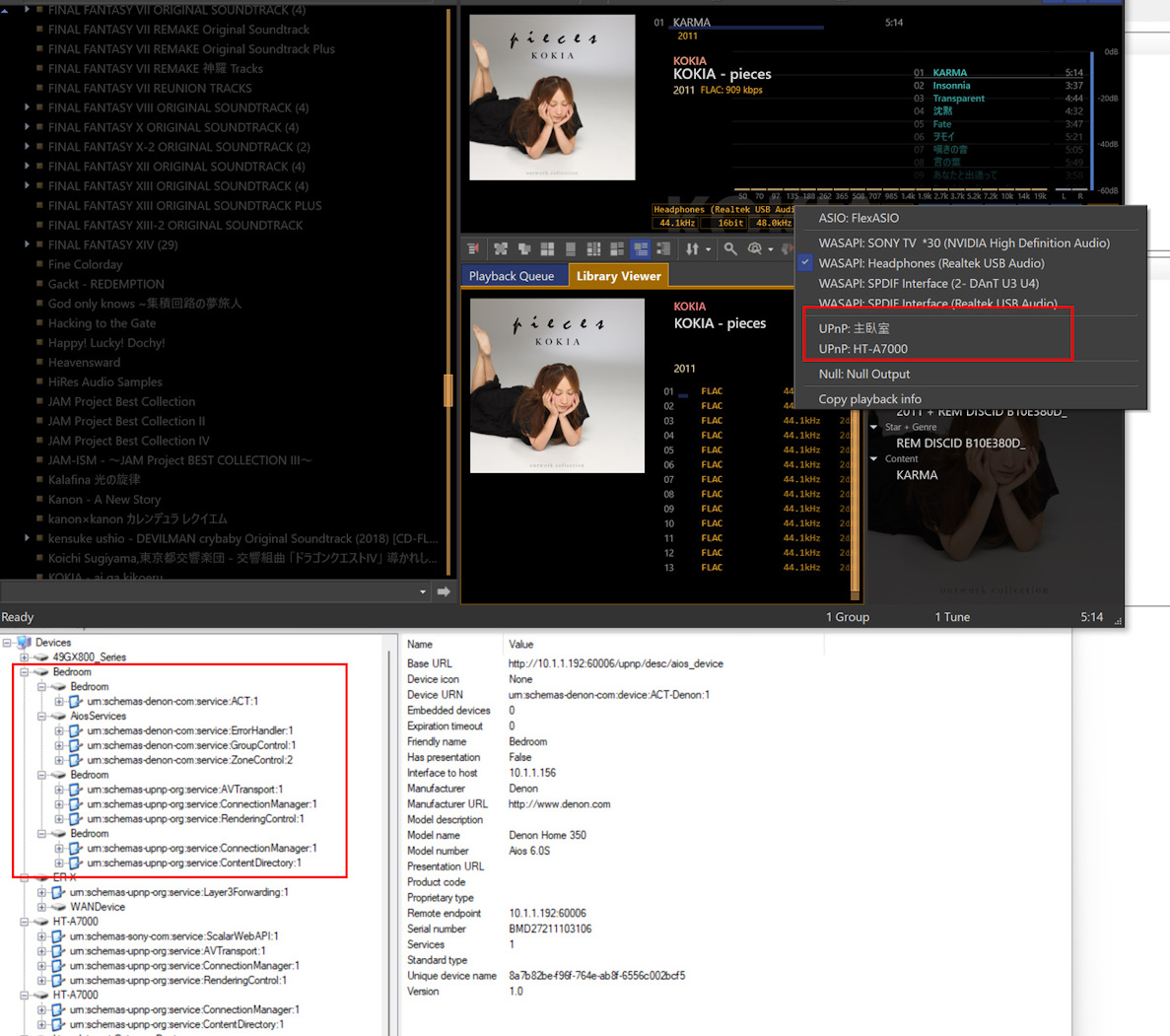
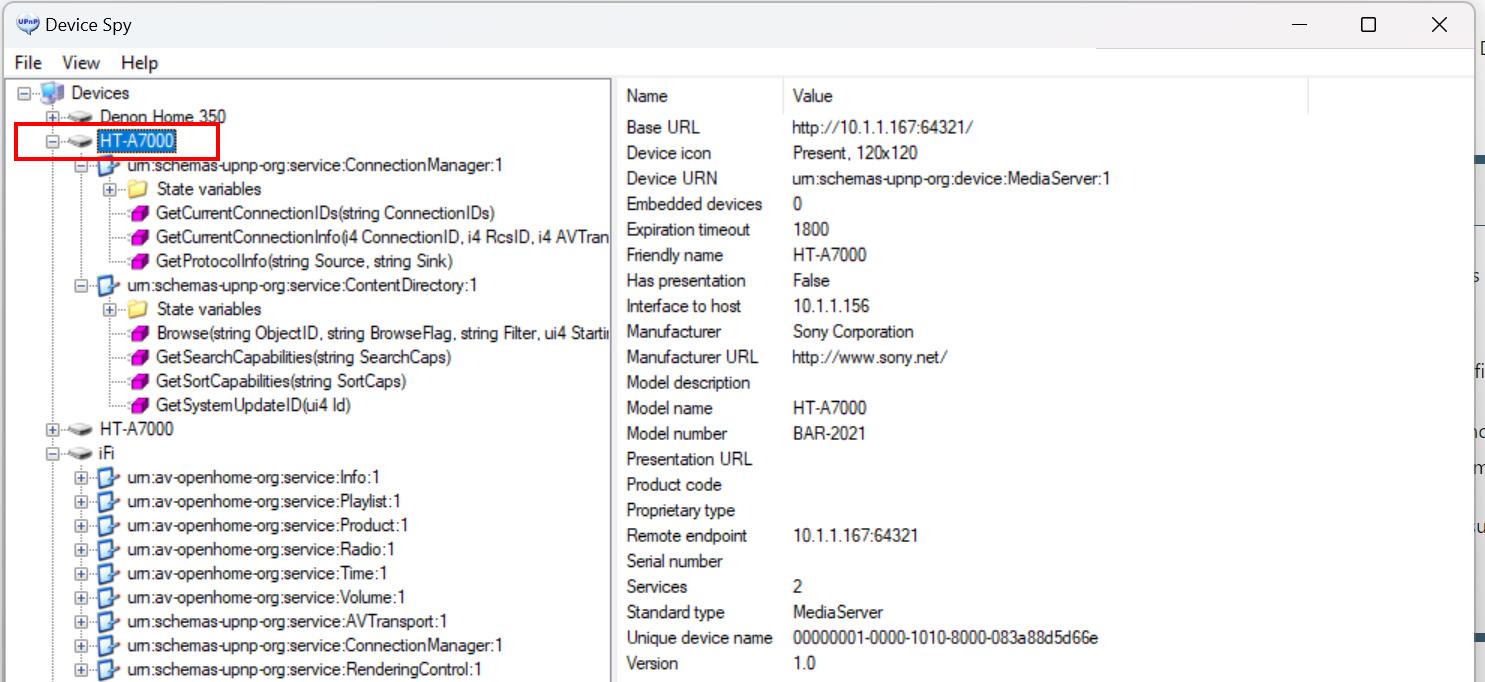
Sometimes when the TuneBrowser reads the SONY HT-A7000 UPnP device…
It causes the program to crash and be forced to close…
 storaid参加者
Hello, Tiki. Thank you very much.
This is a useful feature.
But there is a small issue.
When TuneBrowser loads Denon device-related information for the first time, volume information is loaded.
However, at this point, other devices do not have any previously saved volume information.
If you switch from the Denon device to another device, such as a WASAPI device, the current volume information will retain the previous Denon device’s information.
Is it possible to assign an initial value to the audio volume setting when switching devices if no previously saved volume information is read, such as 100%?
Then try to read the volume information of that device.
If no relevant information is read, use the default initial value?Thanks
PS: In addition, the customized MIME settings you provided are very useful. It’s really great!storaid参加者Hello, Tiki
I have been testing the DLNA function of TuneBrowser for a long time in the past week…
This is not just limited to Denon devices, but also includes other brands of devices…
For example, the ifi Zen Stream network streaming device, which can get good sound quality at a mid-low price
I also wanted to test the SONY SRS-5000…
But the product function is really poor, so I quickly drop it. This makes me miss the old SONY SRS-X99…There are many ways to test, such as:
1. Play songs randomly
2. Switch to another song randomly in the middle of playing a song
3. Crazy click the Stop button (in the old version, clicking the Stop button would interestingly help you play the next song)
4. Force close the program while playing music, and observe whether another song can be played normally after reopening
5. Wait patiently for all the songs in an album with more songs to finish playing
6. Switch to another device forcibly while playing a song, such as a DLNA device or an ASIO/WASAPI device
Anyway, no matter what, I did a long time of testing…
I think the current DLNA function is stable, except for some occasional minor problems…
For example, when the source device does not support the requested music format, this will cause TuneBrowser to perform re-encoding operations…
Sometimes, TuneBrowser just happens to be stuck in this operation stage, and then there is no action…
Then randomly click other songs to play, TuneBrowser seems to be stuck in the whole operation…
At this time I just have to close it and reopen it, and then return to normal…
I don’t know why? I didn’t check its packets either, because I think it’s hard to find any clues…I think re-encoding this operation can be improved?
Or even provide Resampler options for users to choose…
Actually, my ideal(or dream?) is that can be offloaded by GPGPU, but I think this may bring some challenges to developer…
Because I am also a developer, but I am engaged in web development and some ERP or supply chain system development…
I have seen some SDK documents of GPGPU, but because the domain are too different.
Can’t understand the whole usage…
When I see products like HQ player that have similar functions, I am very envious…
(But HQ player is a product that I think is troublesome to set up)Also, before playing music through DLNA devices, can’t you cache the music files to RAM first if RAMDecode/RAMDisk was enabled, and then perform DLNA-related HTTP protocol communication operations?
Anyway, no matter what, so far. TuneBrowser can work well in most cases except for some minor problems I mentioned above…
This is not only limited to DENON devices but also includes some other brands of devices that I have tested…
I can’t guarantee 100% that all DLNA devices can work well in TuneBrowser…
At least my feedback to you is much better than previous versions…
I hope other users can provide feedback, not just my test
PS: In the end, I still don’t know how Synology Audio Station allows DENON devices to correctly identify DSD music files as DSD sources without any re-encoding operations XDstoraid参加者Tiki, this is my idea.
With the constant changes of the times, the rise of streaming media.
I think TuneBrowser should make some changes to support these features.
storaid参加者well…
if I press the Pause button while the music is playing, and then pressing Play button will cause the music to start playback from the beginning.
2023-08-11 19:36 返信先: obvious background noise occurs when playing DSD file using ASIO(Creative) #14053storaid参加者playback info:
Name:
– Creative Sound Blaster ASIO
– PlayStatus::Stop
SR+Bit:
– 2.822MHz | 1bit | 176.4kHz | 32/32bit
Spec:
– [ASIO ] | [INT:L]
– [1768 ] | [—- ]
Switch:
– :BITP : | :RG : | :MAX : | :MONO : | :L<>R :
– :REP : | :RAND : | :RSMP : | :VST3 : | [RAM:X]
DSP:
– :EMPH : | :HDCD : | :DMIX :2023-08-11 19:34 返信先: obvious background noise occurs when playing DSD file using ASIO(Creative) #14052storaid参加者Hi, Tiki
an error message will be thrown after setting “Support DoP” as “false”
2023/08/11 18:28:54,624.207: T0890c: TL19: Playback starts from the top.
2023/08/11 18:28:54,624.218: T0890c: TL19: Post PlayerNotify: 7043 [PlaybackBegin]
2023/08/11 18:28:54,624.529: T0142c: TL19: Proc PlayerNotify: 7043 [PlaybackBegin]
2023/08/11 18:28:54,647.495: T0890c: TL19: Opening tune 0 [\\NAS1\music\[Hi-Res]うたわれるもの 偽りの仮面 & 二人の白皇 歌集\1. ヌエドリ.dff]
2023/08/11 18:28:54,647.931: T0890c: TL19: Calculating RAMDecode size…
2023/08/11 18:28:54,647.946: T0890c: TL19: MaxCache:2048 MB, MaxPhysMem:16014 MB – CurPhysMem:840 MB -> Limit:2048 MB (Contents: 1024 MB).
2023/08/11 18:28:54,680.873: T0890c: TL19: Total RAMDecode size 2290 MB exceeded limit 2048 MB.
2023/08/11 18:28:54,680.884: T0890c: TL19: RAMDecode mode goes to [Single]
2023/08/11 18:28:54,680.889: T0890c: TL19: RAMDecode mode switched from [Single] to [None] because of DSD.
2023/08/11 18:28:54,680.900: T0890c: TL19: Post PlayerNotify: 7044 [SpecUpdate]
2023/08/11 18:28:54,681.100: T0890c: TL19: Creating decoder for file [\\NAS1\music\[Hi-Res]うたわれるもの 偽りの仮面 & 二人の白皇 歌集\1. ヌエドリ.dff]
2023/08/11 18:28:54,681.108: T0890c: TL19: Device and PCM converter are not supporting DSD.
2023/08/11 18:28:54,681.112: T0890c: TL19: File: \\NAS1\music\[Hi-Res]うたわれるもの 偽りの仮面 & 二人の白皇 歌集\1. ヌエドリ.dff
2023/08/11 18:28:54,681.121: T0890c: TL19: Error: Creating decoder failed for file [\\NAS1\music\[Hi-Res]うたわれるもの 偽りの仮面 & 二人の白皇 歌集\1. ヌエドリ.dff]
2023/08/11 18:28:54,681.162: T0890c: TL19: Error: Decoder failed.
2023/08/11 18:28:54,681.212: T0890c: TL19: Post PlayerNotify: 7045 [SpecUpdate]
2023/08/11 18:28:54,683.945: T0890c: TL19: Error: Cannot decode file: \\NAS1\music\[Hi-Res]うたわれるもの 偽りの仮面 & 二人の白皇 歌集\1. ヌエドリ.dff
Message: Cannot decode file: \\NAS1\music\[Hi-Res]うたわれるもの 偽りの仮面 & 二人の白皇 歌集\1. ヌエドリ.dff
Version: 1696Log View:
2023/08/11 18:31:39,428: UL03266: T0890c: TL19: Opening tune 0 [\\NAS1\music\[Hi-Res]うたわれるもの 偽りの仮面 & 二人の白皇 歌集\1. ヌエドリ.dff]
2023/08/11 18:31:39,429: UL03267: T0890c: TL19: RAMDecode mode stays on [None]
2023/08/11 18:31:39,429: UL03268: T0890c: TL19: Creating decoder for file [\\NAS1\music\[Hi-Res]うたわれるもの 偽りの仮面 & 二人の白皇 歌集\1. ヌエドリ.dff]
2023/08/11 18:31:39,429: UL03269: T0890c: TL19: Device and PCM converter are not supporting DSD.
2023/08/11 18:31:39,429: UL03270: T0890c: TL19: File: \\NAS1\music\[Hi-Res]うたわれるもの 偽りの仮面 & 二人の白皇 歌集\1. ヌエドリ.dff
2023/08/11 18:31:39,429: UL03271: T0890c: TL19: Error: Creating decoder failed for file [\\NAS1\music\[Hi-Res]うたわれるもの 偽りの仮面 & 二人の白皇 歌集\1. ヌエドリ.dff]
2023/08/11 18:31:39,429: UL03272: T0890c: TL19: Error: Decoder failed.
2023/08/11 18:31:39,429: UL03273: T0890c: TL19: Post PlayerNotify: 7049 [SpecUpdate]
2023/08/11 18:31:39,433: UL03274: T0890c: TL19: Error: Cannot decode file: \\NAS1\music\[Hi-Res]うたわれるもの 偽りの仮面 & 二人の白皇 歌集\1. ヌエドリ.dff
2023/08/11 18:31:39,433: UL03276: T0890c: TL19: Post PlayerNotify: 7050 [PlaybackEnd]
2023/08/11 18:31:39,438: UL03277: T0142c: TL19: Proc PlayerNotify: 7049 [SpecUpdate]
2023/08/11 18:31:39,443: UL03278: T0142c: TL19: Proc PlayerNotify: 7050 [PlaybackEnd]2023-08-11 19:10 返信先: obvious background noise occurs when playing DSD file using ASIO(Creative) #14050storaid参加者playback info:
Name:
– Creative Sound Blaster ASIO
– PlayStatus::Playing
SR+Bit:
– 2.822MHz | 1bit | 176.4kHz | 32/32bit
Spec:
– [ASIO ] | [DoP:L]
– [1768 ] | [—- ]
Switch:
– :BITP : | :RG : | :MAX : | :MONO : | :L<>R :
– :REP : | :RAND : | :RSMP : | :VST3 : | <RAM:X>
DSP:
– :EMPH : | :HDCD : | :DMIX :???????
It seems that there is no special information…
2023-08-10 23:30 返信先: obvious background noise occurs when playing DSD file using ASIO(Creative) #14045storaid参加者I have contacted Creative Support with E-mail and waiting for reply..
due to driver quality with this company
however, I don’t expect they will give me a good solution…
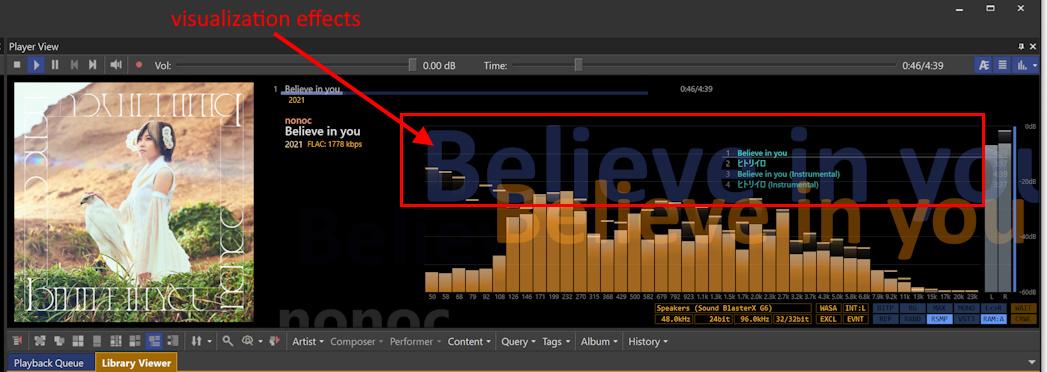
storaid参加者it’s possible that the visualization effects will appear when playing for a while??
 2023-08-10 22:33 返信先: obvious background noise occurs when playing DSD file using ASIO(Creative) #14043storaid参加者
hello, Tiki
Are there others in a similar situation? >
NO
I’ve tested some higher-end DACs
definitely they all good working…
with Creative ASIO driver, background noise issue only occurs in playing DSD
==================================================
foobar2000 log:
new service_impl_t<autoproxy_output_v5>(device = “ASIO : Creative Sound Blaster ASIO”, buffer_length = 1.000s, dither = false, bitdepth = 16)
autoproxy_output_v3::get_forced_sample_rate() => 0
autoproxy_output_v5::get_forced_channel_mask() => 0x00000000
autoproxy_output_v3::get_injected_dsps() => 0
autoproxy_output_v2::enable_fading(true)
autoproxy_output::volume_set(0.000)
autoproxy_output::volume_adjust(samplerate = 0, latency = 0.000, volume = 0.000)
autoproxy_output::check_dsd_stream(true) => DSD stream contains 0 chunks and 0 samples
autoproxy_output::pause(false)
autoproxy_output_v3::get_forced_sample_rate() => 0
Opening track for playback: “\\nas1\music\[Hi-Res]うたわれるもの 偽りの仮面 & 二人の白皇 歌集\1. ヌエドリ.dff” / index: 1
autoproxy_output::check_dsd_stream(true) => DSD stream contains 3 chunks and 14112 samples
autoproxy_output::process_samples() => Switch to DSD playback
autoproxy_output::process_samples() => Input stream [channels: 2, samplerate: 2822400, channel_config: 0x00000003]
autoproxy_output::process_samples() => Output stream [channels: 2, samplerate: 2822400, channel_config: 0x00000003]
autoproxy_output::process_samples(channels = 2, sample_rate = 2822400, channel_config = 0x00000003)
autoproxy_output::volume_adjust(samplerate = 2822400, latency = 0.000, volume = 0.000)
autoproxy_output::check_dsd_stream(false) => DSD stream contains 4 chunks and 18816 samples]it’s working well…
==================================================
storaid参加者Hi, Tiki
May I ask if the output encoding format is fixed(44.1K/24b) after re-encoding operation occurs?
(DSD to PCM: Auto)
storaid参加者hello, tiki
First of all, thank you very much for your help…
I tested a few songs a little bit.
The “skip issue” seems to have gone away
But I noticed that the DSD format file will be re-encoded before sending it to uPnP renderer
May I ask what is the reason for doing so?
thanks
and…
I’ll keep testing for a while and report back…storaid参加者that’s great! Tiki
very thanks for your information…
storaid参加者I have raised a ticket on Denon Tech support to make an inquiry about “skip track issue” using the UPnP renderer.
I don’t expect them to give me a good response, but I still have hope(maybe…:(..)

and I uploaded an upnp log for Synology Audio Station(if you can receive it)…
this file named “audiolog” is a compression file..
You can unzip this file with any unzip software to check how that works.
Although, I don’t see any particular difference….Orz
storaid参加者Hi, Tiki
sadly…:(
I don’t know what information to provide for you.
Is it possible to observe how it works from the diag log of Synology Audio Station?
I can provide this log.
Because it’s really good at UPnP support.storaid参加者Hello, Tiki…
Have you tested Audiophile UPnP Renderer(v2.3)?
https://sourceforge.net/projects/audiophilerenderer/files/Setup/
I’m not sure…
but it seems like it has the same problem…
I’ll retest it again later
storaid参加者“It seems the TuneBrowser is working well. Currently I can’t find the difference.”
the HEOS app controls TuneBrowser is solid working for playback operations.
but HEOS UI is not friendly
so currently I only use this app for testing purposes.
==========================================================
The new version you provided seems to improve the stability of music playback on UPnP devices compared to the previous version.
But still encounter some problems(always generate temp flac).
1. encountered “skip” issue as before with single-track albums mostly
2. I know it’s difficult. The timeline information is often lost during music playback.
3. there is still a chance to encounter the “skip” issue
of course! If I set “Always” to “NotFixed/Auto” to avoid temporary flac.
it’s going to make things worseI googled the relevant information.
There is a lot of information about the “skip” issue encountered on the UPnP device.
It’s not easy to keep devices compatible and get solid working.
Of course, I don’t know why Synology Audio Station works very stably.
Sent a dumpfile to you, Tiki
storaid参加者I sent you a dumpfile..
I use HEOS app provided by DENON…
and use this app to control TuneBrowser to play some music and generate dumpfile..
then my idea is that you can check how the DENON device works..maybe it’s useful for you or not…
==================================================
I’ll be testing the new version you provided later.
storaid参加者hello, Tiki
I make TuneBrowser as Server and use the HEOS app provided by Denon to control it and play music.
So I create dumpfile from TuneBrowser and send it to you
my idea is that you can check how the DENON device works.
Is this useful for you if I do that?
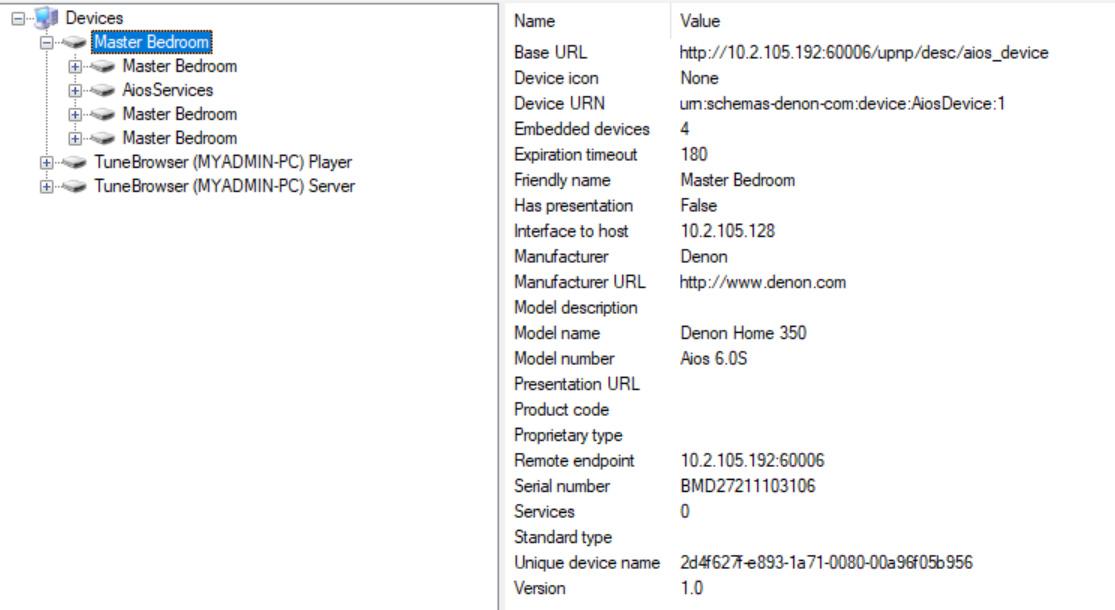
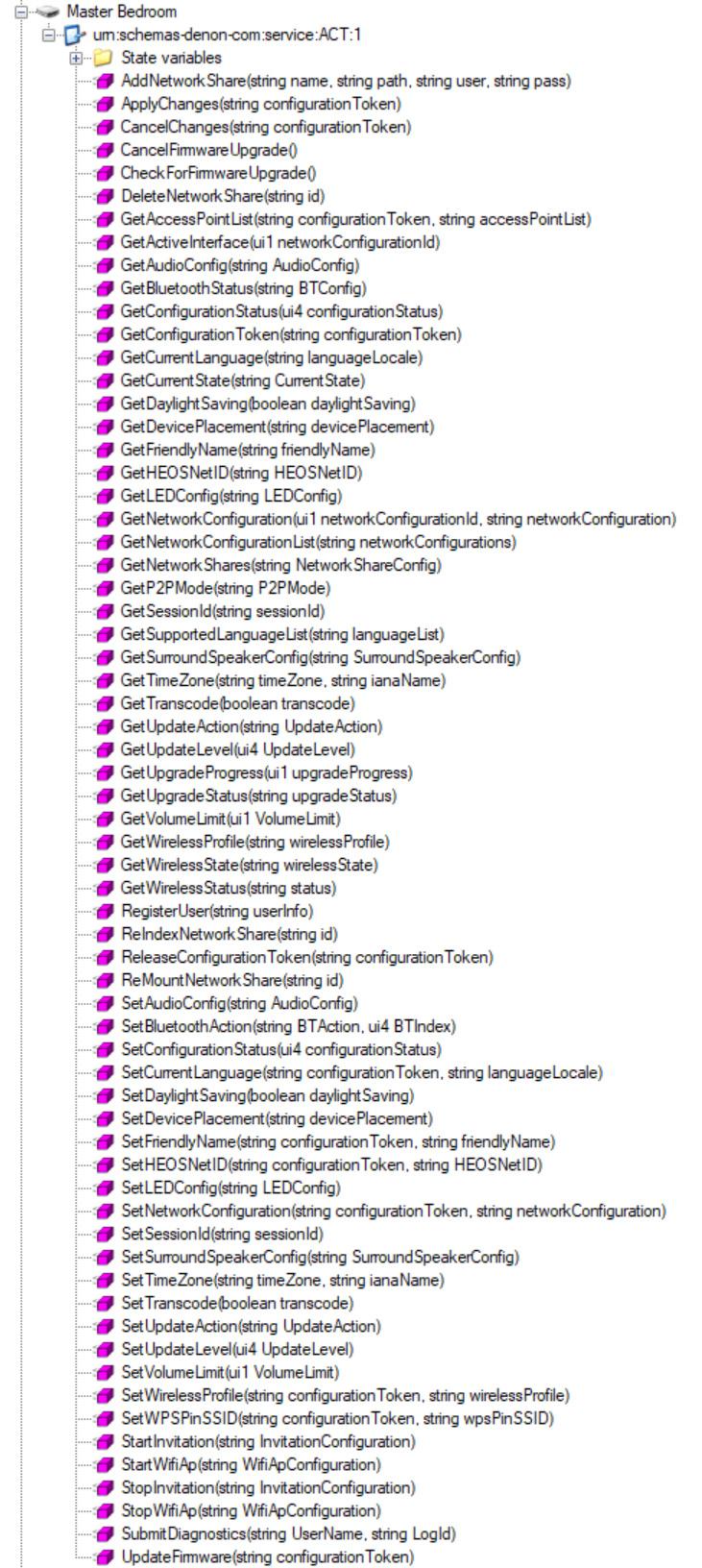
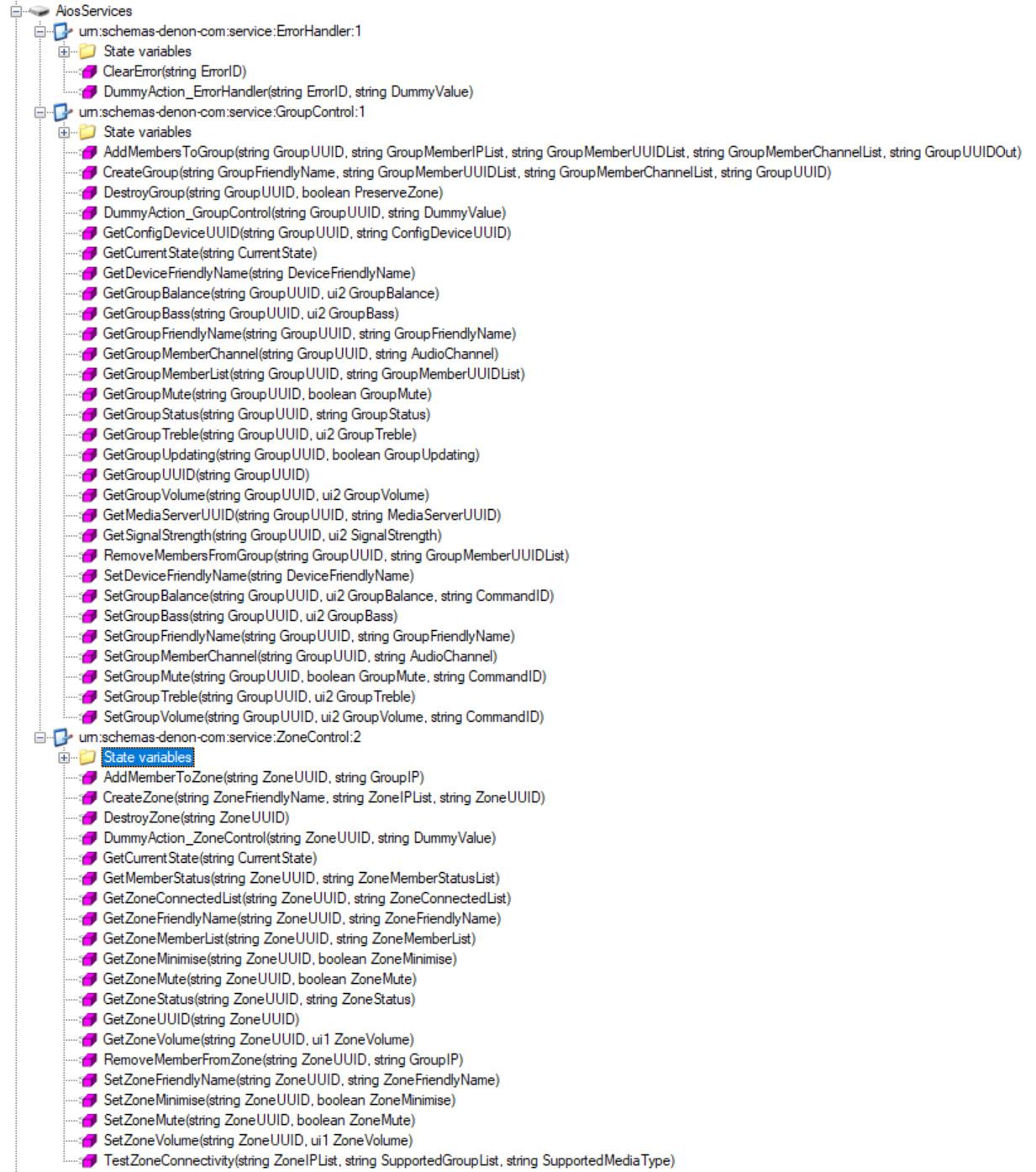
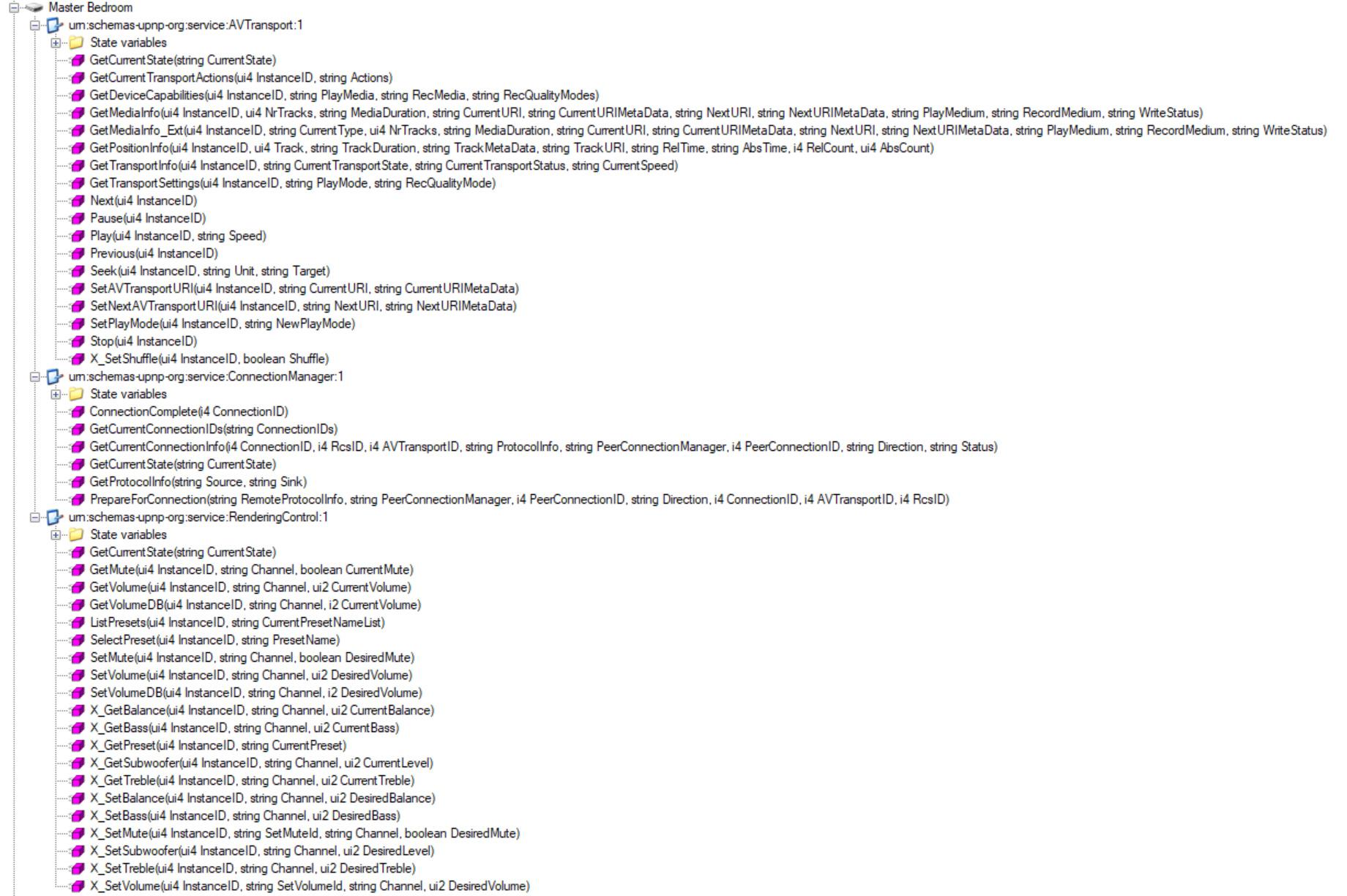
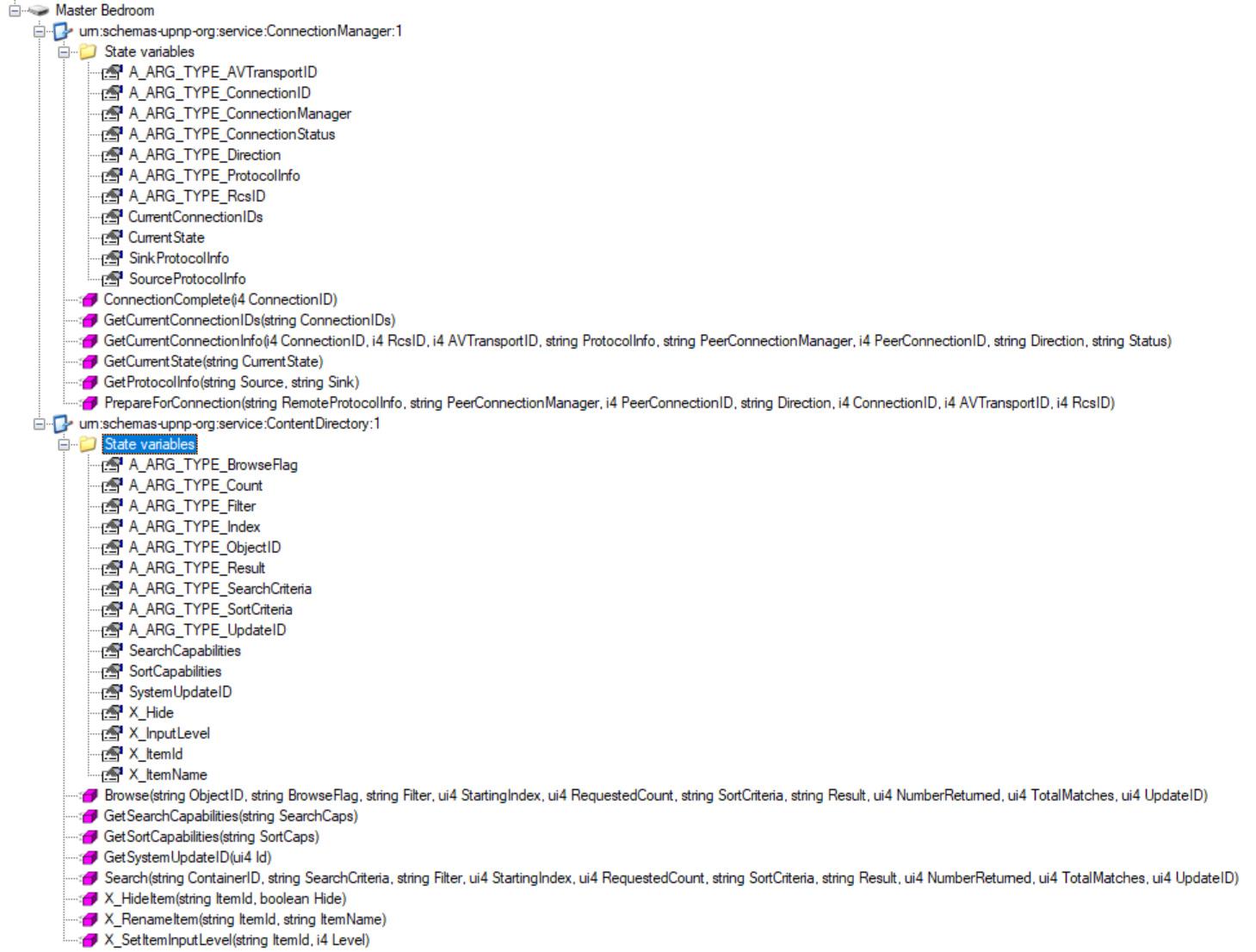
storaid参加者These screenshots are the service’s schema
I don’t know if these pics can help you?!
 storaid参加者
“Is it recognized by the renderer as FLAC type ?”
YES, 44.1KHz/24b
storaid参加者I keep clicking on the same song repeatedly, and it triggers a device error message.
2023/07/09 14:12:01,015.642: T03308: TL18: Set volume to device: 40
2023/07/09 14:12:01,016.102: T03308: TL18: [SOAP Request]: SOAP request: [SetVolume]
2023/07/09 14:12:01,016.357: T07b90: TL18: Proc PlayerNotify: 0015 [PlayStatus]
2023/07/09 14:12:01,025.117: T07b90: TL18: Proc PlayerNotify: 0015 [Stopped]
2023/07/09 14:12:01,026.903: T07b90: TL18: PLTTrace released(G): PLTIdx:15
2023/07/09 14:12:01,031.440: T03308: TL18: [SOAP Request]: SOAP request: [SetVolume] was completed.
2023/07/09 14:12:01,031.521: T03308: TL18: Playback starts from the top.
2023/07/09 14:12:01,031.531: T03308: TL18: Post PlayerNotify: 0015 [PlayStatus]
2023/07/09 14:12:01,031.539: T03308: TL18: Post PlayerNotify: 7113 [PlaybackBegin]
2023/07/09 14:12:01,031.656: T03308: TL18: MimeType is supported by device: audio/flac
2023/07/09 14:12:01,031.661: T03308: TL18: This is not Subsong.
2023/07/09 14:12:01,031.740: T03308: TL18: [SetAVTransportURI]: File : [\\NAS1\music\SLAYERS MEGUMIXXX/林原めぐみ\1.01. two thumbs up!.flac]
2023/07/09 14:12:01,031.744: T03308: TL18: [SetAVTransportURI]: URL : [http://10.2.105.128:10800/TuneID/00004835.flac]
2023/07/09 14:12:01,031.755: T03308: TL18: [SetAVTransportURI]: <DIDL-Lite xmlns:upnp=”urn:schemas-upnp-org:metadata-1-0/upnp/” xmlns:dc=”http://purl.org/dc/elements/1.1/” xmlns:dlna=”urn:schemas-dlna-org:metadata-1-0/” xmlns=”urn:schemas-upnp-org:metadata-1-0/DIDL-Lite/”>
2023/07/09 14:12:01,031.759: T03308: TL18: [SetAVTransportURI]: <item>
2023/07/09 14:12:01,031.763: T03308: TL18: [SetAVTransportURI]: <res protocolInfo=”http-get:*:audio/flac:*” duration=”0:03:35.440″ bitrate=”1063960″ bitsPerSample=”16″ nrAudioChannels=”2″ sampleFrequency=”44100″>http://10.2.105.128:10800/TuneID/00004835.flac</res>
2023/07/09 14:12:01,031.767: T03308: TL18: [SetAVTransportURI]: <dc:title>DISC1:two thumbs up!</dc:title>
2023/07/09 14:12:01,031.770: T03308: TL18: [SetAVTransportURI]: <dc:date>2020</dc:date>
2023/07/09 14:12:01,031.773: T03308: TL18: [SetAVTransportURI]: <dc:creator>林原めぐみ</dc:creator>
2023/07/09 14:12:01,031.775: T03308: TL18: [SetAVTransportURI]: <dc:publisher>KING RECORDS</dc:publisher>
2023/07/09 14:12:01,031.778: T03308: TL18: [SetAVTransportURI]: <upnp:album>スレイヤーズ MEGUMIXXX</upnp:album>
2023/07/09 14:12:01,031.783: T03308: TL18: [SetAVTransportURI]: <upnp:artist>林原めぐみ</upnp:artist>
2023/07/09 14:12:01,031.785: T03308: TL18: [SetAVTransportURI]: <upnp:artist role=”AlbumArtist”>林原めぐみ</upnp:artist>
2023/07/09 14:12:01,031.788: T03308: TL18: [SetAVTransportURI]: <upnp:originalTrackNumber>01</upnp:originalTrackNumber>
2023/07/09 14:12:01,031.791: T03308: TL18: [SetAVTransportURI]: <upnp:albumArtURI>http://10.2.105.128:10800/Image/97f26fb9-e1ef-459b-bcafe12cd73b0f9b.jpg</upnp:albumArtURI>
2023/07/09 14:12:01,031.794: T03308: TL18: [SetAVTransportURI]: <upnp:class>object.item.audioItem.musicTrack</upnp:class>
2023/07/09 14:12:01,031.797: T03308: TL18: [SetAVTransportURI]: </item>
2023/07/09 14:12:01,031.801: T03308: TL18: [SetAVTransportURI]: </DIDL-Lite>
2023/07/09 14:12:01,031.987: T03308: TL18: [SOAP Request]: SOAP request: [SetAVTransportURI]
2023/07/09 14:12:01,037.380: T07b90: TL18: Proc PlayerNotify: 7110 [Update]
2023/07/09 14:12:01,043.079: T07b90: TL18: Proc PlayerNotify: 7111 [PlaybackEnd]
2023/07/09 14:12:01,050.156: T07b90: TL18: Proc PlayerNotify: 7112 [Update]
2023/07/09 14:12:01,055.352: T07b90: TL18: Proc PlayerNotify: 0015 [PlayStatus]
2023/07/09 14:12:01,056.132: T03308: TL18: [SOAP Request]: SOAP request: [SetAVTransportURI] was completed.
2023/07/09 14:12:01,056.195: T03308: TL18: [SetAVTransportURI]: Device accepted current tune by SetAVTransportURI: [http://10.2.105.128:10800/TuneID/00004835.flac]
2023/07/09 14:12:01,056.205: T03308: TL18: Preparing next tune by SetNextAVTransportURI.
2023/07/09 14:12:01,056.210: T03308: TL18: Next tune sequence position 0 -> 1.
2023/07/09 14:12:01,056.218: T03308: TL18: This device is supporting SetNextAVTransportURI.
2023/07/09 14:12:01,056.231: T03308: TL18: ResubscribeAllEvent.
2023/07/09 14:12:01,056.234: T03308: TL18: UnsubscribeAllEvent.
2023/07/09 14:12:01,056.258: T07ab4: TL18: [UPP_TransCThread]: MimeType is supported by device: audio/flac
2023/07/09 14:12:01,056.262: T07ab4: TL18: [UPP_TransCThread]: This is not Subsong.
2023/07/09 14:12:01,056.365: T07ab4: TL18: [SetNextAVTransportURI]: File : [\\NAS1\music\SLAYERS MEGUMIXXX/林原めぐみ\1.02. Get along ~SelfTag Version~.flac]
2023/07/09 14:12:01,056.369: T07ab4: TL18: [SetNextAVTransportURI]: URL : [http://10.2.105.128:10800/TuneID/00004836.flac]
2023/07/09 14:12:01,056.379: T07ab4: TL18: [SetNextAVTransportURI]: <DIDL-Lite xmlns:upnp=”urn:schemas-upnp-org:metadata-1-0/upnp/” xmlns:dc=”http://purl.org/dc/elements/1.1/” xmlns:dlna=”urn:schemas-dlna-org:metadata-1-0/” xmlns=”urn:schemas-upnp-org:metadata-1-0/DIDL-Lite/”>
2023/07/09 14:12:01,056.382: T07ab4: TL18: [SetNextAVTransportURI]: <item>
2023/07/09 14:12:01,056.386: T07ab4: TL18: [SetNextAVTransportURI]: <res protocolInfo=”http-get:*:audio/flac:*” duration=”0:04:08.827″ bitrate=”1099986″ bitsPerSample=”16″ nrAudioChannels=”2″ sampleFrequency=”44100″>http://10.2.105.128:10800/TuneID/00004836.flac</res>
2023/07/09 14:12:01,056.389: T07ab4: TL18: [SetNextAVTransportURI]: <dc:title>DISC1:Get along ~SelfTag Version~</dc:title>
2023/07/09 14:12:01,056.392: T07ab4: TL18: [SetNextAVTransportURI]: <dc:date>2020</dc:date>
2023/07/09 14:12:01,056.395: T07ab4: TL18: [SetNextAVTransportURI]: <dc:creator>林原めぐみ</dc:creator>
2023/07/09 14:12:01,056.400: T07ab4: TL18: [SetNextAVTransportURI]: <dc:publisher>KING RECORDS</dc:publisher>
2023/07/09 14:12:01,056.404: T07ab4: TL18: [SetNextAVTransportURI]: <upnp:album>スレイヤーズ MEGUMIXXX</upnp:album>
2023/07/09 14:12:01,056.407: T07ab4: TL18: [SetNextAVTransportURI]: <upnp:artist>林原めぐみ</upnp:artist>
2023/07/09 14:12:01,056.410: T07ab4: TL18: [SetNextAVTransportURI]: <upnp:artist role=”AlbumArtist”>林原めぐみ</upnp:artist>
2023/07/09 14:12:01,056.413: T07ab4: TL18: [SetNextAVTransportURI]: <upnp:originalTrackNumber>02</upnp:originalTrackNumber>
2023/07/09 14:12:01,056.417: T07ab4: TL18: [SetNextAVTransportURI]: <upnp:albumArtURI>http://10.2.105.128:10800/Image/c17d63a2-1e15-4deb-8f14136cdc993be9.jpg</upnp:albumArtURI>
2023/07/09 14:12:01,056.420: T07ab4: TL18: [SetNextAVTransportURI]: <upnp:class>object.item.audioItem.musicTrack</upnp:class>
2023/07/09 14:12:01,056.423: T07ab4: TL18: [SetNextAVTransportURI]: </item>
2023/07/09 14:12:01,056.425: T07ab4: TL18: [SetNextAVTransportURI]: </DIDL-Lite>
2023/07/09 14:12:01,056.608: T07ab4: TL18: [SOAP Request]: SOAP request: [SetNextAVTransportURI]
2023/07/09 14:12:01,061.441: T07b90: TL18: Proc PlayerNotify: 7113 [PlaybackBegin]
2023/07/09 14:12:01,068.126: T07ab4: TL18: [SOAP Request]: SOAP request: [SetNextAVTransportURI] was completed.
2023/07/09 14:12:01,068.174: T07ab4: TL18: [SetNextAVTransportURI]: Device accepted next tune by SetNextAVTransportURI: [http://10.2.105.128:10800/TuneID/00004836.flac]
2023/07/09 14:12:01,085.467: T03308: TL18: End Subscriber.
2023/07/09 14:12:01,085.483: T03308: TL18: Begin Subscriber.
2023/07/09 14:12:01,086.000: T03308: TL18: SubscribeAllEvent.
2023/07/09 14:12:01,107.222: T03308: TL18: ResubscribeAllEvent done.
2023/07/09 14:12:01,137.076: T03308: TL18: SyncActive: No
2023/07/09 14:12:01,137.811: T03308: TL18: [SOAP Request]: SOAP request: [Play]
2023/07/09 14:12:01,138.959: T03308: TL18: Error: [SOAP Request]: SOAP request: [Play] was failed.
2023/07/09 14:12:01,138.978: T03308: TL18: Error: [SOAP Request]: SOAP request detected error: [ 3][TFXFWSocketDisconnected]
2023/07/09 14:12:01,139.171: T03308: TL18: Post PlayerNotify: 0015 [PlayStatus]
2023/07/09 14:12:01,139.682: T03308: TL18: Error: Playback device error.
Message: Playback device error.
Version: 1690
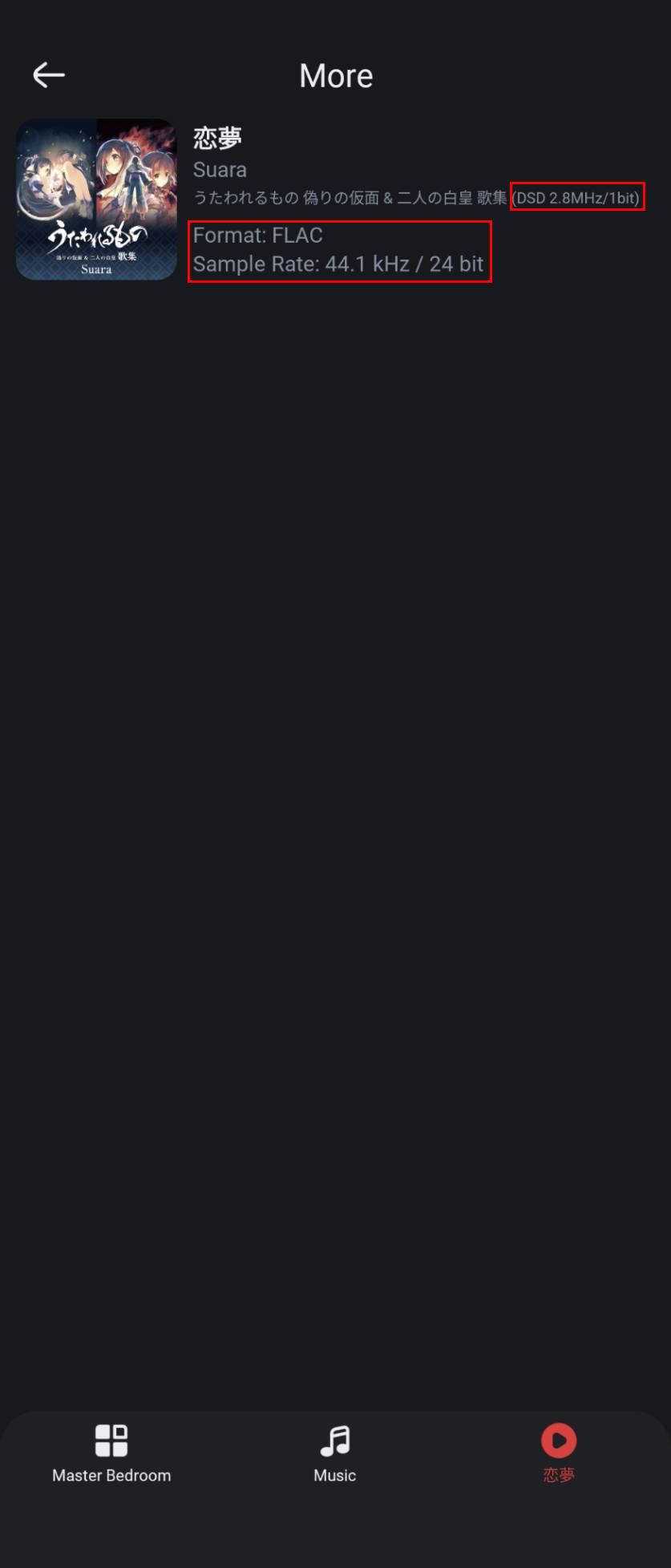
Then after a few clicks, that song can be successfully played…XDstoraid参加者well, tested a music DSD file(dff)
looks like it’s re-encoded…
 storaid参加者
Hello, Tiki
“temp flac is normal flac file.”
so, temp flac is already re-encoded?? right?for example:
input: DSD file(dff) => output: re-encoded temp flac
Will this cause the external UPnP renderer not to recognize the original format?
because the output format is re-encoded format
storaid参加者Denon Tech support is too bad…
I sent a mail, and they just give me a useless reply..
“Thank you. We understand and will try to give your precious feedback to our design software team.”
no further response
====================================
Is temp flac for compatibility?
If yes, maybe there is a UPnP compatibility issue due to the lack of a temp flac?temp flac is raw format?
storaid参加者no temp flac file generated, but music is playback successfully:


temp flac:

so strange…
storaid参加者I have a question…
a temp flac file will be generated if music is playback successfully.
so, it’s normal???
storaid参加者hello, Tiki
sometimes, if I switch from one album to another to play music.
that music will be successfully played.
no weird socket disconnection issue happened.
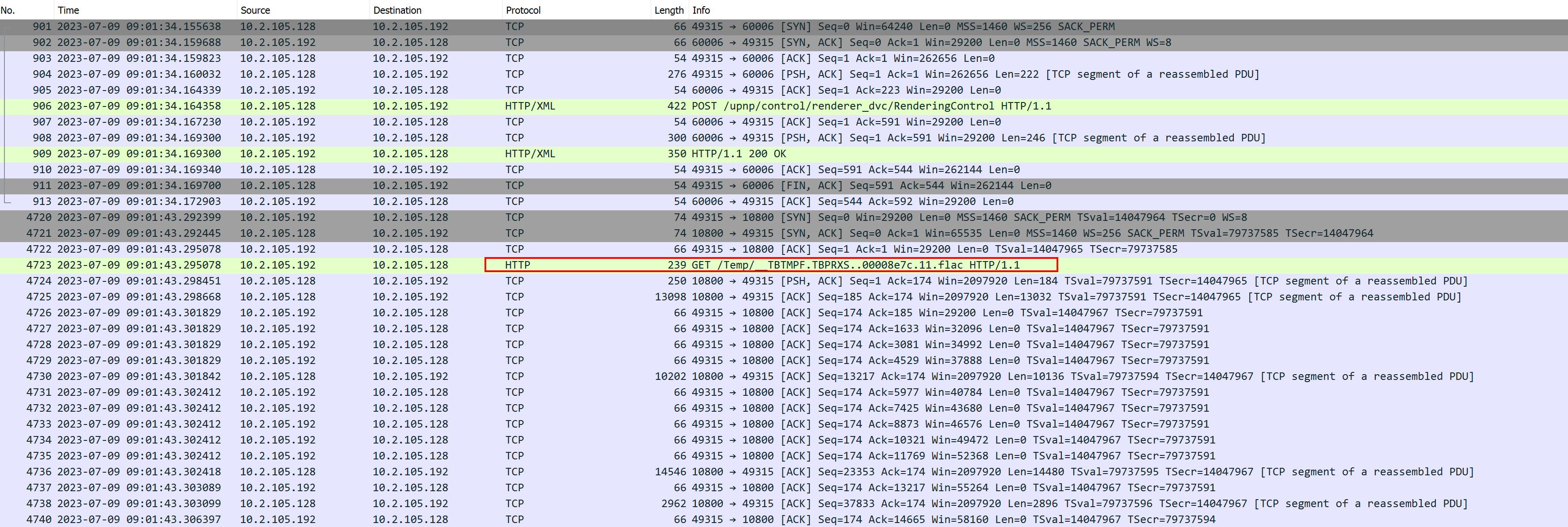
should I send a dumpfile to you?
storaid参加者Hello, Tiki
Unfortunately, the problem has not been resolved..:(

sent a dumpfile to you…
thanks
storaid参加者I have to say, Synology Audio Station works quite stably in the part of operating UPnP renderer.
But it’s not good music player software.
It lacks many features, such as Music Library.
so i don’t use it at all
storaid参加者Hello, Tiki
1. You are using other application, and it is working well with DENON.
I tested Audio Station from Synology NAS, it’s good working with DENON but JRiver not
it’s not good luck using JRiver, it can not recognize DENON Home speaker
maybe it has something to do with the nested structure.
2. You are using other device (like HT-A7000), and it is working well with TuneBrowser.
for HT-A7000, it’s special
I tested it with Synology Audio Station…
if I play some music, HT-A7000 will automatically switch to the H.NET channel and start its Music service.
as I mentioned above, I guess it does do that after receiving something command.
but it’s not luck using TuneBrowser, it can not do that as I mentioned previously, and failed to playback music.
UL06507: 2023/07/02 11:11:06,697: T08fb8: HTTP Server: [10.1.1.167 :53716]: Tune : \\NAS1\music\[Hi-Res]TVアニメ「進撃の巨人」最終章のOPテーマ「僕の戦争」/神聖かまってちゃん\01-僕の戦争.flac
UL06537: 2023/07/02 11:11:06,777: T00c84: HTTP Server: [10.1.1.167 :53718]: Tune : \\NAS1\music\[Hi-Res]TVアニメ「進撃の巨人」最終章のOPテーマ「僕の戦争」/神聖かまってちゃん\02-僕の戦争(Instrumental).flac
UL06545: 2023/07/02 11:11:06,792: T011e0: Cannot connect to server : 80Testing TuneBrowser with this device(HT-A7000) is very difficult.
Also, I tested the Audiophile UPnP Renderer with TuneBrowser. It encountered the same problem as the DENON device.
so, mmnn… I don’t think this problem is only for DENON.
> – CASE “Audiophile UPnP Renderer”:
UPnP log:

Wireshark:
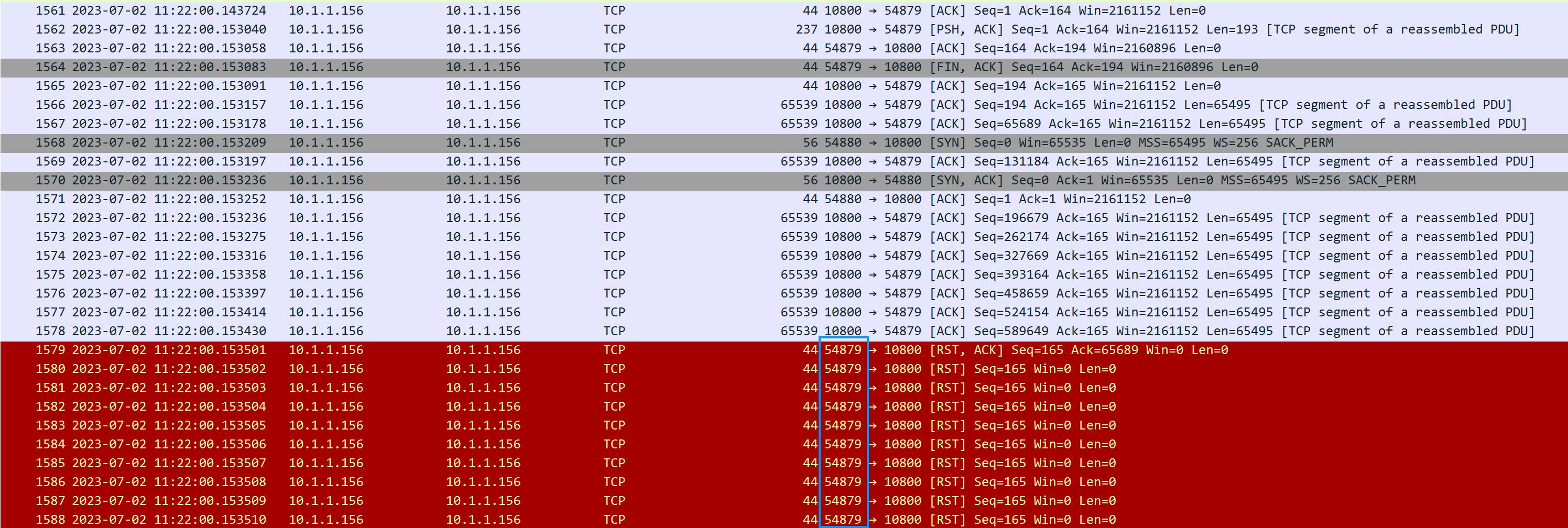
Only the combination of DENON and TuneBrowser is causing this matter. Is it right ?
In short, NO…XD
Sent a dumpfile to you, Tiki
storaid参加者hi, Tiki
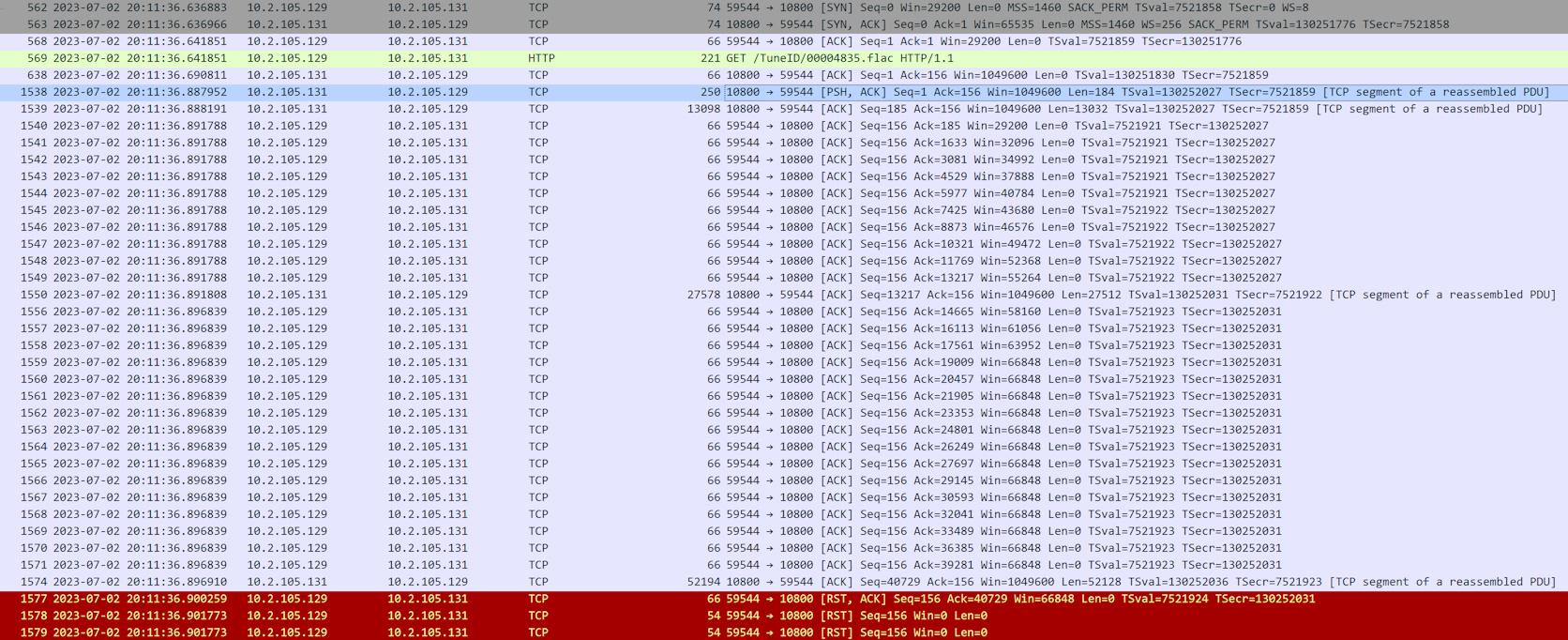
I’m not sure. But I used WireShark to capture some packets and saw something strange.
UPnP Log:

Denon: 10.2.105.129
TuneBrowser Client: 10.2.105.131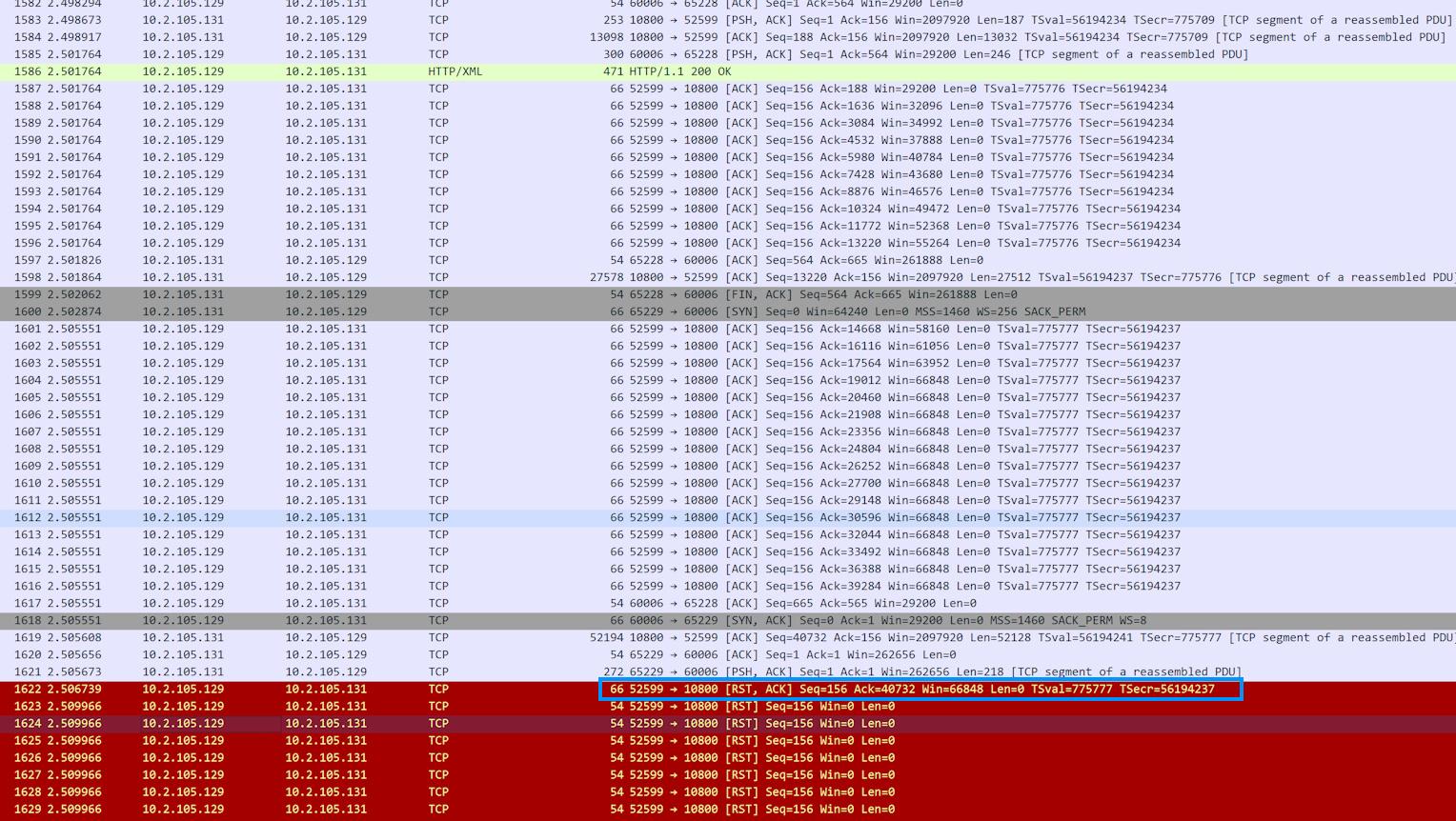
Denon(10.2.105.129) sends many ACK packets and doesn’t seem to get a response from Tunebrowser client.
The last sent [RST, ACK] packet indicates that this is an abnormal situation.storaid参加者I tested single-track album, but it couldn’t be played successfully.
UL03312: 2023/07/01 20:36:46,602: T064d0: HTTP Server: [10.2.105.129 :55649]: Tune : \\NAS1\music\[Hi-Res]TVアニメ「無職転生 ~異世界行ったら本気だす~」OP2テーマ「目覚めの唄」/大原ゆい子\01. 目覚めの唄.flac
UL03316: 2023/07/01 20:36:46,811: T064d0: HTTP Server: [10.2.105.129 :55649]: Socket disconnected. Sent 1048576 bytes.storaid参加者ok, Tiki..
but why can I encounter “jump to next track” problem???
storaid参加者In addition, I don’t know if this is normal in using UPnP renderer..
1. sometimes progress bar is not working
2. Peakmeter spectrum is not rendered in player view
storaid参加者so fast
thanks
I’ve done some tests.
It seems that for the case of nested structure, it seems to get working normally.
But I found something strange.
1. After launching the software, I found that sometimes the top and bottom views do not match.
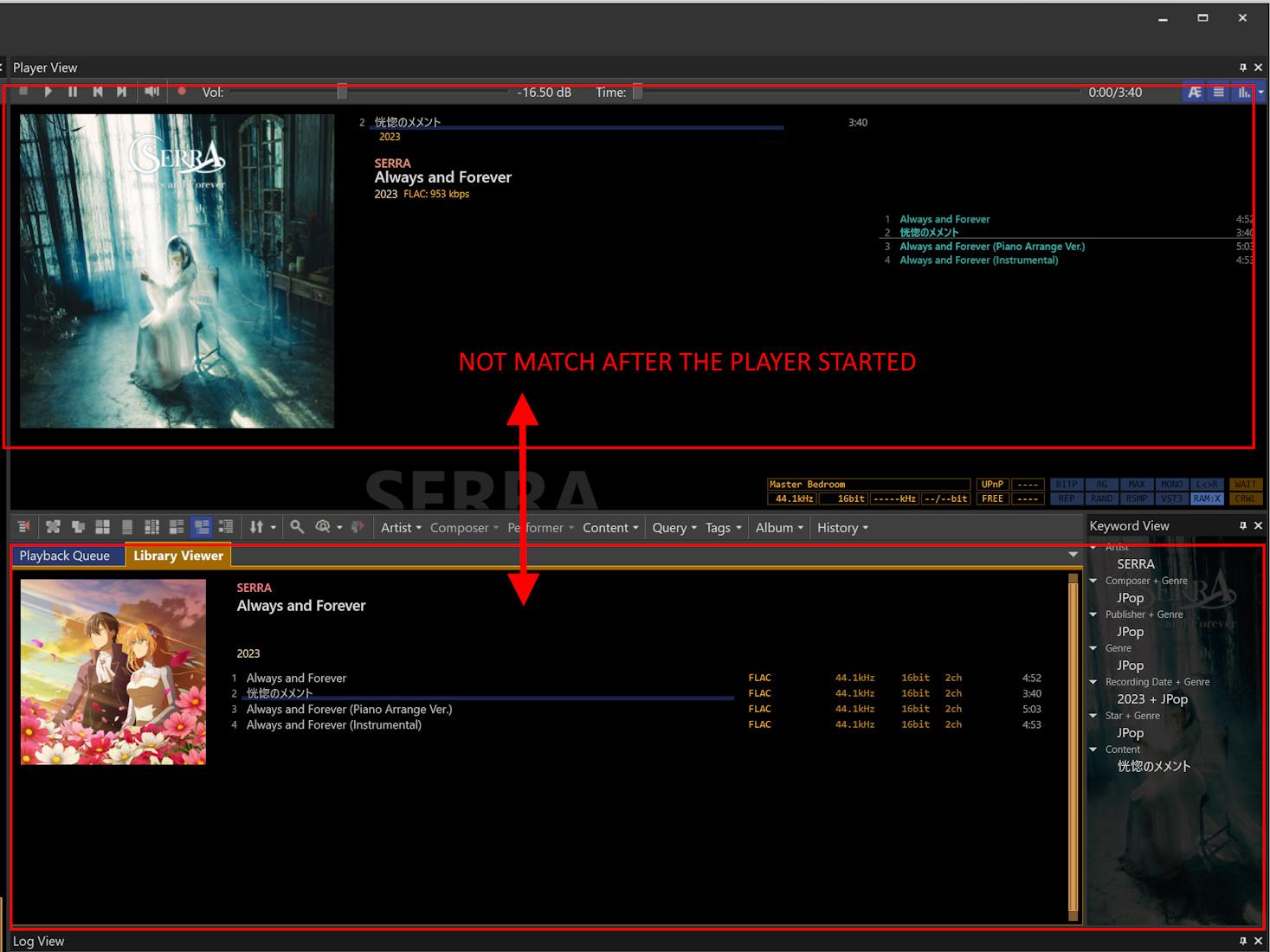
2. sometimes, when I play a certain song with the UPnP renderer, it will automatically skip to the next one for playback.
> – CASE 1
UL01624: 2023/07/01 16:07:44,089: T04d48: HTTP Server: [10.2.105.129 :52719]: Tune : \\NAS1\music\TVアニメ「彼女が公爵邸に行った理由」EDテーマ「Always and Forever」/SERRA\01. Always and Forever.flac
UL01625: 2023/07/01 16:07:44,090: T04d48: HTTP Server: [10.2.105.129 :52719]: Begin monitoring playback.
UL01634: 2023/07/01 16:07:44,342: T04d48: HTTP Server: [10.2.105.129 :52719]: Socket disconnected. Sent 1048576 bytes.
UL01635: 2023/07/01 16:07:44,354: T04bf8: HTTP Server: [10.2.105.129 :52723]: Tune : \\NAS1\music\TVアニメ「彼女が公爵邸に行った理由」EDテーマ「Always and Forever」/SERRA\02. 恍惚のメメント.flac
UL01636: 2023/07/01 16:07:44,355: T04bf8: HTTP Server: [10.2.105.129 :52723]: Begin monitoring playback.> – CASE 2
UL02066: 2023/07/01 16:08:54,300: T06760: –> 10.2.105.129 :50424 SSDP NOTIFY: ssdp:alive urn:schemas-upnp-org:service:ConnectionManager:1
UL02074: 2023/07/01 16:09:00,312: T04bf8: HTTP Server: [10.2.105.129 :52723]: Sent 11534336 bytes.
UL02085: 2023/07/01 16:09:03,286: T04bf8: HTTP Server: [10.2.105.129 :52723]: Socket disconnected. Sent 11534336 bytes.
UL02195: 2023/07/01 16:09:10,713: T04d48: HTTP Server: [10.2.105.129 :52751]: Tune : \\NAS1\music\[Hi-Res]FINAL FANTASY VII REMAKE and FINAL FANTASY VII Vinyl\A1. The Prelude.flac
UL02196: 2023/07/01 16:09:10,733: T04d48: HTTP Server: [10.2.105.129 :52751]: Begin monitoring playback.
UL02207: 2023/07/01 16:09:10,957: T04d48: HTTP Server: [10.2.105.129 :52751]: Socket disconnected. Sent 1048576 bytes.
UL02209: 2023/07/01 16:09:10,971: T04bf8: HTTP Server: [10.2.105.129 :52753]: Tune : \\NAS1\music\[Hi-Res]FINAL FANTASY VII REMAKE and FINAL FANTASY VII Vinyl\A2. Tifa’s Theme.flac
UL02212: 2023/07/01 16:09:10,991: T04bf8: HTTP Server: [10.2.105.129 :52753]: Begin monitoring playback.In addition, I specially installed Audiophile UPnP Renderer to do some tests for non-nested structure. It seems to get working normally.
storaid参加者thanks, Tiki…
also, I’ve reported this compatibility issue to Denon and asked them to improve it
Although I don’t think they will take my opinion…storaid参加者var/packages/MediaServer/var/log/dms.log 0000660 0000001 0000023 00000625712 14447660053 017360 0 ustar system log 2023-07-01T06:57:05+08:00 NAS1 dms[28926]: mediaserver.cpp:445 OPT_DMS_LOGLEVEL: 3 2023-07-01T06:57:05+08:00 NAS1 dms[28926]: mediaserver.cpp:873 MediaServer bind to 10.1.1.127:50001 2023-07-01T06:57:05+08:00 NAS1 dms[28926]: mediaserver.cpp:876 MediaServer device desc:http://10.1.1.127:50001/desc/device.xml (...omitted...)storaid参加者hello, Tiki
I have sent Dump File to you…
also, I have tested the Audio Station from Synology NAS, it can play music very well.
But it’s not good music software, and I would not want to use itI attached a UPnP log generated from Synology NAS
Attachments:
storaid参加者UPnP Log:
UL00043: 2023/07/01 00:07:04,176: T06f80: TL03: Using default DIDLTag definitions. UL00044: 2023/07/01 00:07:04,176: T06f80: DIDLTag definitions: UL00045: 2023/07/01 00:07:04,176: T06f80: - dc:creator (...omitted...)storaid参加者hi, Tiki
I have turned off the firewall, but TuneBrowser still can’t find the Denon device…
Attachments:
storaid参加者Hello, Tiki..
I found the problem.
it’s caused by a shit ASUS Sonic Mixer Utility.
that crap will seriously interfere with “ANY” sound devices…
not only like I say: “Realtek USB Audio Driver(ALC4050)”
so I uninstalled it…
this problem is gone…
THANKS
storaid参加者“If you are using Folder Tree node at the Tree View, please see this comment by using Translate.”
yes, I’m using Folder tree.
did you make something changes in the Folder tree settings???
if that’s true, WHY??
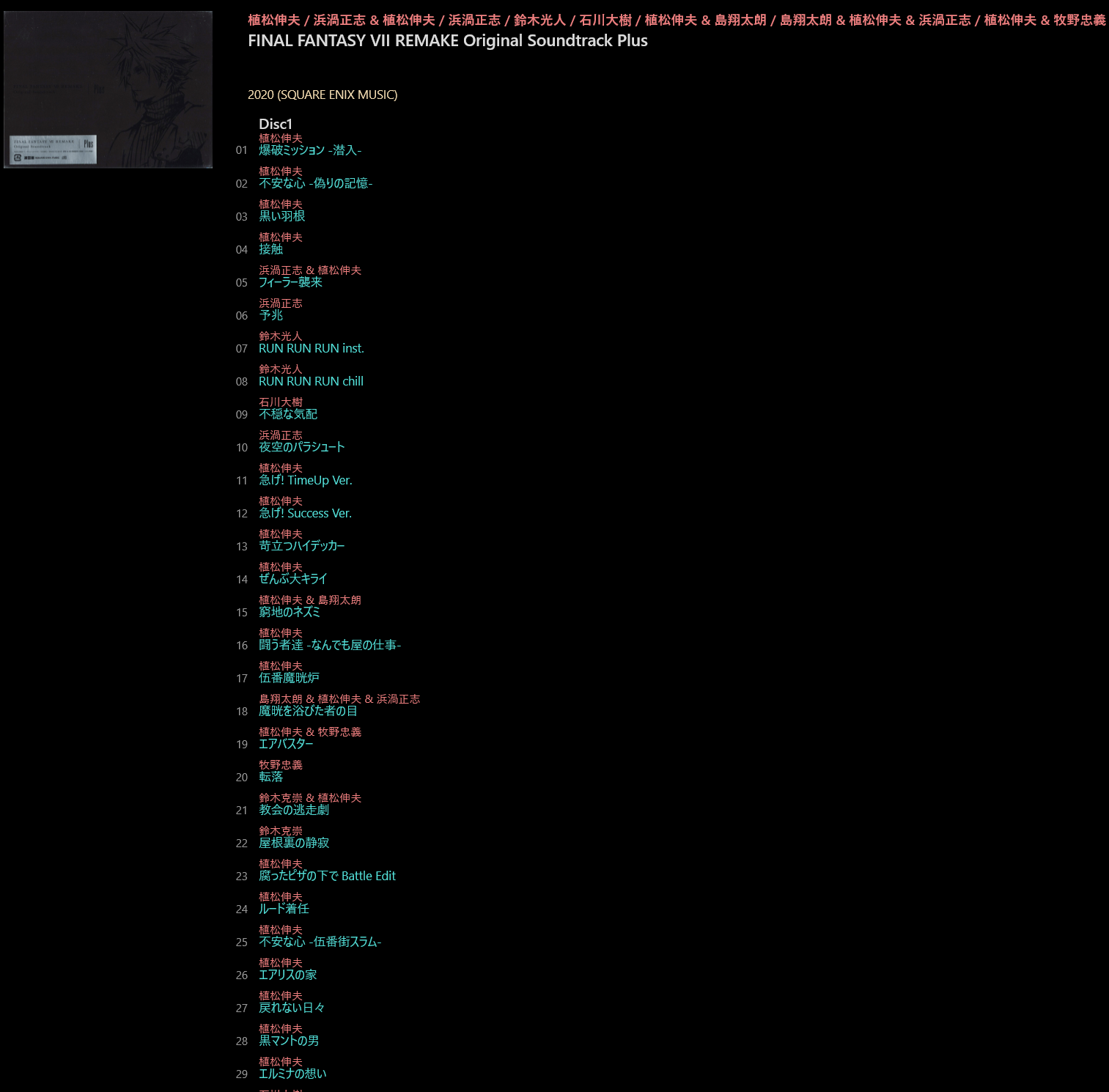
I gave a try to change some settings in order to keep as the same as the old version.
1. add “%_FILEFOLDER%”
2. add “%_FILENAME%,%DISCNUMBER,4INT%,%TRACKNUMBER,4INT%”
now view style keeps the same as the old version.
 storaid参加者
In different versions, there is no change in any settings.
latest version:
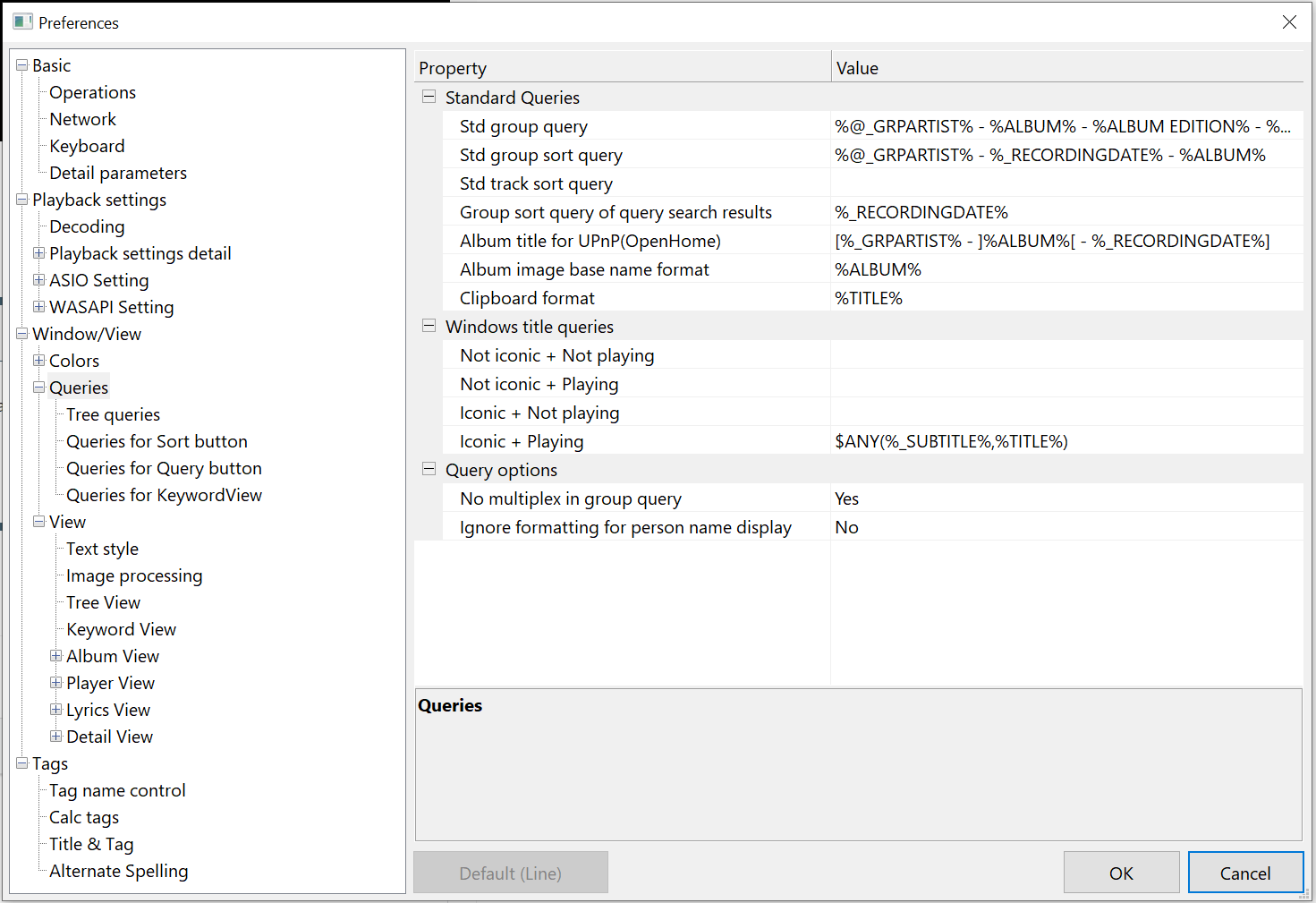
v4.1.7:
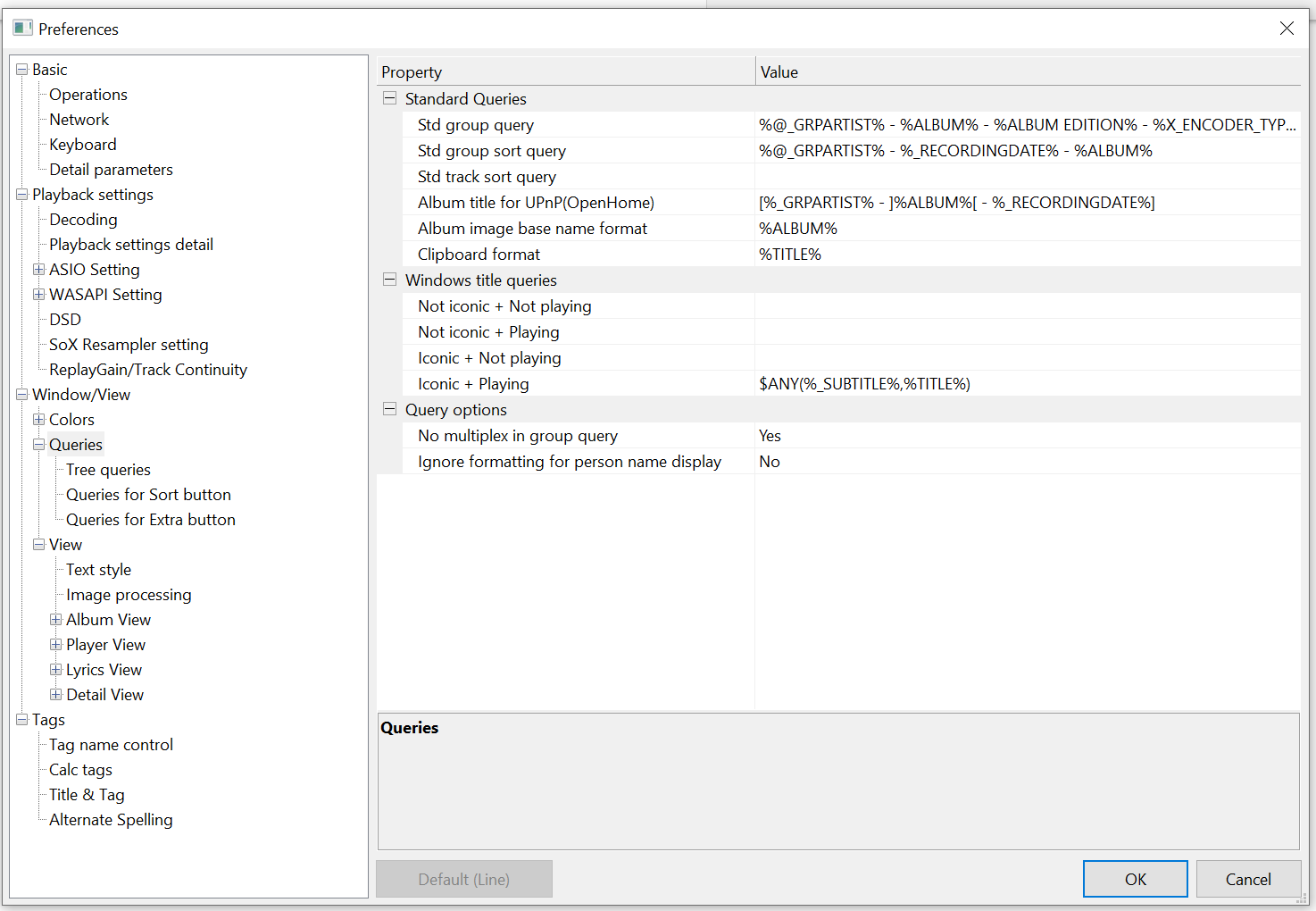
How can I keep the view style the same as the old version?
storaid参加者I gave a try for your providing version..
Looks like the issue I encountered has been fixed….
thanks for your help…
storaid参加者“Did you modify view style in 4.17 ?”
No….
-
投稿者投稿